

How to manage Home screen shortcuts on the Redmi 13C 5G?
The Redmi 13C 5G supports managing home screen shortcuts, allowing you to instantly access your most-used applications, improving overall usability. By organizing your applications and key functions neatly, it reduces screen clutter and enhances ease of navigation. With fewer taps needed to reach essential items, it saves valuable time in your daily phone usage and makes it easier to tailor your home screen layout for both aesthetics and functionality, ensuring a more streamlined and enjoyable using experience.
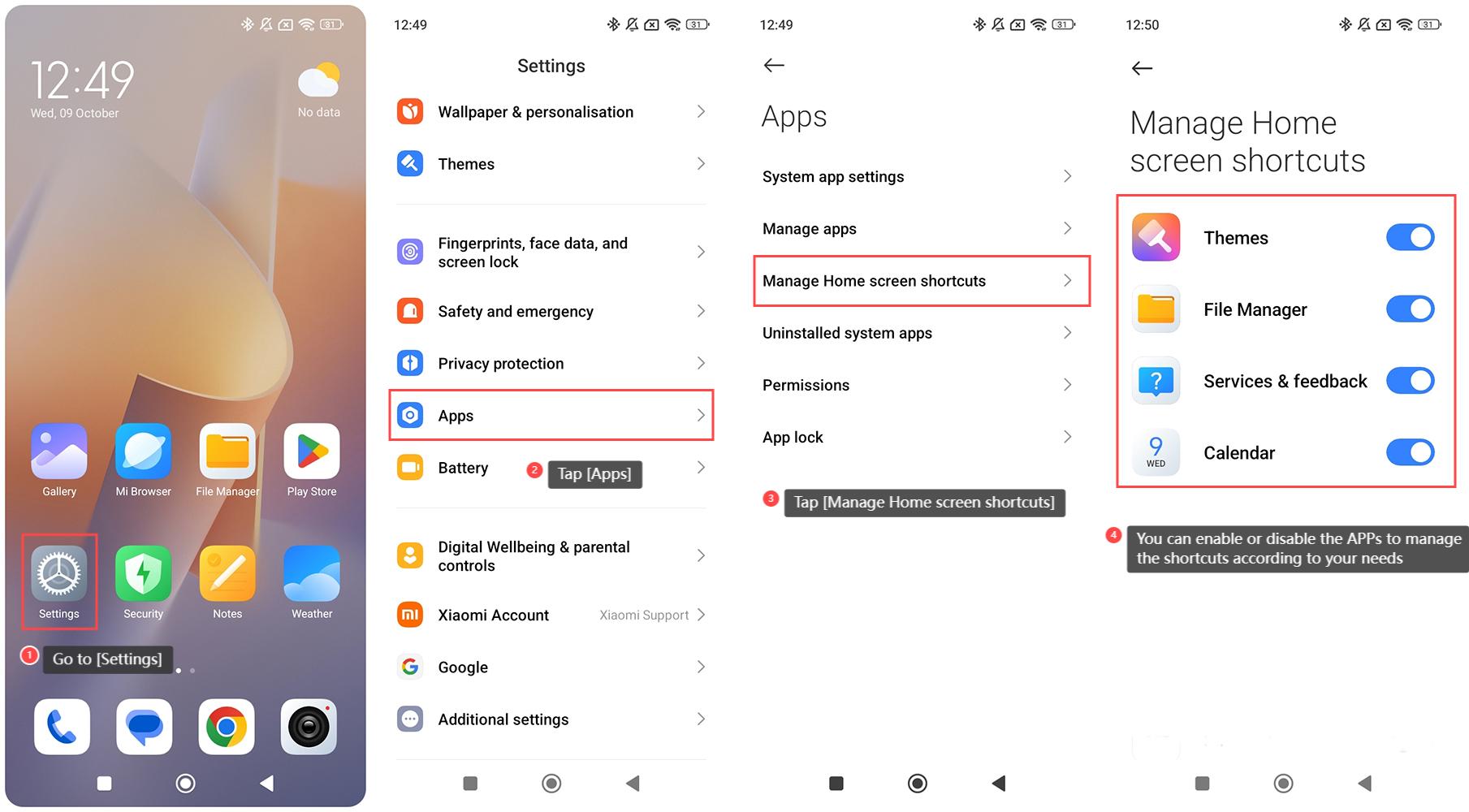
To manage Home screen shortcuts on the Redmi 13C 5G, please refer to the following steps:
1. Go to [Settings] on your phone;
2. Swipe down to find and tap [Apps];
3. Tap [Manage Home screen shortcuts];
4. You can enable or disable the APPs below [Manage Home screen shortcuts] to manage the shortcuts according to your needs.
To manage Home screen shortcuts on the Redmi 13C 5G, please refer to the following steps:
1. Go to [Settings] on your phone;
2. Swipe down to find and tap [Apps];
3. Tap [Manage Home screen shortcuts];
4. You can enable or disable the APPs below [Manage Home screen shortcuts] to manage the shortcuts according to your needs.
Does it help?
Yes
No