

What are the steps for wall mounting the Xiaomi Smart Camera C700?
The Xiaomi Smart Camera C700 offers various installation options. It can be placed upright on flat surfaces such as a desk, dining table, or coffee table, or it can be securely mounted on a wall.
The steps to mount the Xiaomi Smart Camera C700 on a wall are as follows:
1. Paste the mounting sticker where the camera needs to be installed, and drill two holes in the wall with a drilling tool according to the locating holes on the sticker. The hole is approx. 6mm in diameter and approx. 30mm in depth;
2. Insert the plastic wall plugs into the drilled holes;

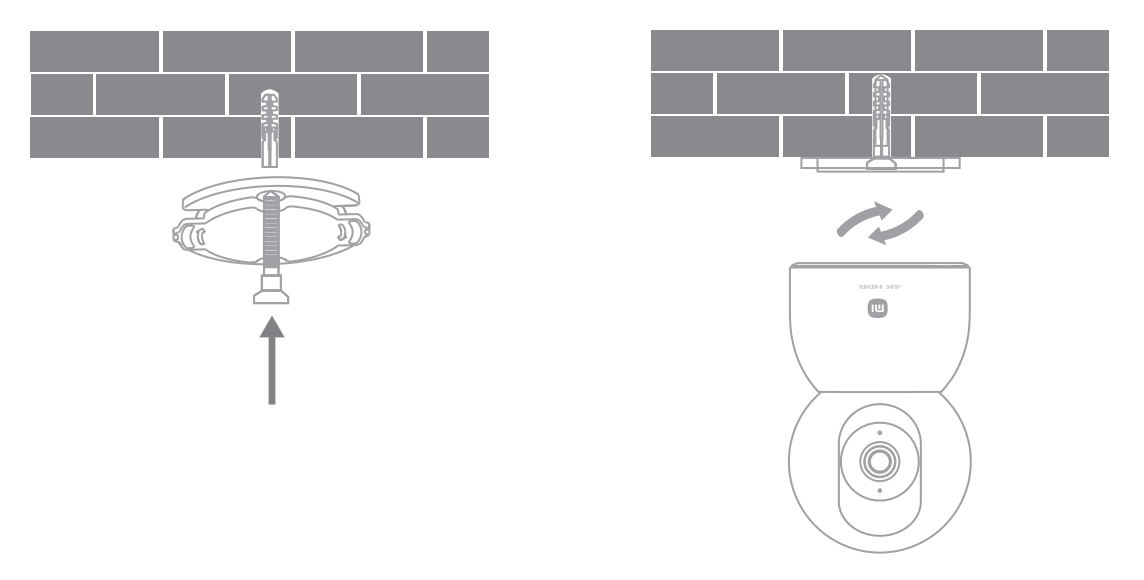
3. Keep the base side with an arrow facing outward, and align the base with the holes. Insert the screws and then tighten them into the wall plugs with Phillips head screwdriver;
4. Align the groove on the bottom of the camera with the raised part on the base, and then turn the camera clockwise until it locks into place.
Note:
1. The installation surface must be able to support at least three times the total weight of the camera;
2. To prevent injury, the device must be securely fixed to the floor or wall according to the installation instructions;
3. If you choose to install it upside down, you will need to rotate the image settings 180° in the Mi Home/Xiaomi Home APP;
4. The wall mounting kit is compatible with other PTZ cameras, and the distance between the two holes in the base of the accessory kit is 36mm.
The steps to mount the Xiaomi Smart Camera C700 on a wall are as follows:
1. Paste the mounting sticker where the camera needs to be installed, and drill two holes in the wall with a drilling tool according to the locating holes on the sticker. The hole is approx. 6mm in diameter and approx. 30mm in depth;
2. Insert the plastic wall plugs into the drilled holes;
3. Keep the base side with an arrow facing outward, and align the base with the holes. Insert the screws and then tighten them into the wall plugs with Phillips head screwdriver;
4. Align the groove on the bottom of the camera with the raised part on the base, and then turn the camera clockwise until it locks into place.
Note:
1. The installation surface must be able to support at least three times the total weight of the camera;
2. To prevent injury, the device must be securely fixed to the floor or wall according to the installation instructions;
3. If you choose to install it upside down, you will need to rotate the image settings 180° in the Mi Home/Xiaomi Home APP;
4. The wall mounting kit is compatible with other PTZ cameras, and the distance between the two holes in the base of the accessory kit is 36mm.
Does it help?
Yes
No