

Xiaomi Smart Pet Fountain 2 FAQ
Overview
1. Q: What kind of product is the Xiaomi Smart Pet Fountain 2?
A: The Xiaomi Smart Pet Fountain 2 is an intelligent device designed specifically for pets, helping pet owners feed their animals during work or short outings. This pet fountain continuously provides a sufficient water source for pets. The filter's water softening and antibacterial properties ensure that pets have access to healthy drinking water.
The device can be connected to the Mi Home/Xiaomi Home APP, allowing remote monitoring of its status. It features a built-in large-capacity lithium battery that enables prolonged use without a power connection, preventing issues such as pets accidentally biting through cables or power outages that could render the fountain unusable.
2. Q: What is the appearance of the Xiaomi Smart Pet Fountain 2?
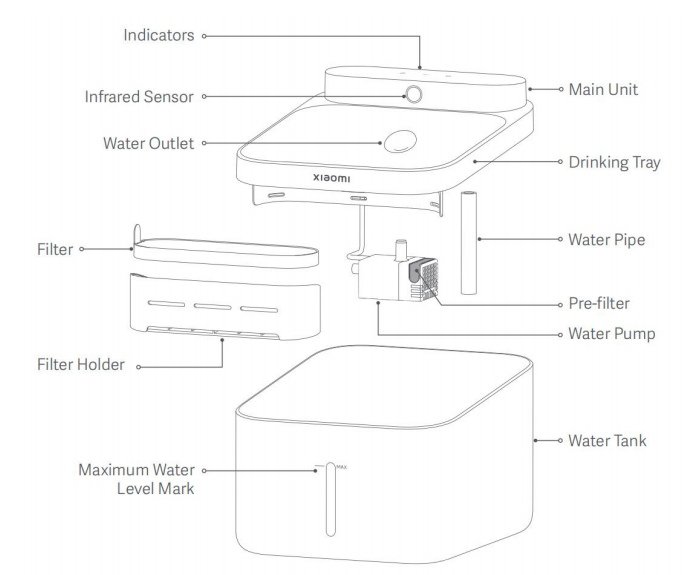
A: The appearance of the product is as follows:
There are Indicators, Infrared Sensor, Main Unit, Water Outlet, Drinking Tray, Water Pipe, Filter, Filter Holder, Pre-filter, Water Pump, Maximum Water Level Mark and Water Tank.
FAQ
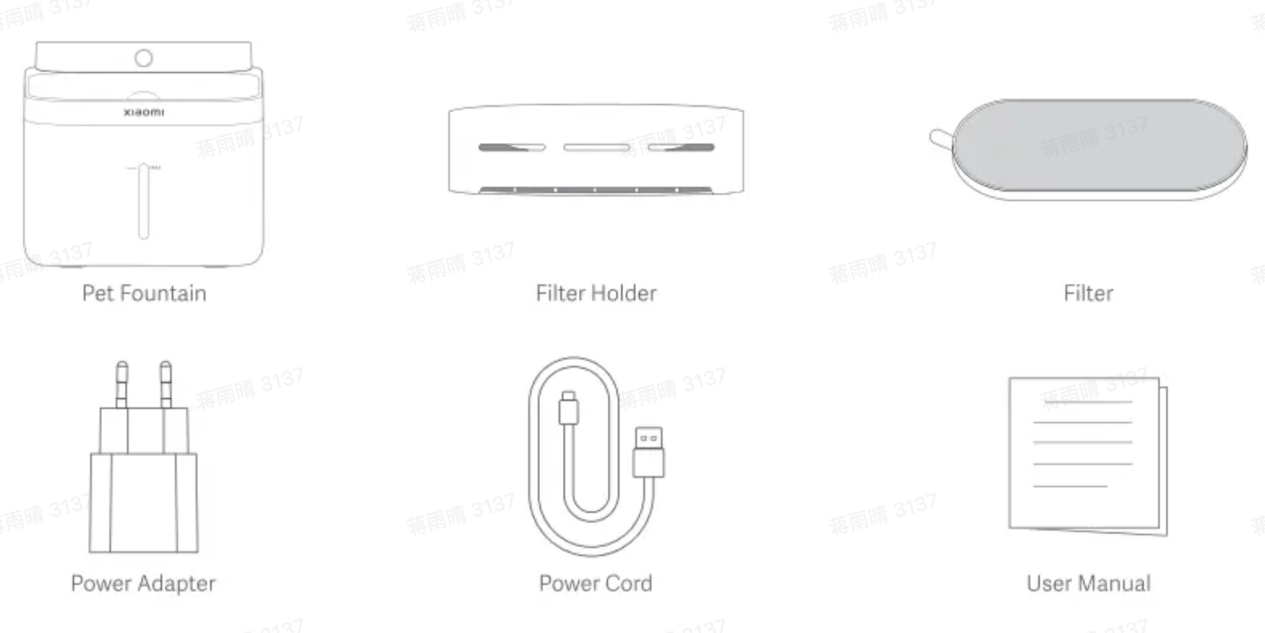
1. Q: What are the package contents of the Xiaomi Smart Pet Fountain 2 European edition?
A: The package contents of the Xiaomi Smart Pet Fountain 2 European edition include: Pet Fountain × 1, Filter Holder × 1, Filter × 1, Power Adapter × 1, Power Cord × 1, and User Manual × 1.
2. Q: What are the package contents of the Xiaomi Smart Pet Fountain 2 Global edition?
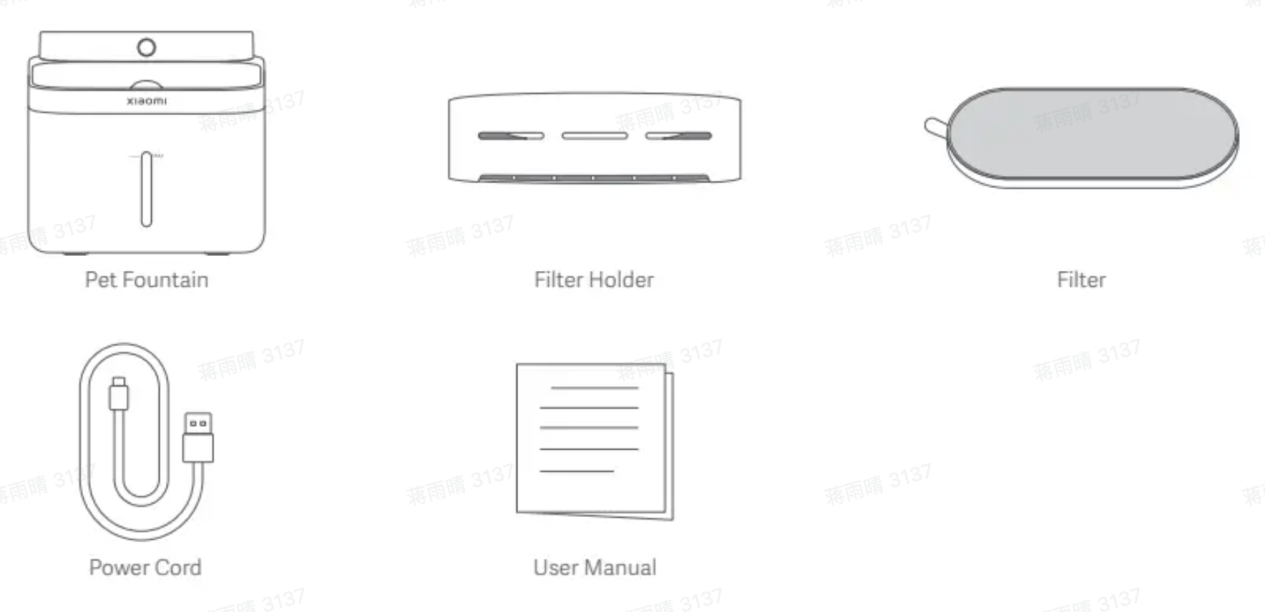
A: The package contents of the Xiaomi Smart Pet Fountain 2 Global edition include: Pet Fountain × 1, Filter Holder × 1, Filter × 1, Power Cord × 1, and User Manual × 1.
3. Q: What are the water output modes of the Xiaomi Smart Pet Fountain 2?
A: Sensor mode: Dispense water for 10 seconds when its infrared sensor detects the presence of the pet;
Intermittent mode: In this mode, the pet fountain dispenses water for 10 seconds every 15 minutes, and the time interval can be set in the Mi Home/Xiaomi Home APP;
Continuous mode: The pet fountain can be switched to this mode when being connected to the power cord. In this mode, the pet fountain dispenses water continuously.
4. Q: What is the material of the Xiaomi Smart Pet Fountain 2?
A: The water tank, water tray and external leakage parts of the device are made of non-toxic and harmless ABS material to ensure the safety of pets.
5. Q: Can the Xiaomi Smart Pet Fountain 2 be used continuously while plugged in?
A: Yes, to use it with a power supply, please purchase an adapter that meets national standards with an output of 5V⎓2A, and use it with the original charging cable.
6. Q: Does the Xiaomi Smart Pet Fountain 2 support fast charging?
A: This device does not support any fast charging protocols. It is recommended to use an adapter that meets national standards with an output of 5V⎓2A for charging. When charging, please ensure that the charging cable and port do not come into contact with water.
7. Q: Is there a risk of electric shock when using the Xiaomi Smart Pet Fountain 2?
A: The device operates at low voltage and low current, ensuring pet safety. If your pet has a habit of chewing, please stop them immediately and remove the charger and cable once charging is complete. If there is any damage, please contact the after-sales service center for a prompt replacement.
8. Q: How long does it take to fully charge the Xiaomi Smart Pet Fountain 2?
A: It takes about 4 hours to fully charge by using a 5V⎓2A adapter. The charging time will vary slightly depending on the usage environment, so please disconnect the charging cable once fully charged.
9. Q: How long can the Xiaomi Smart Pet Fountain 2 be used on a full charge?
A: In sensor mode, with water dispensed 24 times a day, it can be used for about 100 days on a full charge. The actual battery endurance will vary due to differences in usage environment and drinking frequency, which is normal.
10. Q: What is the water tank capacity of the Xiaomi Smart Pet Fountain 2?
A: The water tank capacity of the Xiaomi Smart Pet Fountain 2 is 3L. To prevent overflow, do not fill it above the maximum water level mark.
11. Q: What is the filter system of the Xiaomi Smart Pet Fountain 2?
A: The pet fountain uses high-quality filter materials to effectively remove hair, impurities, calcium, magnesium, and other heavy metal ions, fully purifying and softening the water, which improves the taste and benefits the urinary health of pets. Additionally, the filter features antibacterial cotton to effectively inhibit common bacteria encountered by pets. A sponge filter is added in front of the pump to prevent hair and impurities from entering the pump and affecting its normal operation.
12. Q: How often should the filter of the Xiaomi Smart Pet Fountain 2 be replaced, and how to reset it after replacement?
A: It is recommended to replace the filter every 30 days. Before installation, rinse it with clean water for 2 minutes. After replacing the filter, reset the remaining time in the Mi Home/Xiaomi Home APP.
13. Q: Can the Xiaomi Smart Pet Fountain 2 use tap water, and can it use hot water?
A: It is not recommended to use tap water, it is best to use room temperature purified water or mineral water. Hot water or boiling water should not be used.
14. Q: What are the placement requirements for the Xiaomi Smart Pet Fountain 2?
A: It is recommended to place it in a fixed area where pets eat and drink, ensuring the surface is hard and level, and that there is no direct sunlight. The environment temperature should be around 25-35 degrees Celsius. To reduce accidental activation of the water sensing feature, avoid placing it in high-traffic areas.
15. Q: Is the noise level of the Xiaomi Smart Pet Fountain 2 high?
A: The noise level of the Xiaomi Smart Pet Fountain 2 is approximately ≤35dB during operation, which will not affect normal rest.
16. Q: What are the low water protection functions and reminders of the Xiaomi Smart Pet Fountain 2?
A: When the water level is low, the indicator will flash orange, the water pump will stop working, and a notification will be sent to the APP. After adding water, you need to manually tap the power button. Once water is successfully dispensed, the device will return to normal status.
17. Q: What are the precautions for using the Xiaomi Smart Pet Fountain 2?
A: 1. Please ensure to disconnect the power and securely seal the charging port before disassembling and cleaning the unit;
2. Do not immerse the main body of the fountain or the charging cable in water;
3. Before using it for the first time, clean all components and do not add hot or boiling water;
4. It is normal for the filter to have some powder attached when it leaves the factory, simply rinse it with clean water;
5. It is recommended to replace the filter every month.
18. Q: What types of pets is the Xiaomi Smart Pet Fountain 2 suitable for?
A: The device is suitable for cats and small dogs. It is not recommended for puppies under three months or large dog breeds.
19. Q: What is the detection range of the PIR sensor of the Xiaomi Smart Pet Fountain 2?
A: Under environmental conditions of 25-35 degrees Celsius, the maximum sensing distance is 55cm, and the minimum sensing distance is 20cm, with a sensing error of ±5cm.
20. Q: Can the Xiaomi Smart Pet Fountain 2 dispense water after going offline?
A: Yes, in sensor mode and intermittent mode, the device can dispense water according to the mode it was in before going offline. In continuous mode, it will switch to intermittent mode to continue dispensing water after going offline.
App Usage
1. Q: How to connect the Xiaomi Smart Pet Fountain 2 with the Mi Home/Xiaomi Home APP?
A: The Xiaomi Smart Pet Fountain 2 has been connected to the Mi Home/Xiaomi Home APP, you can control the device with the APP.
1. Please scan the QR code to download and install the APP. You will be directed to the connection setup page if the APP is installed already. Or search for “Mi/Home/Xiaomi Home” in the APP store to download and install it;
2. Open the Mi/Home/Xiaomi Home APP, tap “+” on the upper right corner, and add the device according to the prompts in the APP.
Note:
Due to updates and upgrades to the Mi Home/Xiaomi Home APP, the actual operation can differ slightly from the descriptions above. Please follow the current instructions within the Mi Home/Xiaomi Home APP.
2. Q: What to do if the Xiaomi Smart Pet Fountain 2 goes offline?
A: The device going offline could be caused by fluctuations in the home network. The device will automatically attempt to reconnect, so it is recommended to wait for a while and then check the device status again. If the device is still not connected after half an hour, please rebind the device.
3. Q: What is the child lock function of the Xiaomi Smart Pet Fountain 2?
A: You can enable the child lock function in the APP to avoid accidental touch.
1. Open the Mi/Home/Xiaomi Home APP >> select the Xiaomi Smart Pet Fountain 2 >> tap the three-dot at the upper right corner >> enable [Child lock];
2. Press and hold the power button and Wi-Fi button simultaneously to enable/disable the child lock.
4. Q: What is the DND function of the Xiaomi Smart Pet Fountain 2?
A: Open the Mi/Home/Xiaomi Home APP >> select the Xiaomi Smart Pet Fountain 2 >> tap the three-dot at the upper right corner >> enable [DND]. After being activated, the device will no longer actively light up the indicator during the specified period.
5. Q: How to use the smart scene feature of the Xiaomi Smart Pet Fountain 2?
A: Currently, the device supports low water and low battery status as trigger conditions for smart scenes. The specific functions will vary slightly based on other smart devices linked to the same Xiaomi account and the actual features of the Mi/Home/Xiaomi Home APP.
6. Q: Can the Xiaomi Smart Pet Fountain 2 be turned on or off remotely?
A: Yes, the device supports remote power on/off.
7. Q: What functional limitations are there for users who participate in device sharing?
A: Shared users can switch water dispensing modes, enable child lock, activate Do Not Disturb mode, and check the device status.
8. Q: How to update the firmware of the Xiaomi Smart Pet Fountain 2? Is automatic updating or remote updating available?
A: Open the Mi/Home/Xiaomi Home APP >> select the Xiaomi Smart Pet Fountain 2 >> tap the three-dot at the upper right corner >> select [Firmware update]. It supports scheduled automatic updates and remote updates.
Frequent problems and troubleshooting
1. Q: What to do if the Xiaomi Smart Pet Fountain 2 does not respond or cannot be turned on?
A: If there is no sound or indicator feedback when tapping or pressing and holding the power button for 2 seconds, connect the adapter and original charging cable and charge for more than two minutes. Observe if the battery indicator shows a white flash. If it does, the battery can be depleted and the device will automatically shut down. It is recommended to fully charge it and then unplug the charging cable to turn it on.
After charging if there is still no indicator when pressing the power button, try using a known working adapter and charging cable. If the issue persists, please contact the after-sales service center.
2. Q: What to do if the Xiaomi Smart Pet Fountain 2 cannot be connected to the Mi/Home/Xiaomi Home APP?
A: 1. Ensure that the pet fountain is in the waiting to connect state, indicated by an orange flashing light. If it is not flashing, please press and hold the Wi-Fi button for 7 seconds to reset it;
2. On the Mi Home/Xiaomi Home APP homepage, tap the "+" icon at the upper right corner again, the device should be automatically discovered. The pet fountain remains in the waiting to connect state for 20 minutes by default. If it times out, you will need to tap or press and hold the Wi-Fi button for 7 seconds to reset it again. If the pet fountain does not appear in the waiting to connect mode, please manually search for Xiaomi Smart Pet Fountain 2 to add it.
3. Q: Why is there a buzzing sound during the Xiaomi Smart Pet Fountain 2 operation?
A: If there is a buzzing sound, please follow these steps:
1. Check if both ends of the water pipe are properly secured. Movement during transportation can loosen the water pipe, causing the pump to touch the bottom of the tank and produce abnormal sounds;
2. Inspect the pre-filter below the conduit. If the water quality is poor or there are many foreign objects, it can easily become clogged, increasing the pump's load and resulting in louder sounds. It is recommended to thoroughly clean and replace the water tray and reservoir weekly, and to change the filter and pre-filter monthly.
4. Q: Will the Xiaomi Smart Pet Fountain 2 automatically dispense water again after adding water when it was previously low?
A: After adding water, it will only dispense water if it detects an object (in sensor mode) or reaches the scheduled dispensing time (in intermittent mode). Low water levels do not affect or change the original dispensing mode.
5. Q: What components make up the filter of the Xiaomi Smart Pet Fountain 2?
A: The filter is composed of microporous PP cotton (to filter hair and debris), activated carbon granules (to remove residual chlorine and odors), ion exchange resin (to purify calcium and magnesium ions), and antibacterial cotton (to inhibit E. coli, Staphylococcus aureus, and Candida albicans).
Note:
If the filter has not been soaked in water before use, it can produce black particles, which are from the activated carbon.
6. Q: What to do if there are unusual colors in the water dispensed by the Xiaomi Smart Pet Fountain 2?
A: The activated carbon particles in the filter can produce trace amounts of carbon dust during transportation. Therefore, please rinse the filter in clean water for 2 minutes (to wash away any floating carbon) before use to ensure better filtration. If the water bowl shows black after cleaning the filter, simply replace the water for safe use.
Note:
Activated carbon effectively filters out unusual colors and odors from the water. If ingested, it can be expelled through feces without any toxic side effects.
Some pets consuming colored foods containing beetroot powder or purple sweet potato powder (fruit and vegetable powder) can cause red marks on the filter and the bottom or edges of the water bowl, which is normal. It is recommended to follow the cleaning guidelines to maintain the quality of the water for your pets.
7. Q: Why are there bugs in the filter of the Xiaomi Smart Pet Fountain 2?
A: The larvae you see are likely from mosquito eggs, not produced by the pet fountain. During summer, there are more flies and mosquitoes, and these insects typically prefer to lay eggs in damp areas.
Here are some suggested measures:
1. Check if the pet fountain is too close to the litter box or other areas that attract mosquitoes, and consider moving it further away;
2. The current filter is no longer usable, as mosquito eggs have been washed into it;
3. It is advisable to connect the power and activate the continuous mode, this can effectively prevent mosquitoes from landing and laying eggs. Alternatively, you can look online for devices that repel mosquitoes and flies, which can also help;
4. It is recommended to change the water every 2-3 days and clean the device.
1. Q: What kind of product is the Xiaomi Smart Pet Fountain 2?
A: The Xiaomi Smart Pet Fountain 2 is an intelligent device designed specifically for pets, helping pet owners feed their animals during work or short outings. This pet fountain continuously provides a sufficient water source for pets. The filter's water softening and antibacterial properties ensure that pets have access to healthy drinking water.
The device can be connected to the Mi Home/Xiaomi Home APP, allowing remote monitoring of its status. It features a built-in large-capacity lithium battery that enables prolonged use without a power connection, preventing issues such as pets accidentally biting through cables or power outages that could render the fountain unusable.
2. Q: What is the appearance of the Xiaomi Smart Pet Fountain 2?
A: The appearance of the product is as follows:
There are Indicators, Infrared Sensor, Main Unit, Water Outlet, Drinking Tray, Water Pipe, Filter, Filter Holder, Pre-filter, Water Pump, Maximum Water Level Mark and Water Tank.
FAQ
1. Q: What are the package contents of the Xiaomi Smart Pet Fountain 2 European edition?
A: The package contents of the Xiaomi Smart Pet Fountain 2 European edition include: Pet Fountain × 1, Filter Holder × 1, Filter × 1, Power Adapter × 1, Power Cord × 1, and User Manual × 1.
2. Q: What are the package contents of the Xiaomi Smart Pet Fountain 2 Global edition?
A: The package contents of the Xiaomi Smart Pet Fountain 2 Global edition include: Pet Fountain × 1, Filter Holder × 1, Filter × 1, Power Cord × 1, and User Manual × 1.
3. Q: What are the water output modes of the Xiaomi Smart Pet Fountain 2?
A: Sensor mode: Dispense water for 10 seconds when its infrared sensor detects the presence of the pet;
Intermittent mode: In this mode, the pet fountain dispenses water for 10 seconds every 15 minutes, and the time interval can be set in the Mi Home/Xiaomi Home APP;
Continuous mode: The pet fountain can be switched to this mode when being connected to the power cord. In this mode, the pet fountain dispenses water continuously.
4. Q: What is the material of the Xiaomi Smart Pet Fountain 2?
A: The water tank, water tray and external leakage parts of the device are made of non-toxic and harmless ABS material to ensure the safety of pets.
5. Q: Can the Xiaomi Smart Pet Fountain 2 be used continuously while plugged in?
A: Yes, to use it with a power supply, please purchase an adapter that meets national standards with an output of 5V⎓2A, and use it with the original charging cable.
6. Q: Does the Xiaomi Smart Pet Fountain 2 support fast charging?
A: This device does not support any fast charging protocols. It is recommended to use an adapter that meets national standards with an output of 5V⎓2A for charging. When charging, please ensure that the charging cable and port do not come into contact with water.
7. Q: Is there a risk of electric shock when using the Xiaomi Smart Pet Fountain 2?
A: The device operates at low voltage and low current, ensuring pet safety. If your pet has a habit of chewing, please stop them immediately and remove the charger and cable once charging is complete. If there is any damage, please contact the after-sales service center for a prompt replacement.
8. Q: How long does it take to fully charge the Xiaomi Smart Pet Fountain 2?
A: It takes about 4 hours to fully charge by using a 5V⎓2A adapter. The charging time will vary slightly depending on the usage environment, so please disconnect the charging cable once fully charged.
9. Q: How long can the Xiaomi Smart Pet Fountain 2 be used on a full charge?
A: In sensor mode, with water dispensed 24 times a day, it can be used for about 100 days on a full charge. The actual battery endurance will vary due to differences in usage environment and drinking frequency, which is normal.
10. Q: What is the water tank capacity of the Xiaomi Smart Pet Fountain 2?
A: The water tank capacity of the Xiaomi Smart Pet Fountain 2 is 3L. To prevent overflow, do not fill it above the maximum water level mark.
11. Q: What is the filter system of the Xiaomi Smart Pet Fountain 2?
A: The pet fountain uses high-quality filter materials to effectively remove hair, impurities, calcium, magnesium, and other heavy metal ions, fully purifying and softening the water, which improves the taste and benefits the urinary health of pets. Additionally, the filter features antibacterial cotton to effectively inhibit common bacteria encountered by pets. A sponge filter is added in front of the pump to prevent hair and impurities from entering the pump and affecting its normal operation.
12. Q: How often should the filter of the Xiaomi Smart Pet Fountain 2 be replaced, and how to reset it after replacement?
A: It is recommended to replace the filter every 30 days. Before installation, rinse it with clean water for 2 minutes. After replacing the filter, reset the remaining time in the Mi Home/Xiaomi Home APP.
13. Q: Can the Xiaomi Smart Pet Fountain 2 use tap water, and can it use hot water?
A: It is not recommended to use tap water, it is best to use room temperature purified water or mineral water. Hot water or boiling water should not be used.
14. Q: What are the placement requirements for the Xiaomi Smart Pet Fountain 2?
A: It is recommended to place it in a fixed area where pets eat and drink, ensuring the surface is hard and level, and that there is no direct sunlight. The environment temperature should be around 25-35 degrees Celsius. To reduce accidental activation of the water sensing feature, avoid placing it in high-traffic areas.
15. Q: Is the noise level of the Xiaomi Smart Pet Fountain 2 high?
A: The noise level of the Xiaomi Smart Pet Fountain 2 is approximately ≤35dB during operation, which will not affect normal rest.
16. Q: What are the low water protection functions and reminders of the Xiaomi Smart Pet Fountain 2?
A: When the water level is low, the indicator will flash orange, the water pump will stop working, and a notification will be sent to the APP. After adding water, you need to manually tap the power button. Once water is successfully dispensed, the device will return to normal status.
17. Q: What are the precautions for using the Xiaomi Smart Pet Fountain 2?
A: 1. Please ensure to disconnect the power and securely seal the charging port before disassembling and cleaning the unit;
2. Do not immerse the main body of the fountain or the charging cable in water;
3. Before using it for the first time, clean all components and do not add hot or boiling water;
4. It is normal for the filter to have some powder attached when it leaves the factory, simply rinse it with clean water;
5. It is recommended to replace the filter every month.
18. Q: What types of pets is the Xiaomi Smart Pet Fountain 2 suitable for?
A: The device is suitable for cats and small dogs. It is not recommended for puppies under three months or large dog breeds.
19. Q: What is the detection range of the PIR sensor of the Xiaomi Smart Pet Fountain 2?
A: Under environmental conditions of 25-35 degrees Celsius, the maximum sensing distance is 55cm, and the minimum sensing distance is 20cm, with a sensing error of ±5cm.
20. Q: Can the Xiaomi Smart Pet Fountain 2 dispense water after going offline?
A: Yes, in sensor mode and intermittent mode, the device can dispense water according to the mode it was in before going offline. In continuous mode, it will switch to intermittent mode to continue dispensing water after going offline.
App Usage
1. Q: How to connect the Xiaomi Smart Pet Fountain 2 with the Mi Home/Xiaomi Home APP?
A: The Xiaomi Smart Pet Fountain 2 has been connected to the Mi Home/Xiaomi Home APP, you can control the device with the APP.
1. Please scan the QR code to download and install the APP. You will be directed to the connection setup page if the APP is installed already. Or search for “Mi/Home/Xiaomi Home” in the APP store to download and install it;
2. Open the Mi/Home/Xiaomi Home APP, tap “+” on the upper right corner, and add the device according to the prompts in the APP.
Note:
Due to updates and upgrades to the Mi Home/Xiaomi Home APP, the actual operation can differ slightly from the descriptions above. Please follow the current instructions within the Mi Home/Xiaomi Home APP.
2. Q: What to do if the Xiaomi Smart Pet Fountain 2 goes offline?
A: The device going offline could be caused by fluctuations in the home network. The device will automatically attempt to reconnect, so it is recommended to wait for a while and then check the device status again. If the device is still not connected after half an hour, please rebind the device.
3. Q: What is the child lock function of the Xiaomi Smart Pet Fountain 2?
A: You can enable the child lock function in the APP to avoid accidental touch.
1. Open the Mi/Home/Xiaomi Home APP >> select the Xiaomi Smart Pet Fountain 2 >> tap the three-dot at the upper right corner >> enable [Child lock];
2. Press and hold the power button and Wi-Fi button simultaneously to enable/disable the child lock.
4. Q: What is the DND function of the Xiaomi Smart Pet Fountain 2?
A: Open the Mi/Home/Xiaomi Home APP >> select the Xiaomi Smart Pet Fountain 2 >> tap the three-dot at the upper right corner >> enable [DND]. After being activated, the device will no longer actively light up the indicator during the specified period.
5. Q: How to use the smart scene feature of the Xiaomi Smart Pet Fountain 2?
A: Currently, the device supports low water and low battery status as trigger conditions for smart scenes. The specific functions will vary slightly based on other smart devices linked to the same Xiaomi account and the actual features of the Mi/Home/Xiaomi Home APP.
6. Q: Can the Xiaomi Smart Pet Fountain 2 be turned on or off remotely?
A: Yes, the device supports remote power on/off.
7. Q: What functional limitations are there for users who participate in device sharing?
A: Shared users can switch water dispensing modes, enable child lock, activate Do Not Disturb mode, and check the device status.
8. Q: How to update the firmware of the Xiaomi Smart Pet Fountain 2? Is automatic updating or remote updating available?
A: Open the Mi/Home/Xiaomi Home APP >> select the Xiaomi Smart Pet Fountain 2 >> tap the three-dot at the upper right corner >> select [Firmware update]. It supports scheduled automatic updates and remote updates.
Frequent problems and troubleshooting
1. Q: What to do if the Xiaomi Smart Pet Fountain 2 does not respond or cannot be turned on?
A: If there is no sound or indicator feedback when tapping or pressing and holding the power button for 2 seconds, connect the adapter and original charging cable and charge for more than two minutes. Observe if the battery indicator shows a white flash. If it does, the battery can be depleted and the device will automatically shut down. It is recommended to fully charge it and then unplug the charging cable to turn it on.
After charging if there is still no indicator when pressing the power button, try using a known working adapter and charging cable. If the issue persists, please contact the after-sales service center.
2. Q: What to do if the Xiaomi Smart Pet Fountain 2 cannot be connected to the Mi/Home/Xiaomi Home APP?
A: 1. Ensure that the pet fountain is in the waiting to connect state, indicated by an orange flashing light. If it is not flashing, please press and hold the Wi-Fi button for 7 seconds to reset it;
2. On the Mi Home/Xiaomi Home APP homepage, tap the "+" icon at the upper right corner again, the device should be automatically discovered. The pet fountain remains in the waiting to connect state for 20 minutes by default. If it times out, you will need to tap or press and hold the Wi-Fi button for 7 seconds to reset it again. If the pet fountain does not appear in the waiting to connect mode, please manually search for Xiaomi Smart Pet Fountain 2 to add it.
3. Q: Why is there a buzzing sound during the Xiaomi Smart Pet Fountain 2 operation?
A: If there is a buzzing sound, please follow these steps:
1. Check if both ends of the water pipe are properly secured. Movement during transportation can loosen the water pipe, causing the pump to touch the bottom of the tank and produce abnormal sounds;
2. Inspect the pre-filter below the conduit. If the water quality is poor or there are many foreign objects, it can easily become clogged, increasing the pump's load and resulting in louder sounds. It is recommended to thoroughly clean and replace the water tray and reservoir weekly, and to change the filter and pre-filter monthly.
4. Q: Will the Xiaomi Smart Pet Fountain 2 automatically dispense water again after adding water when it was previously low?
A: After adding water, it will only dispense water if it detects an object (in sensor mode) or reaches the scheduled dispensing time (in intermittent mode). Low water levels do not affect or change the original dispensing mode.
5. Q: What components make up the filter of the Xiaomi Smart Pet Fountain 2?
A: The filter is composed of microporous PP cotton (to filter hair and debris), activated carbon granules (to remove residual chlorine and odors), ion exchange resin (to purify calcium and magnesium ions), and antibacterial cotton (to inhibit E. coli, Staphylococcus aureus, and Candida albicans).
Note:
If the filter has not been soaked in water before use, it can produce black particles, which are from the activated carbon.
6. Q: What to do if there are unusual colors in the water dispensed by the Xiaomi Smart Pet Fountain 2?
A: The activated carbon particles in the filter can produce trace amounts of carbon dust during transportation. Therefore, please rinse the filter in clean water for 2 minutes (to wash away any floating carbon) before use to ensure better filtration. If the water bowl shows black after cleaning the filter, simply replace the water for safe use.
Note:
Activated carbon effectively filters out unusual colors and odors from the water. If ingested, it can be expelled through feces without any toxic side effects.
Some pets consuming colored foods containing beetroot powder or purple sweet potato powder (fruit and vegetable powder) can cause red marks on the filter and the bottom or edges of the water bowl, which is normal. It is recommended to follow the cleaning guidelines to maintain the quality of the water for your pets.
7. Q: Why are there bugs in the filter of the Xiaomi Smart Pet Fountain 2?
A: The larvae you see are likely from mosquito eggs, not produced by the pet fountain. During summer, there are more flies and mosquitoes, and these insects typically prefer to lay eggs in damp areas.
Here are some suggested measures:
1. Check if the pet fountain is too close to the litter box or other areas that attract mosquitoes, and consider moving it further away;
2. The current filter is no longer usable, as mosquito eggs have been washed into it;
3. It is advisable to connect the power and activate the continuous mode, this can effectively prevent mosquitoes from landing and laying eggs. Alternatively, you can look online for devices that repel mosquitoes and flies, which can also help;
4. It is recommended to change the water every 2-3 days and clean the device.
8. Q: Why isn't the Xiaomi Smart Pet Fountain 2's data displayed in the "Log" section of the Xiaomi Home App?
A: The log feature is new. Please upgrade the firmware to the latest version for it to take effect.
9. Q: Why doesn't the Xiaomi Home App button respond after the Xiaomi Smart Pet Fountain 2 is turned on?
A: After the Xiaomi Smart Pet Fountain 2 is turned on, it takes 5-10 seconds to reconnect to the network. Once the network connection is successful, you can control the device through the App.
10. Q: Why does the Xiaomi Smart Pet Fountain 2's battery level remain unchanged after charging for a while?
A: The pump is discharging water when you unplug the charging cable. This can cause errors in the battery calculation and delay in reporting the battery level. Please wait 10 minutes before refreshing the screen.
A: The log feature is new. Please upgrade the firmware to the latest version for it to take effect.
9. Q: Why doesn't the Xiaomi Home App button respond after the Xiaomi Smart Pet Fountain 2 is turned on?
A: After the Xiaomi Smart Pet Fountain 2 is turned on, it takes 5-10 seconds to reconnect to the network. Once the network connection is successful, you can control the device through the App.
10. Q: Why does the Xiaomi Smart Pet Fountain 2's battery level remain unchanged after charging for a while?
A: The pump is discharging water when you unplug the charging cable. This can cause errors in the battery calculation and delay in reporting the battery level. Please wait 10 minutes before refreshing the screen.
Does it help?
Yes
No