

How to do if the App lock password has been forgotten on the Redmi 13C 5G?
If you linked your Xiaomi Account when enabling App lock on the Redmi 13C 5G, you can resolve the forgotten password issue through this method. However, if you did not link a Xiaomi Account, you will only be able to perform a factory reset.
If you've forgotten the App lock password on the phone, please refer to the following steps:
1. Open the [Settings] APP on your phone;
2. Navigate to [Apps];
3. Enter [App lock];
4. Tap [Forgot password] in the password input interface;
5. If you have not added a Xiaomi Account, you can only reset your password after a factory data reset;
6. If you have added a Xiaomi Account, you just need to enter the password for the Xiaomi Account you added to reset the password.
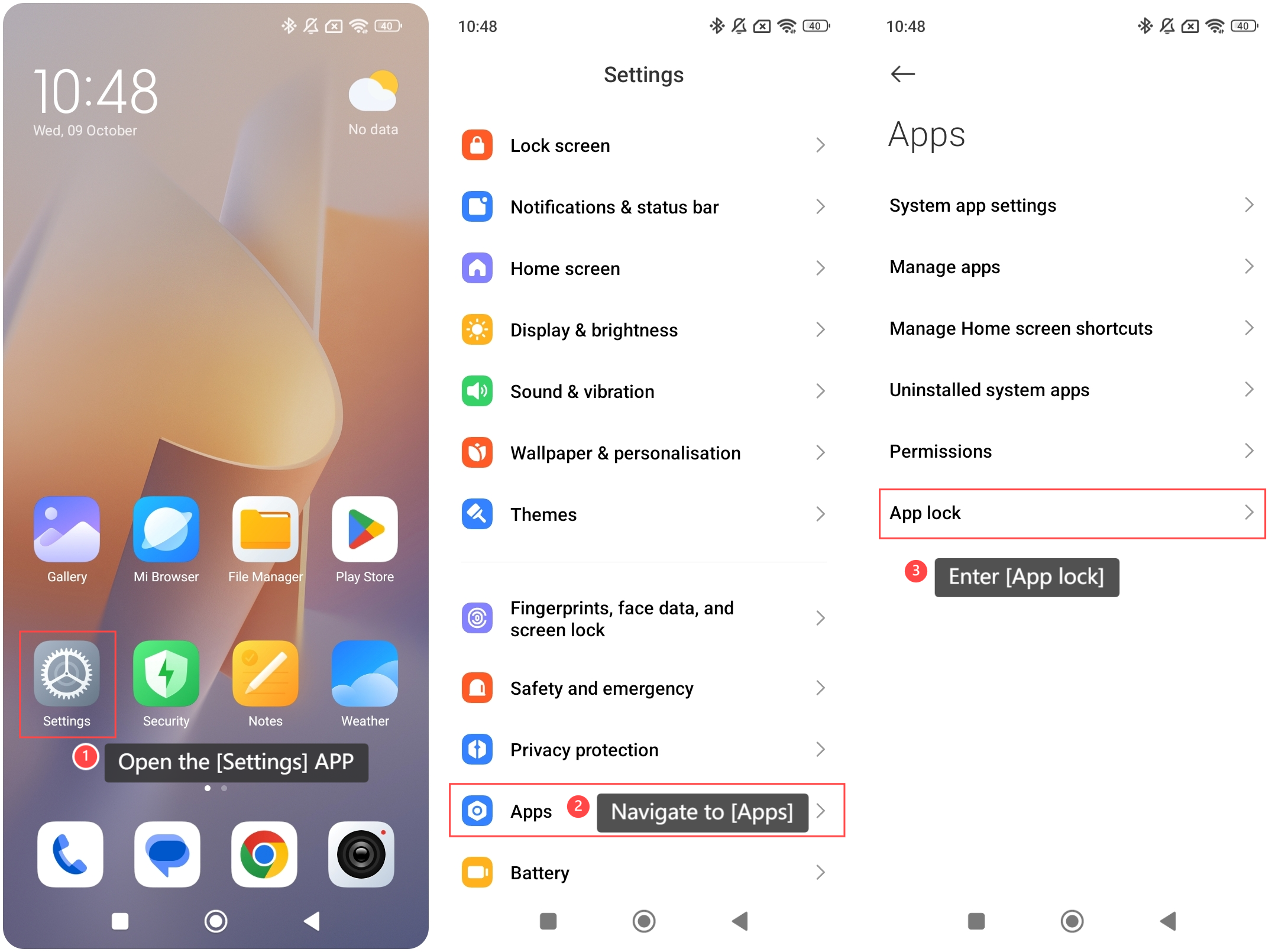
If you've forgotten the App lock password on the phone, please refer to the following steps:
1. Open the [Settings] APP on your phone;
2. Navigate to [Apps];
3. Enter [App lock];
4. Tap [Forgot password] in the password input interface;
5. If you have not added a Xiaomi Account, you can only reset your password after a factory data reset;
6. If you have added a Xiaomi Account, you just need to enter the password for the Xiaomi Account you added to reset the password.
Does it help?
Yes
No