

How to set the Emergency SOS on the Redmi 13C 5G?
The Emergency SOS feature on the Redmi 13C 5G ensures quick and direct contact with services like the police in urgent situations. It's designed for easy access, making it crucial in emergencies where every second counts. Familiarizing yourself with how to use this feature on your phone is vital, as it could be a lifesaver in critical moments.
To set the Emergency SOS on your phone, please refer to the following steps:
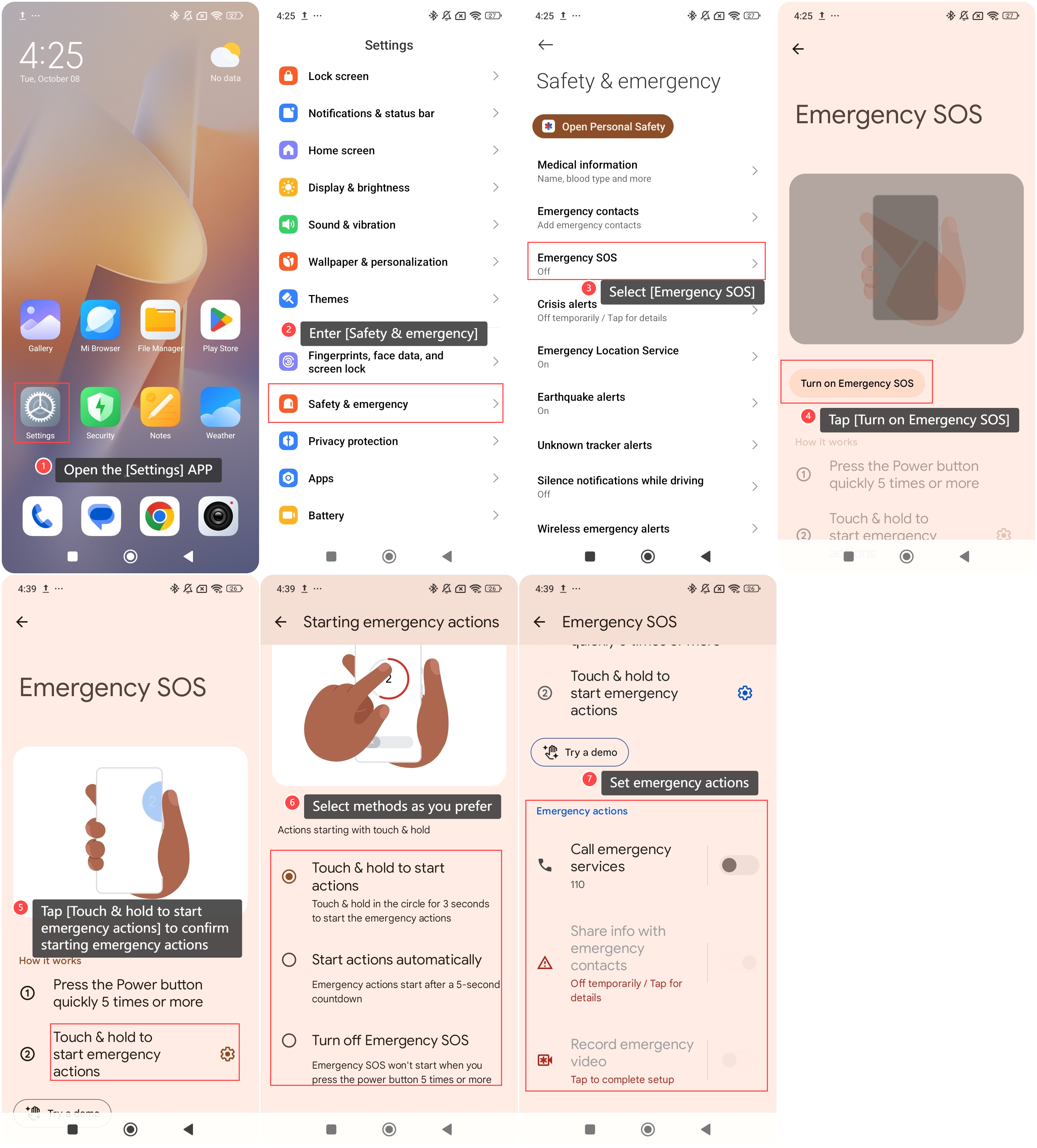
1. Open the [Settings] APP on your phone;
2. Enter [Safety & emergency];
3. Select [Emergency SOS] in this interface;
4. Tap [Turn on Emergency SOS], you can press the Power button quickly 5 times or more to enter Emergency SOS;
5. Additionally, tap [Touch & hold to start emergency actions] to confirm starting emergency actions with touch and hold or start the action automatically;
6. Select [Touch & hold to start actions], [Start actions automatically] or [Turn off Emergency SOS] methods as you prefer;
7. You can also set emergency actions by tapping [Call emergency services], [Share info with emergency contacts], or [Record emergency video] on the previous screen.
To set the Emergency SOS on your phone, please refer to the following steps:
1. Open the [Settings] APP on your phone;
2. Enter [Safety & emergency];
3. Select [Emergency SOS] in this interface;
4. Tap [Turn on Emergency SOS], you can press the Power button quickly 5 times or more to enter Emergency SOS;
5. Additionally, tap [Touch & hold to start emergency actions] to confirm starting emergency actions with touch and hold or start the action automatically;
6. Select [Touch & hold to start actions], [Start actions automatically] or [Turn off Emergency SOS] methods as you prefer;
7. You can also set emergency actions by tapping [Call emergency services], [Share info with emergency contacts], or [Record emergency video] on the previous screen.
Does it help?
Yes
No