

How to enable the Silence notifications while driving on the Redmi 13C 5G?
The feature of Silence notifications while driving on the Redmi 13C 5G is a functionality designed to minimize distractions while you are driving. The feature works by detecting motion or connecting to your car via Bluetooth, automatically activating when you start driving. It can reduce the potential risk of traffic accidents caused by mobile phone operations.
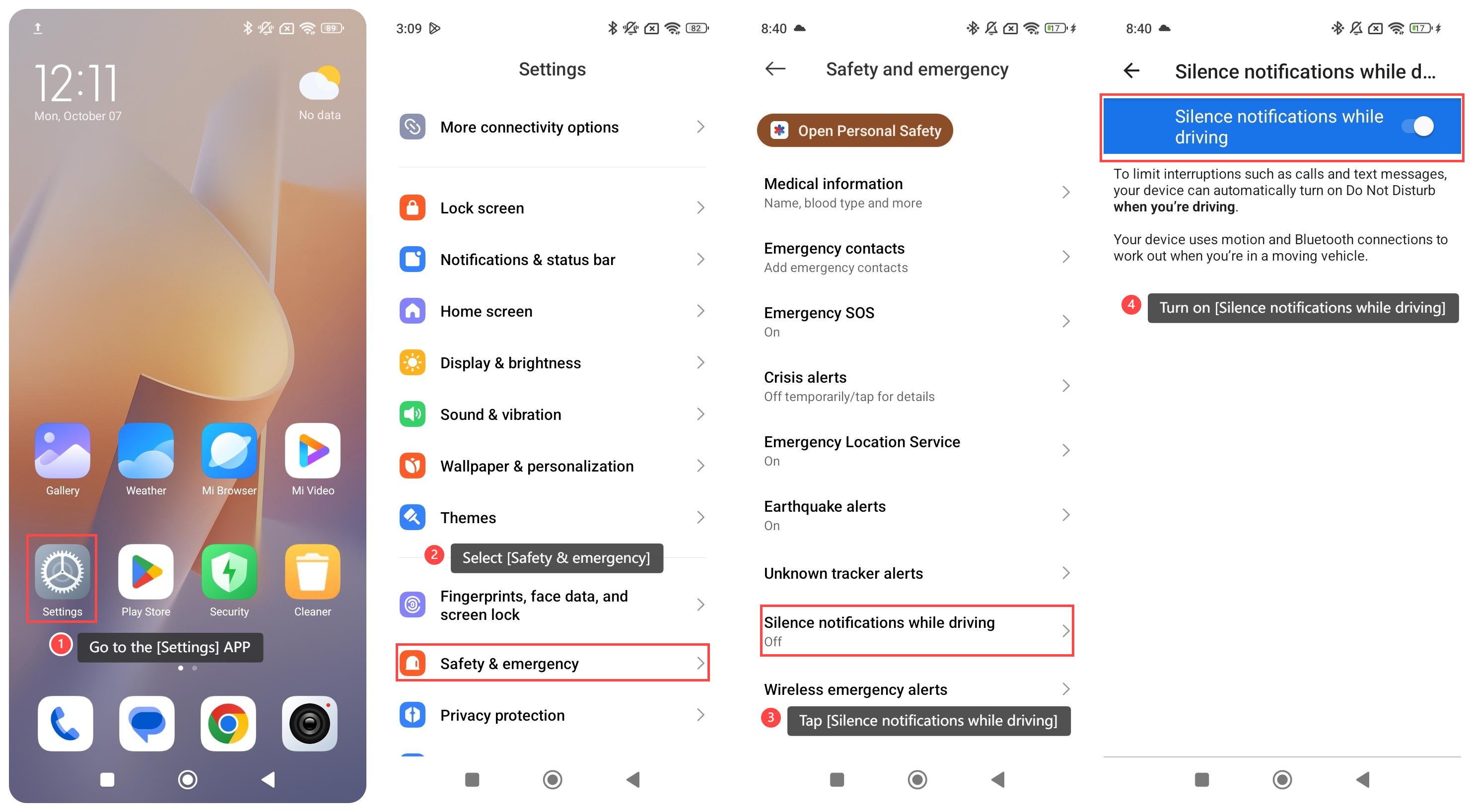
To enable the Silence notifications while driving on your phone, please refer to the following steps:
1. Go to the [Settings] APP on your phone;
2. Scroll down and select [Safety & emergency];
3. Tap [Silence notifications while driving];
4. Turn on [Silence notifications while driving].
Note:
After enabling this feature, to limit interruptions such as calls and text messages, your device can automatically turn on Do Not Disturb when you are driving.
To enable the Silence notifications while driving on your phone, please refer to the following steps:
1. Go to the [Settings] APP on your phone;
2. Scroll down and select [Safety & emergency];
3. Tap [Silence notifications while driving];
4. Turn on [Silence notifications while driving].
Note:
After enabling this feature, to limit interruptions such as calls and text messages, your device can automatically turn on Do Not Disturb when you are driving.
Does it help?
Yes
No