

How to set the Privacy protection password on the Redmi 13C 5G?
The Privacy Protection Password on the Redmi 13C 5G is a specific password that you can set to protect your private data, such as photos, files or notes, from unauthorized access.
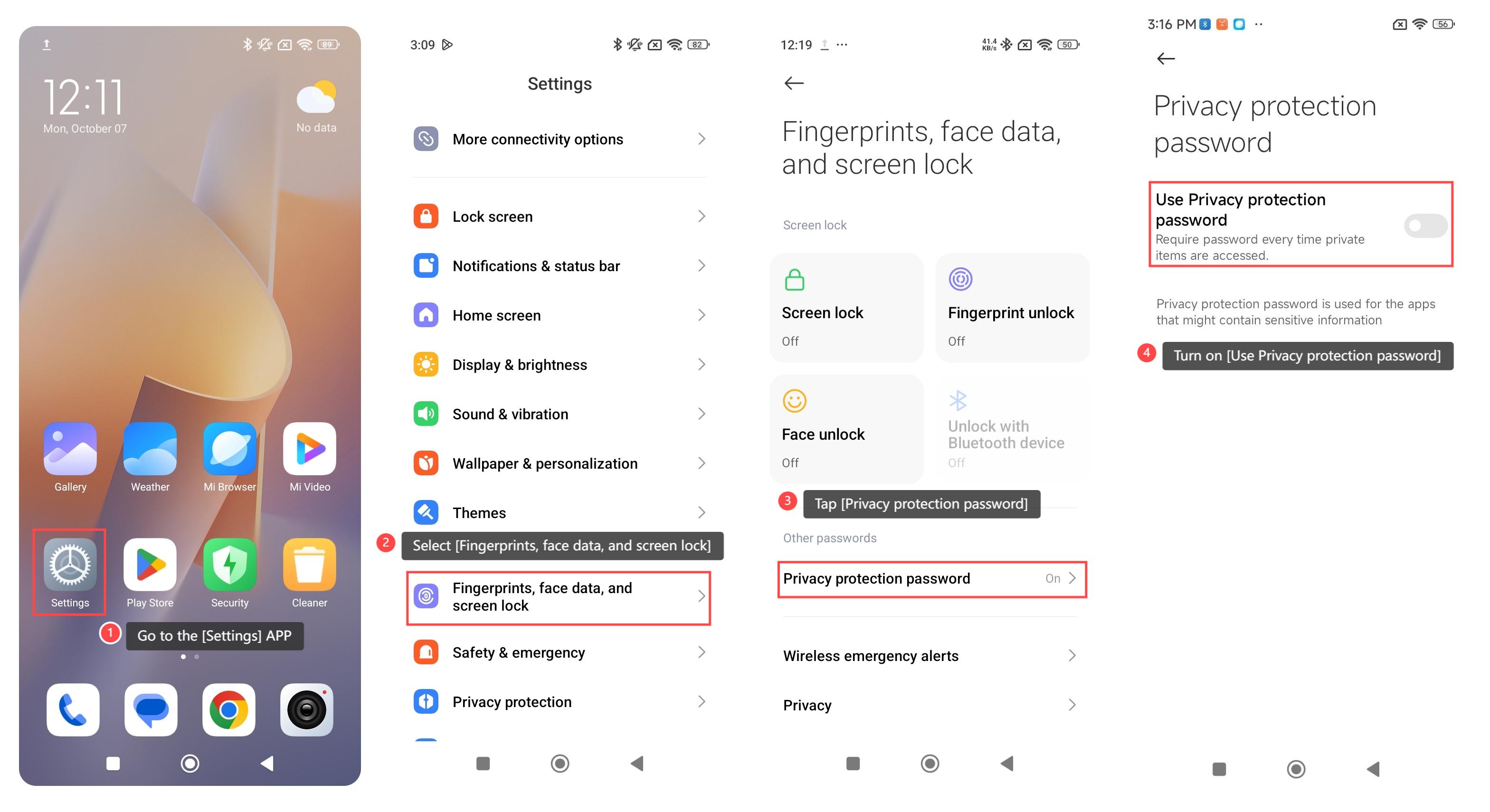
To set the Privacy protection password on your phone, please refer to the following steps:
1. Go to the [Settings] APP on your phone;
2. Select [Fingerprints, face data, and screen lock];
3. Tap [Privacy protection password];
4. Turn on [Use Privacy protection password], and you will follow the prompts to create your password, confirming it as needed.
 \
\
Note:
If you forget the password, you will lose access to your private notes and files. It can restrict access to important information if others need to view it temporarily.
To set the Privacy protection password on your phone, please refer to the following steps:
1. Go to the [Settings] APP on your phone;
2. Select [Fingerprints, face data, and screen lock];
3. Tap [Privacy protection password];
4. Turn on [Use Privacy protection password], and you will follow the prompts to create your password, confirming it as needed.
\Note:
If you forget the password, you will lose access to your private notes and files. It can restrict access to important information if others need to view it temporarily.
Does it help?
Yes
No