

How to enable vibration for calls on the Redmi 13C 5G?
The vibration for calls function on the Redmi 13C 5G provides silent alerts, allowing you to discreetly receive calls and notifications in various environments while maintaining privacy and improving convenience.
To enable vibration for calls on your phone, please refer to the following steps:
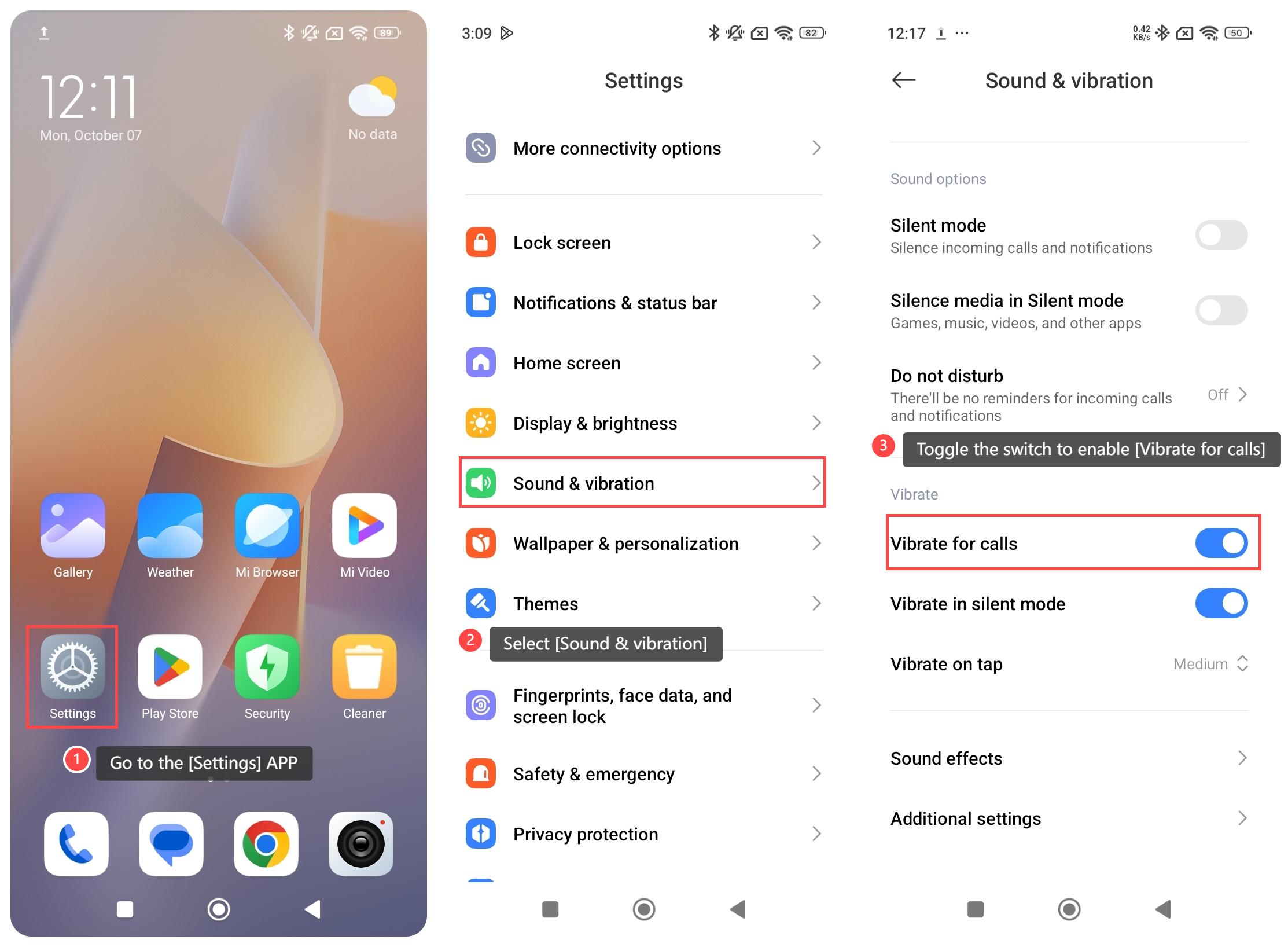
1. Go to the [Settings] APP on your phone;
2. Select [Sound & vibration];
3. Toggle the switch to enable [Vibrate for calls]. After enabling this, the phone will vibrate when receiving calls according to your selected setting.
Note:
1. It provides discreet notifications, ensuring you are aware of incoming calls without disrupting others around you. This is particularly useful in settings such as meetings or public places, where audible alerts would be disruptive;
2. It helps prevent missed calls, as the tactile feedback can be more noticeable than relying solely on sound;
3. Utilizing vibration for calls is more battery-efficient than traditional ringing, contributing to longer battery life for your device.
To enable vibration for calls on your phone, please refer to the following steps:
1. Go to the [Settings] APP on your phone;
2. Select [Sound & vibration];
3. Toggle the switch to enable [Vibrate for calls]. After enabling this, the phone will vibrate when receiving calls according to your selected setting.
Note:
1. It provides discreet notifications, ensuring you are aware of incoming calls without disrupting others around you. This is particularly useful in settings such as meetings or public places, where audible alerts would be disruptive;
2. It helps prevent missed calls, as the tactile feedback can be more noticeable than relying solely on sound;
3. Utilizing vibration for calls is more battery-efficient than traditional ringing, contributing to longer battery life for your device.
Does it help?
Yes
No