

How to set the feature on the -1 screen of the Redmi 13C 5G?
The Redmi 13C 5G supports the -1 screen, which refers to the screen you see when you swipe right from the home screen. It's called the -1 screen because it is positioned before the first (0) home screen. The -1 screen offers quick access to useful information and shortcuts.
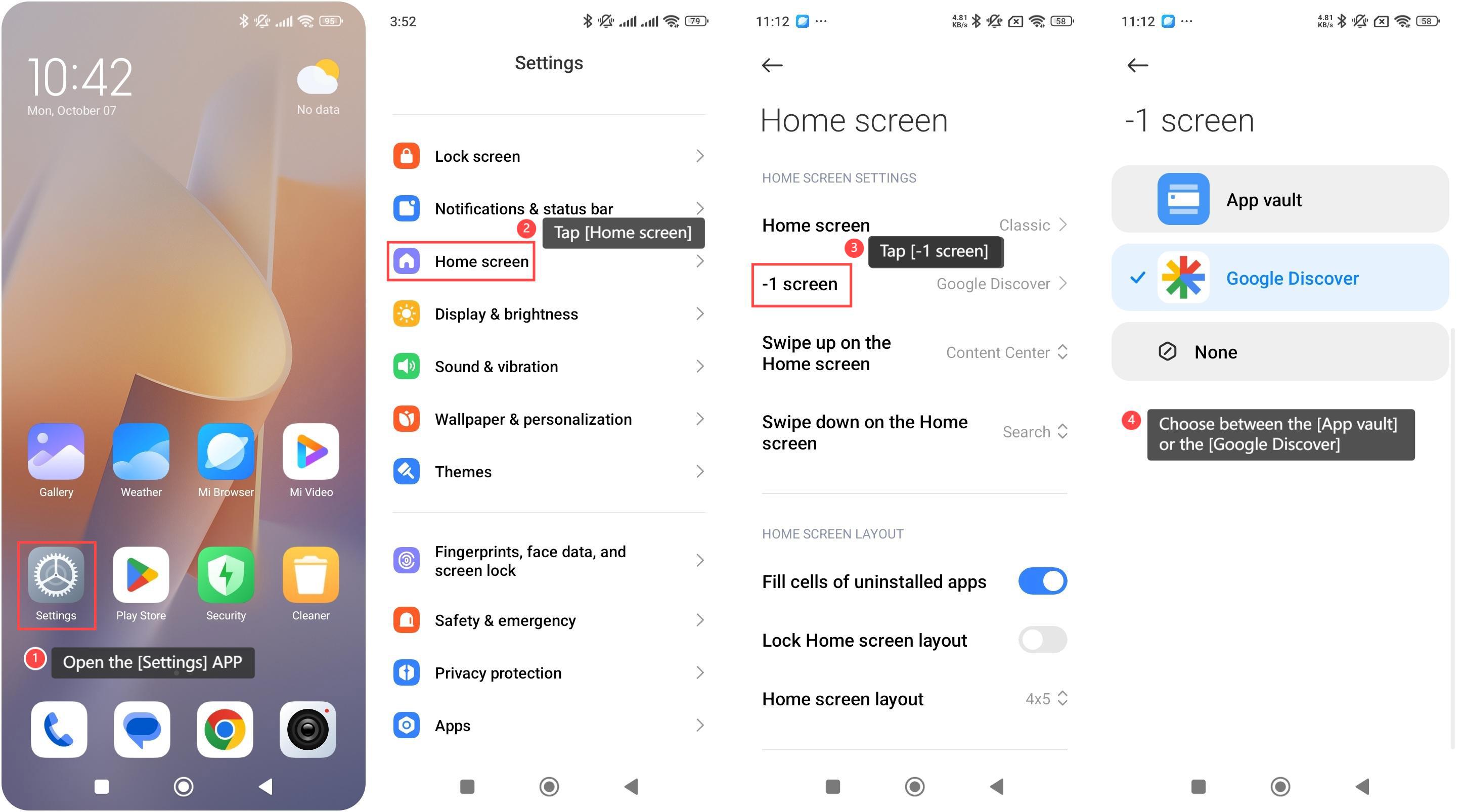
To set the feature on the -1 screen, please refer to the following steps:
1. Open the [Settings] APP on your phone;
2. Scroll down and tap [Home screen];
3. Tap [-1 screen];
4. Choose between the [App vault] or the [Google Discover] on your -1 screen.
Friendly tips:
1. Choose [App vault] if you want to see APP shortcuts, widgets, and quick access features;
2. Choose [Google Discover] if you prefer to see personalized news and content based on your interests.
To set the feature on the -1 screen, please refer to the following steps:
1. Open the [Settings] APP on your phone;
2. Scroll down and tap [Home screen];
3. Tap [-1 screen];
4. Choose between the [App vault] or the [Google Discover] on your -1 screen.
Friendly tips:
1. Choose [App vault] if you want to see APP shortcuts, widgets, and quick access features;
2. Choose [Google Discover] if you prefer to see personalized news and content based on your interests.
Does it help?
Yes
No