

How to set the default SIM card for calls on the Redmi 13C 5G?
When you use the Redmi 13C 5G, setting a default SIM card for calls simplifies the dialing process by eliminating the need to choose a SIM each time.
To set the default SIM card for calls on the phone, please refer to the following steps:
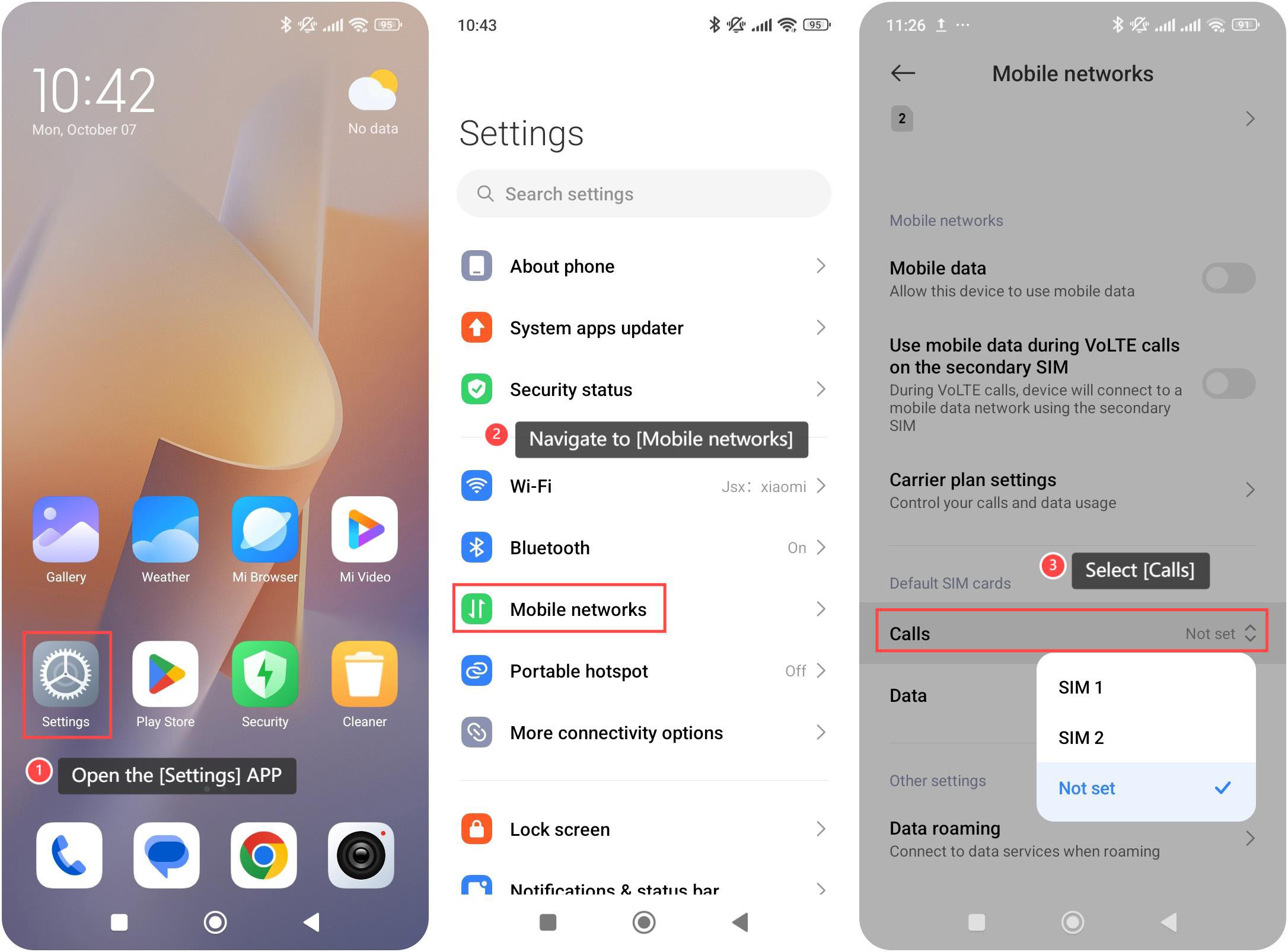
1. Open the [Settings] APP on your device. You can find the gear icon on your home screen or in your APP drawer;
2. Navigate to the [Mobile networks] option and tap it;
3. Select [Calls] to choose your default SIM card. Once selected, your phone will use the chosen SIM card by default for all outgoing calls.
Note:
Please select the SIM card that has better coverage in your location, as poor signal strength can affect call quality.
To set the default SIM card for calls on the phone, please refer to the following steps:
1. Open the [Settings] APP on your device. You can find the gear icon on your home screen or in your APP drawer;
2. Navigate to the [Mobile networks] option and tap it;
3. Select [Calls] to choose your default SIM card. Once selected, your phone will use the chosen SIM card by default for all outgoing calls.
Note:
Please select the SIM card that has better coverage in your location, as poor signal strength can affect call quality.
Does it help?
Yes
No