

How to turn off User Experience Program on the Redmi 13C?
The Redmi 13C has a User Experience Program, which allows Xiaomi to collect and analyze user data in order to improve products and services. If you prefer not to join the program, you can opt out of this program at any time.
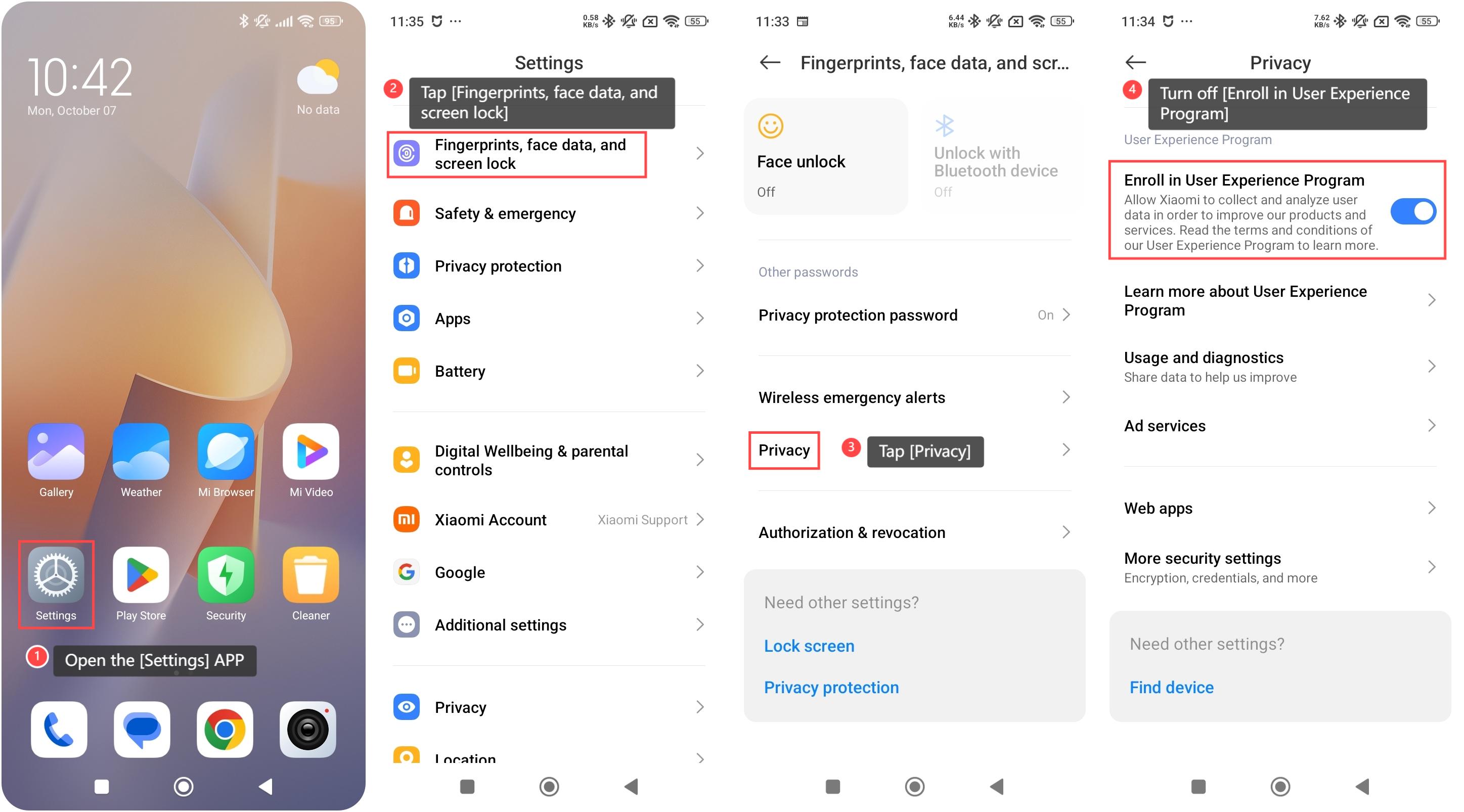
To turn off User Experience Program on your phone, please refer to the following steps:
1. Open the [Settings] APP on your device. You can find the gear icon on your home screen or in your APP drawer;
2. Swipe down and tap [Fingerprints, face data, and screen lock];
3. Tap [Privacy];
4. Scroll down and turn off [Enroll in User Experience Program].
Note:
The [Learn more about User Experience Program] can help you know more information about this program and decide whether to turn off it.
To turn off User Experience Program on your phone, please refer to the following steps:
1. Open the [Settings] APP on your device. You can find the gear icon on your home screen or in your APP drawer;
2. Swipe down and tap [Fingerprints, face data, and screen lock];
3. Tap [Privacy];
4. Scroll down and turn off [Enroll in User Experience Program].
Note:
The [Learn more about User Experience Program] can help you know more information about this program and decide whether to turn off it.
Does it help?
Yes
No