

How to update the Android Security of the Redmi 13C 5G?
The update for the Redmi 13C 5G Android Security includes new features, security patches, and performance improvements. By updating, the phone can run faster and improve application compatibility. Additionally, the update fixes known bugs and vulnerabilities, enhancing system stability and security. Regularly updating the Android Security ensures the device remains optimized in terms of performance and safety.
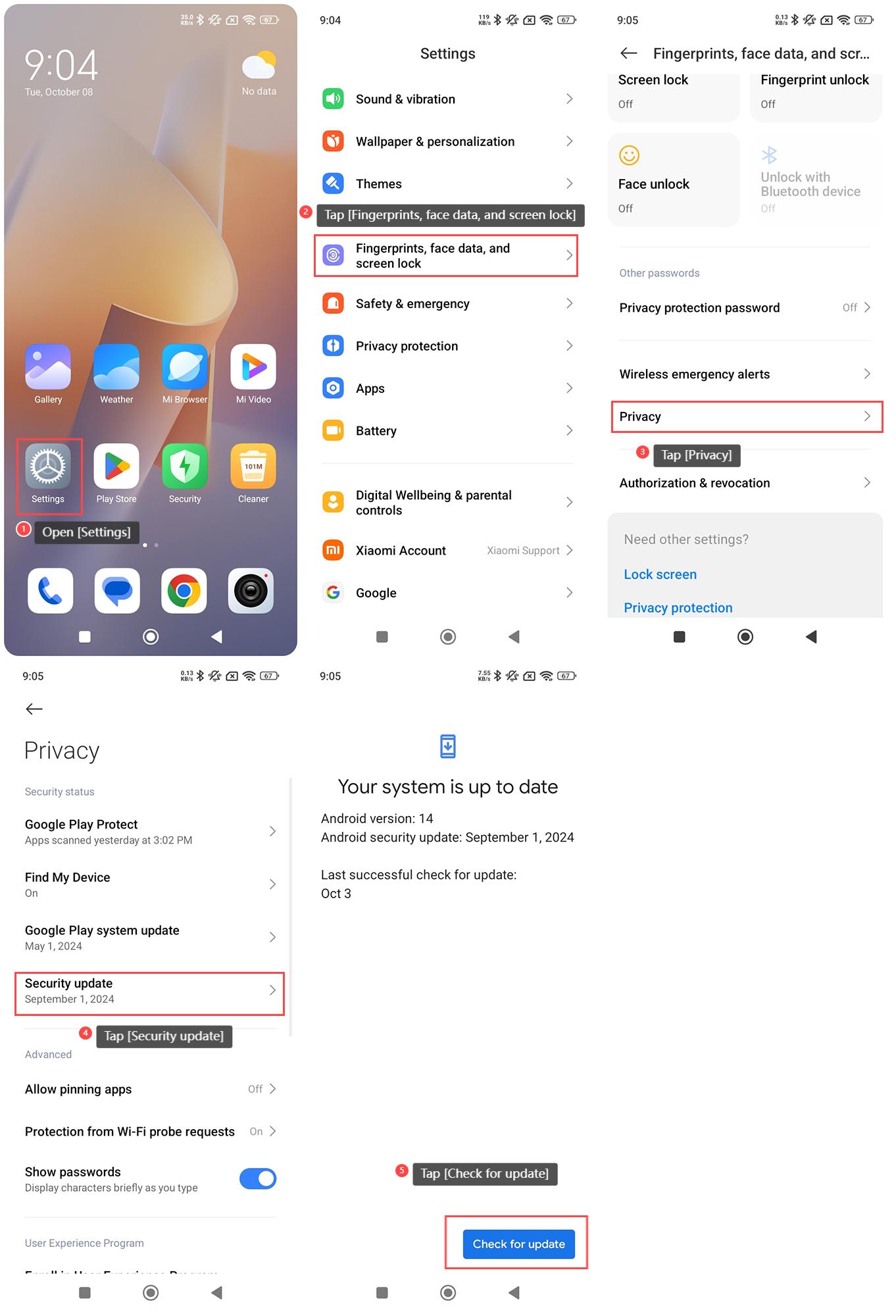
To update the Android Security of the Redmi 13C 5G, please refer to the following steps:
1. Open [Settings] on your phone;
2. Tap [Fingerprints, face data, and screen lock];
3. Tap [Privacy];
4. Tap [Security update];
5. Tap [Check for update] and your phone will automatically check for version updates.
Note:
It is recommended to update over a stable Wi-Fi connection and back up important data to prevent potential data loss.
To update the Android Security of the Redmi 13C 5G, please refer to the following steps:
1. Open [Settings] on your phone;
2. Tap [Fingerprints, face data, and screen lock];
3. Tap [Privacy];
4. Tap [Security update];
5. Tap [Check for update] and your phone will automatically check for version updates.
Note:
It is recommended to update over a stable Wi-Fi connection and back up important data to prevent potential data loss.
Does it help?
Yes
No