

How to make the Redmi 13C play sound when locking device?
The Redmi 13C supports the built-in feature of setting the lock screen sound that allows your device to play sound when locking the device. This feature can remind you that your phone is locked in time to give you convenience and improve your overall sound effect experience.
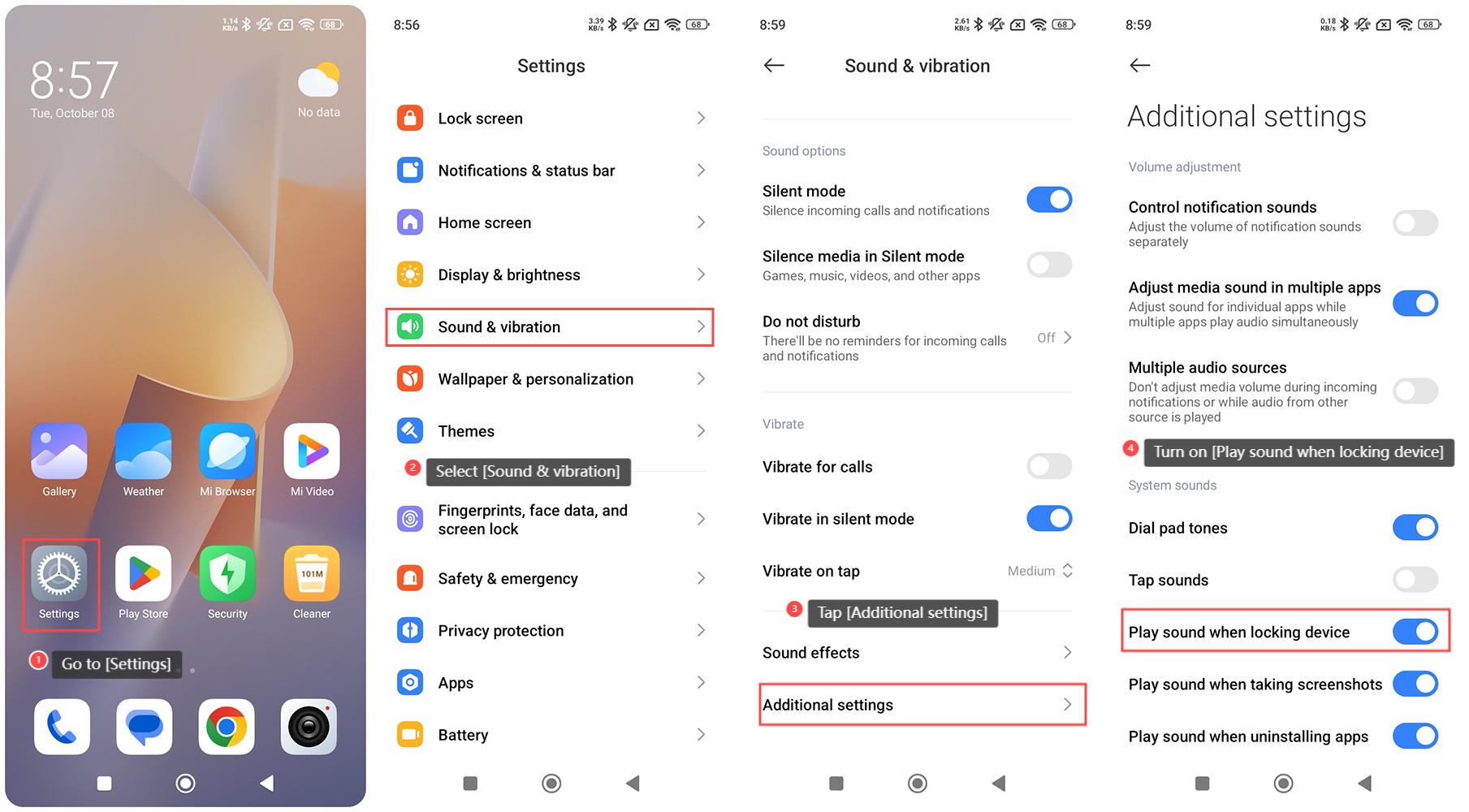
To make the Redmi 13C play sound when locking device, please refer to the following steps:
1. Go to [Settings] on your phone;
2. Select [Sound & vibration];
3. Tap [Additional settings];
4. Turn on [Play sound when locking device].
Note:
1. Check if the system volume (notification or system volume) is muted or too low. Adjust it to an audible level;
2. Make sure the device is not in DND mode, as this can silence lock sounds along with other notifications.
To make the Redmi 13C play sound when locking device, please refer to the following steps:
1. Go to [Settings] on your phone;
2. Select [Sound & vibration];
3. Tap [Additional settings];
4. Turn on [Play sound when locking device].
Note:
1. Check if the system volume (notification or system volume) is muted or too low. Adjust it to an audible level;
2. Make sure the device is not in DND mode, as this can silence lock sounds along with other notifications.
Does it help?
Yes
No