

How to set the default screen on the REDMI 13C 5G?
The REDMI 13C 5G supports setting the default screen, which is the main home screen that appears when you tap the home icon. It is the primary screen on your device, where you can place your frequently used applications or widgets.
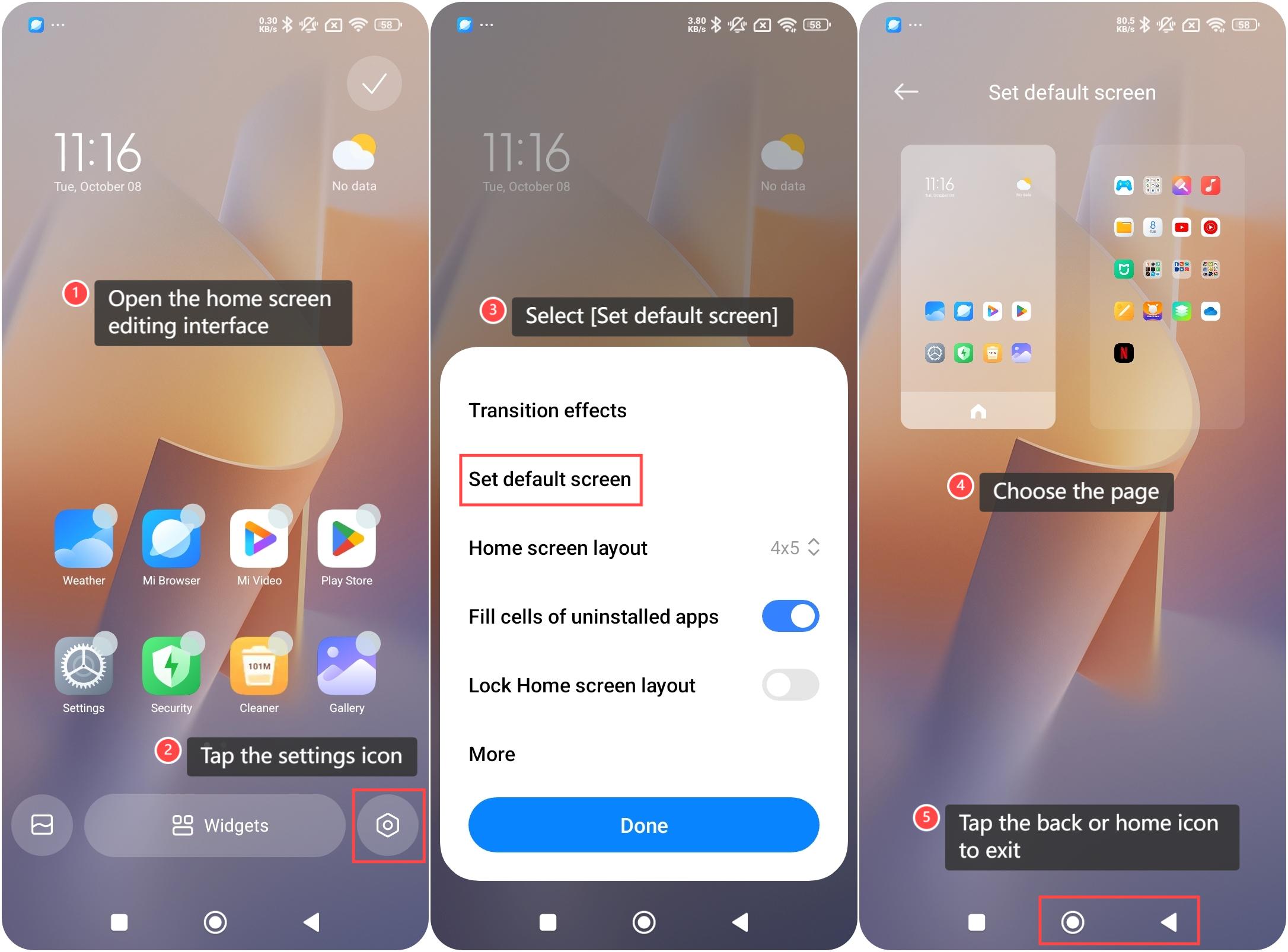
To set the default screen on your phone, please refer to the following steps:
1. On the home screen, use two fingers to pinch the screen or press and hold the blank area of it to open the home screen editing interface;
2. Tap the settings icon at the lower right corner;
3. Select [Set default screen];
4. Choose the page you want to set as the default. A home icon will appear on the selected screen, indicating that it is set as the default screen;
5. Tap the back or home icon to exit the editing interface. Now, whenever you tap the home icon, it will take you directly to the screen you selected as the default.
To set the default screen on your phone, please refer to the following steps:
1. On the home screen, use two fingers to pinch the screen or press and hold the blank area of it to open the home screen editing interface;
2. Tap the settings icon at the lower right corner;
3. Select [Set default screen];
4. Choose the page you want to set as the default. A home icon will appear on the selected screen, indicating that it is set as the default screen;
5. Tap the back or home icon to exit the editing interface. Now, whenever you tap the home icon, it will take you directly to the screen you selected as the default.
Does it help?
Yes
No