

How to adjust the refresh rate on the REDMI 13C?
The REDMI 13C supports a maximum refresh rate of 90 Hz. The refresh rate refers to the number of times a display updates its image per second, measured in hertz (Hz). A higher refresh rate means smoother motion and better responsiveness, which is especially noticeable in activities like gaming or scrolling.
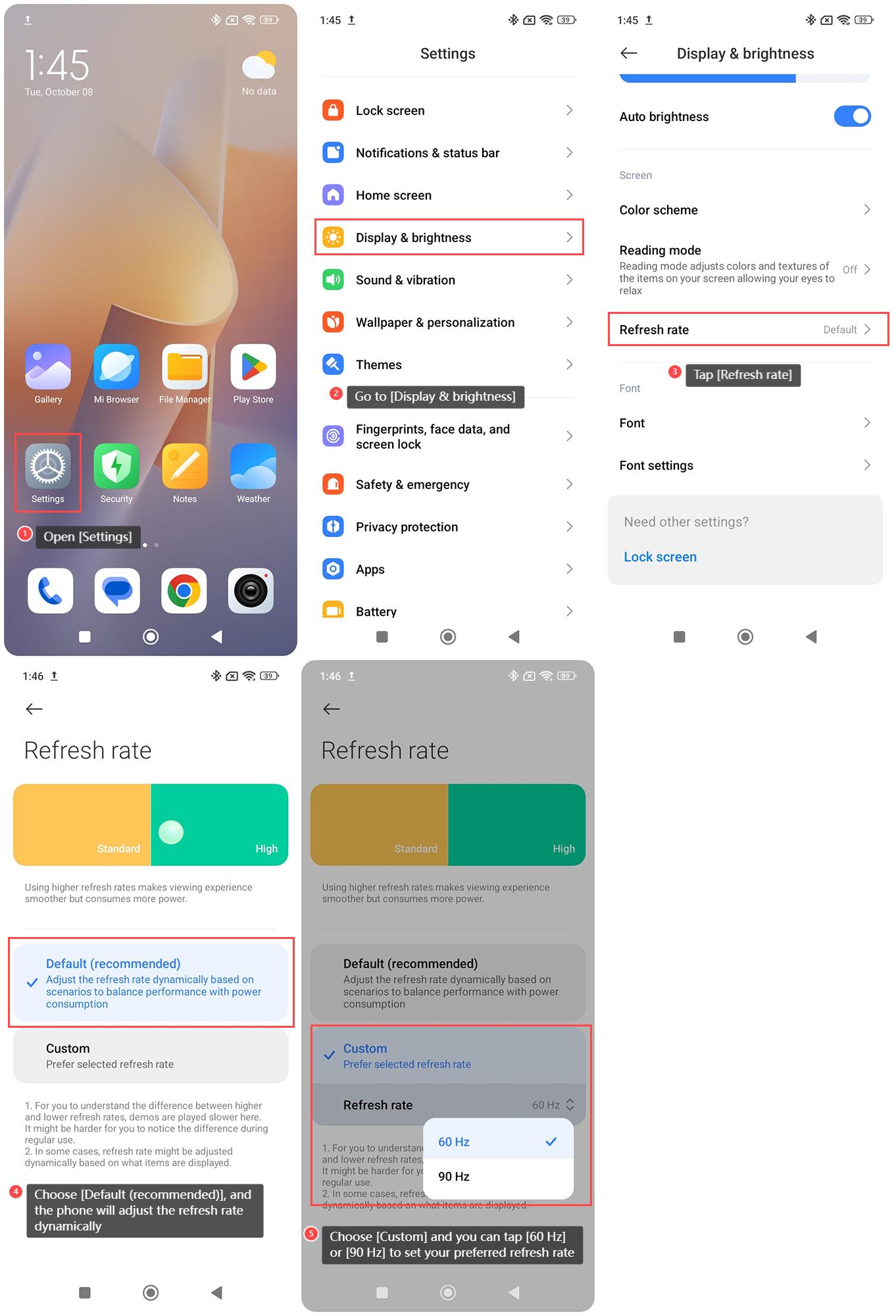
To adjust the refresh rate on the REDMI 13C, please refer to the following steps:
1. Open [Settings] on your phone;
2. Go to [Display & brightness];
3. Tap [Refresh rate];
4. Choose [Default (recommended)], and the phone will adjust the refresh rate dynamically based on scenarios to balance performance with power consumption;
5. Choose [Custom] and you can tap [60 Hz] or [90 Hz] to set your preferred refresh rate.
To adjust the refresh rate on the REDMI 13C, please refer to the following steps:
1. Open [Settings] on your phone;
2. Go to [Display & brightness];
3. Tap [Refresh rate];
4. Choose [Default (recommended)], and the phone will adjust the refresh rate dynamically based on scenarios to balance performance with power consumption;
5. Choose [Custom] and you can tap [60 Hz] or [90 Hz] to set your preferred refresh rate.
Does it help?
Yes
No