

How to set the transition effect of the Home screen on the Redmi 13C?
The transition effect of the Home screen on the Redmi 13C refers to the animations that occur when you navigate between home screen pages. These effects, which can include fade, slide, or zoom animations, enhance the visual appeal of the interface, making it more engaging. Additionally, smooth transitions can improve navigation by providing visual cues that help you understand the interactions. You can customize the transition effect to reflect your personal style, resulting in a more personalized experience.
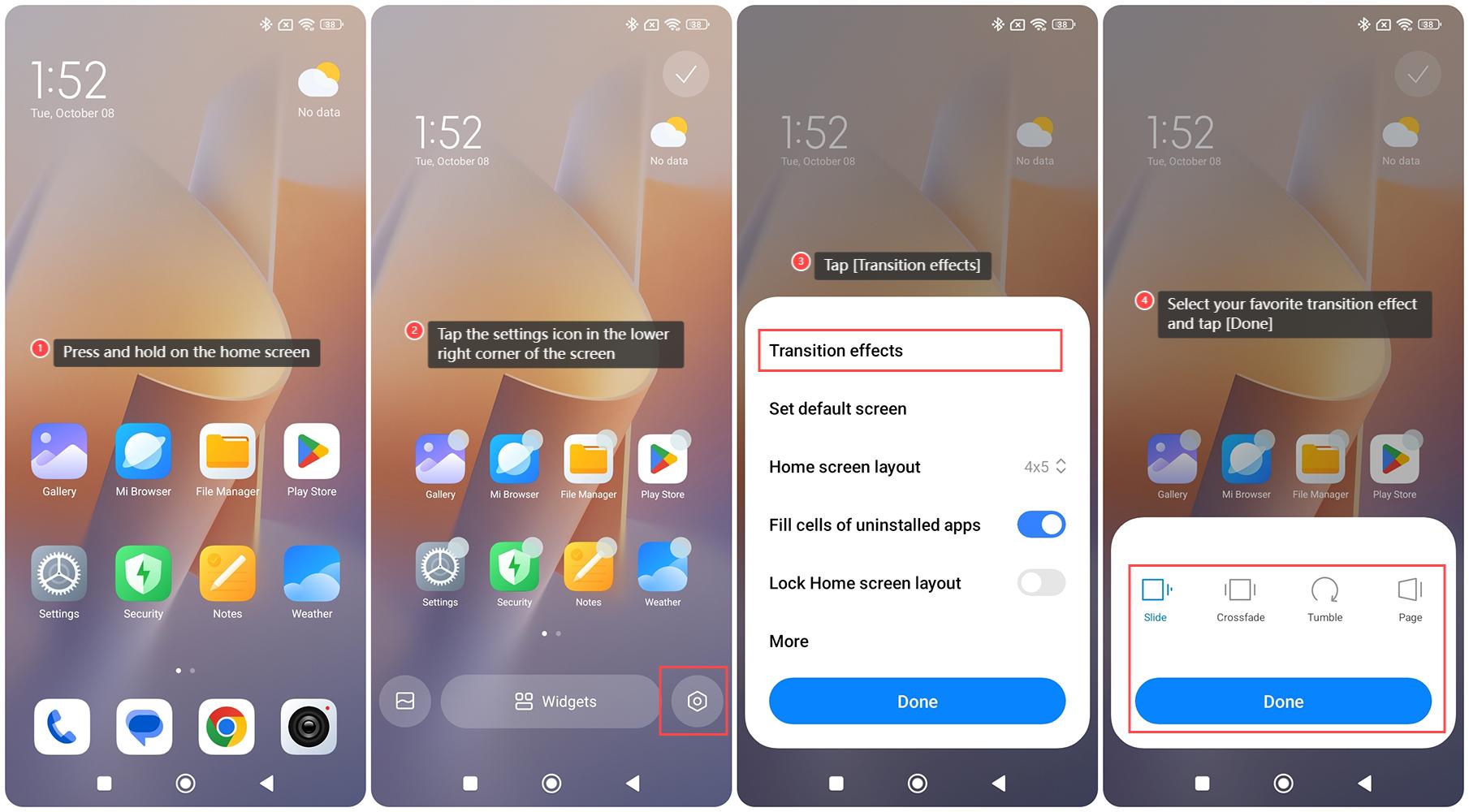
To set the transition effect of the Home screen on the Redmi 13C, please refer to the following steps:
1. Press and hold on the home screen;
2. Tap the settings icon in the lower right corner of the screen;
3. Tap [Transition effects];
4. Select your favorite transition effect and tap [Done].
To set the transition effect of the Home screen on the Redmi 13C, please refer to the following steps:
1. Press and hold on the home screen;
2. Tap the settings icon in the lower right corner of the screen;
3. Tap [Transition effects];
4. Select your favorite transition effect and tap [Done].
Does it help?
Yes
No