

How to set the Home screen layout on the Redmi 13C?
The Redmi 13C supports customizing the Home screen layout, which refers to the grid size (number of rows and columns of APP icons), such as 4x5 or 5x5. The grid size affects how many APP icons you can fit on your home screen.
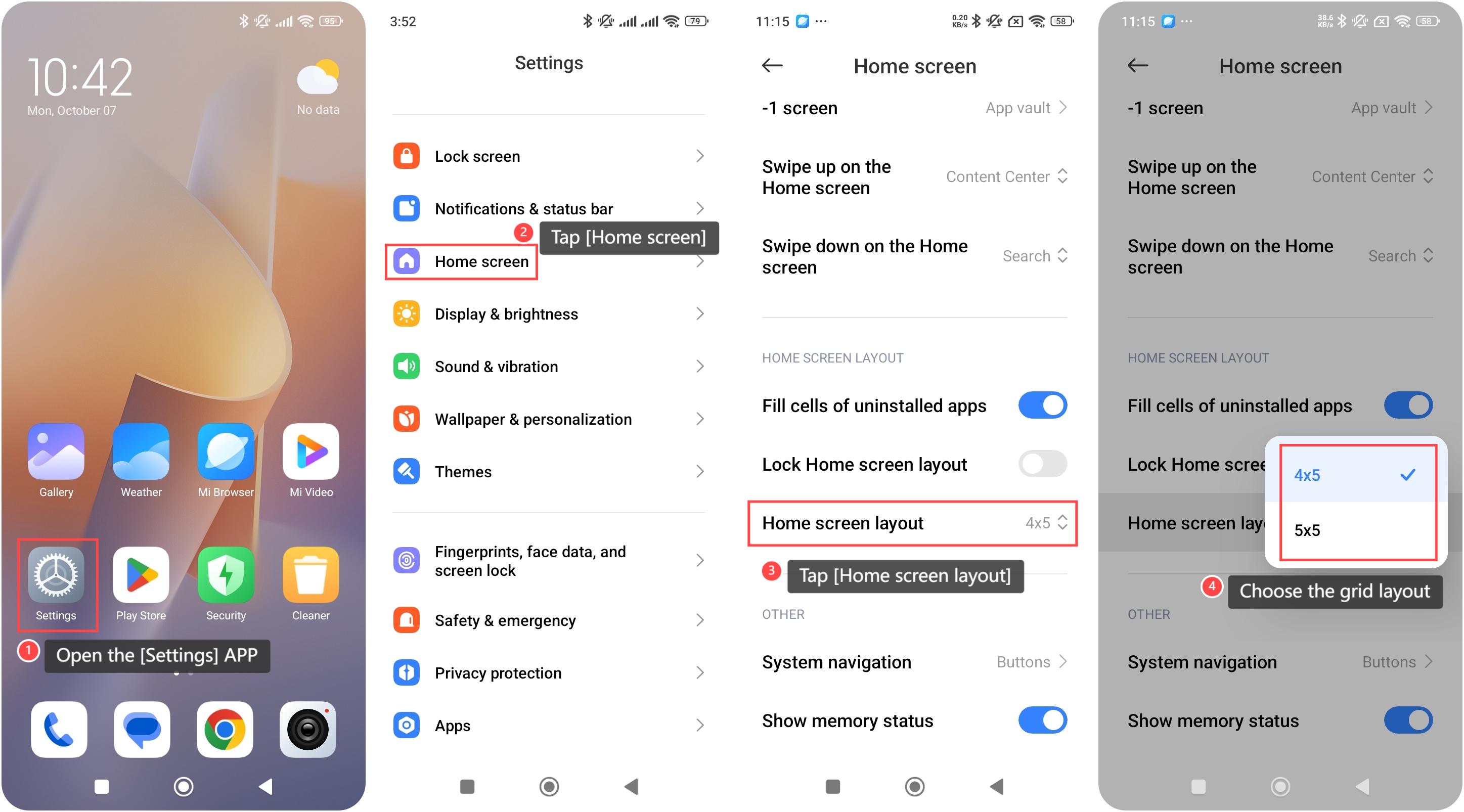
To set the Home screen layout on your phone, please refer to the following steps:
1. Open the [Settings] APP on your device. You can find the gear icon on your home screen or in your APP drawer;
2. Scroll down and tap [Home screen];
3. Within this interface, look for the [Home screen layout] option and tap it;
4. Choose the grid layout that suits your preference. After selecting your desired layout, the system will automatically adjust the home screen to fit your new settings.
To set the Home screen layout on your phone, please refer to the following steps:
1. Open the [Settings] APP on your device. You can find the gear icon on your home screen or in your APP drawer;
2. Scroll down and tap [Home screen];
3. Within this interface, look for the [Home screen layout] option and tap it;
4. Choose the grid layout that suits your preference. After selecting your desired layout, the system will automatically adjust the home screen to fit your new settings.
Does it help?
Yes
No