

How to manage the number of notification icons shown on the Redmi 13C 5G?
Setting the number of notification icons in the status bar on the Redmi 13C 5g helps reduce clutter, making the bar less crowded and easier to navigate. It enhances focus by showing only essential notifications, improves accessibility, and allows for a more personalized usage experience.
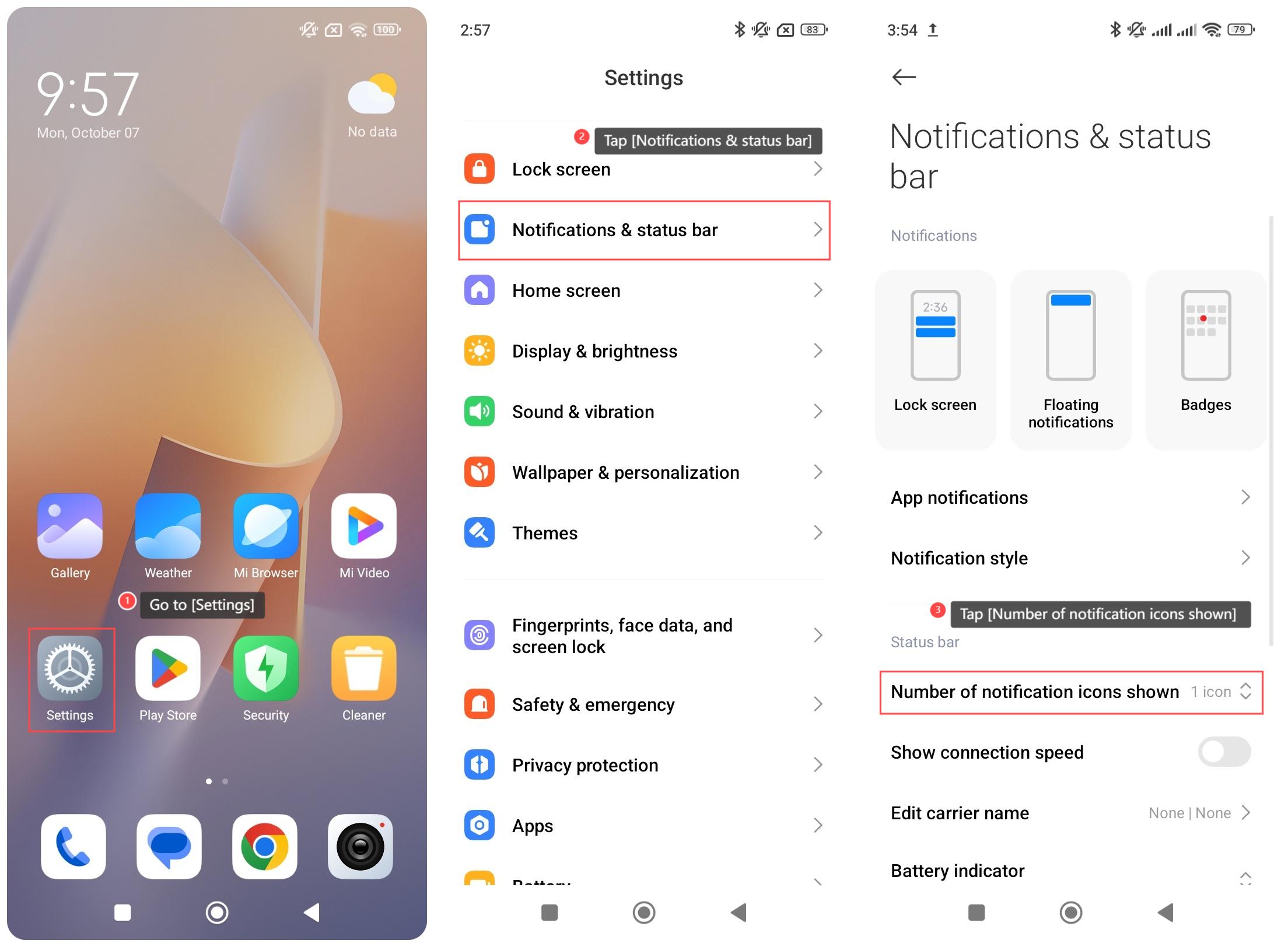
To manage the number of notification icons shown on your phone, please refer to the following steps:
1. Go to [Settings];
2. Tap [Notifications & status bar];
3. Tap [Number of notification icons shown] and select from the options according to your needs.
Note:
After the settings are completed, you can check the status bar to see if the number of icons displayed matches your selection.
To manage the number of notification icons shown on your phone, please refer to the following steps:
1. Go to [Settings];
2. Tap [Notifications & status bar];
3. Tap [Number of notification icons shown] and select from the options according to your needs.
Note:
After the settings are completed, you can check the status bar to see if the number of icons displayed matches your selection.
Does it help?
Yes
No