

How to show memory status on the Recents of the Redmi 13C 5G?
Enabling the Show memory status feature on the Redmi 13C 5G allows for quick checks of memory usage whenever you swipe up to view the Recents. Staying informed about memory status enables you to make better decisions about which APPs to close, enhancing overall multitasking efficiency.
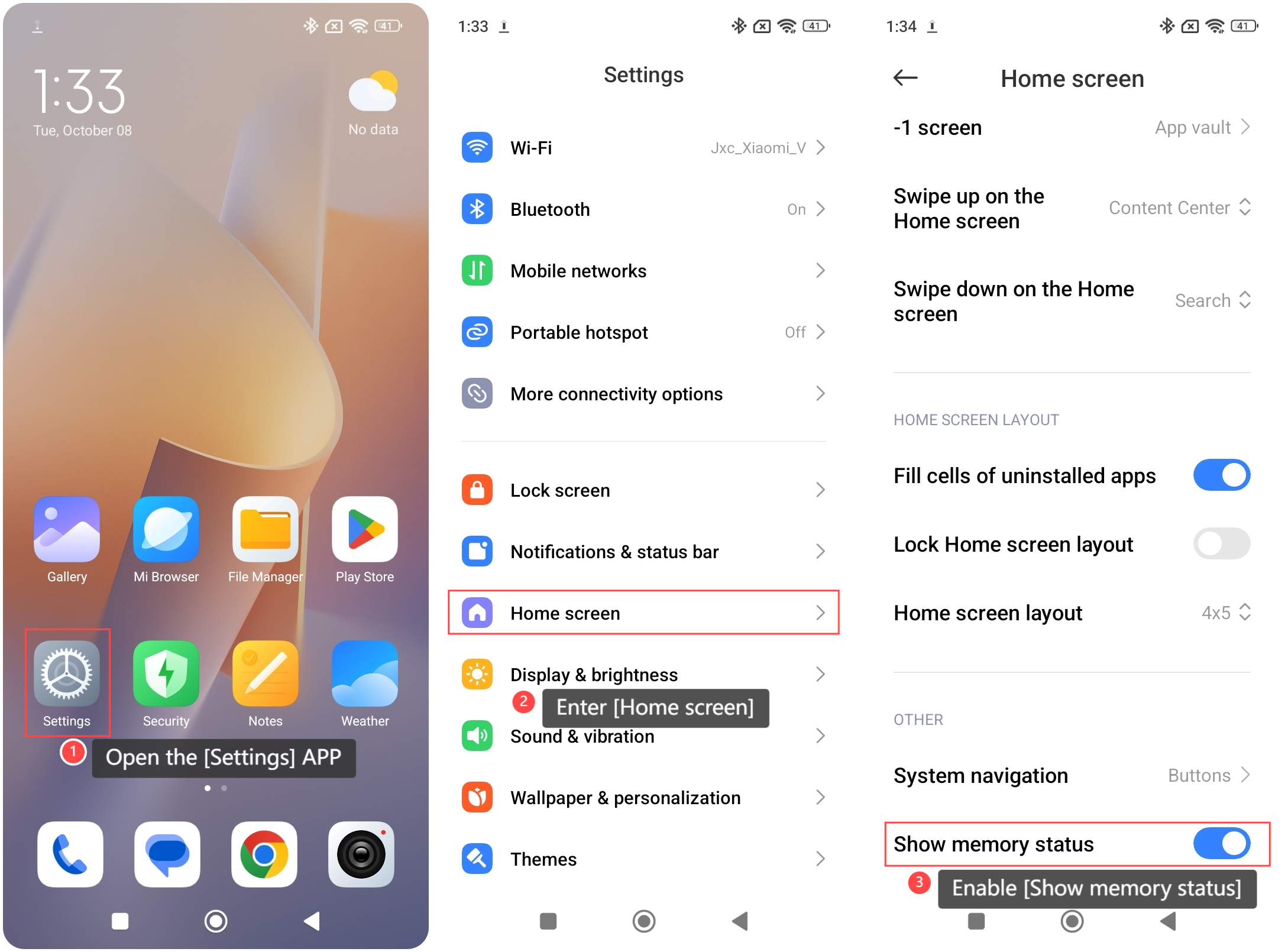
To show memory status on the Recents of your phone, please refer to the following steps:
1. Open the [Settings] APP on your phone;
2. Enter [Home screen];
3. Enable [Show memory status].
To show memory status on the Recents of your phone, please refer to the following steps:
1. Open the [Settings] APP on your phone;
2. Enter [Home screen];
3. Enable [Show memory status].
Note:
The memory status displayed in Recents shows the available capacity of your phone's RAM, providing insights into how much memory is being utilized by active APPs.
The memory status displayed in Recents shows the available capacity of your phone's RAM, providing insights into how much memory is being utilized by active APPs.
Does it help?
Yes
No