

How to set the feature on the Redmi 13C after swiping down on the Home screen?
Setting the feature on the Redmi 13C after swiping down on the Home screen allows quick access to important functions like notification shade, control center, or search. This enhances convenience by allowing faster control and information management without navigating deeper into settings.
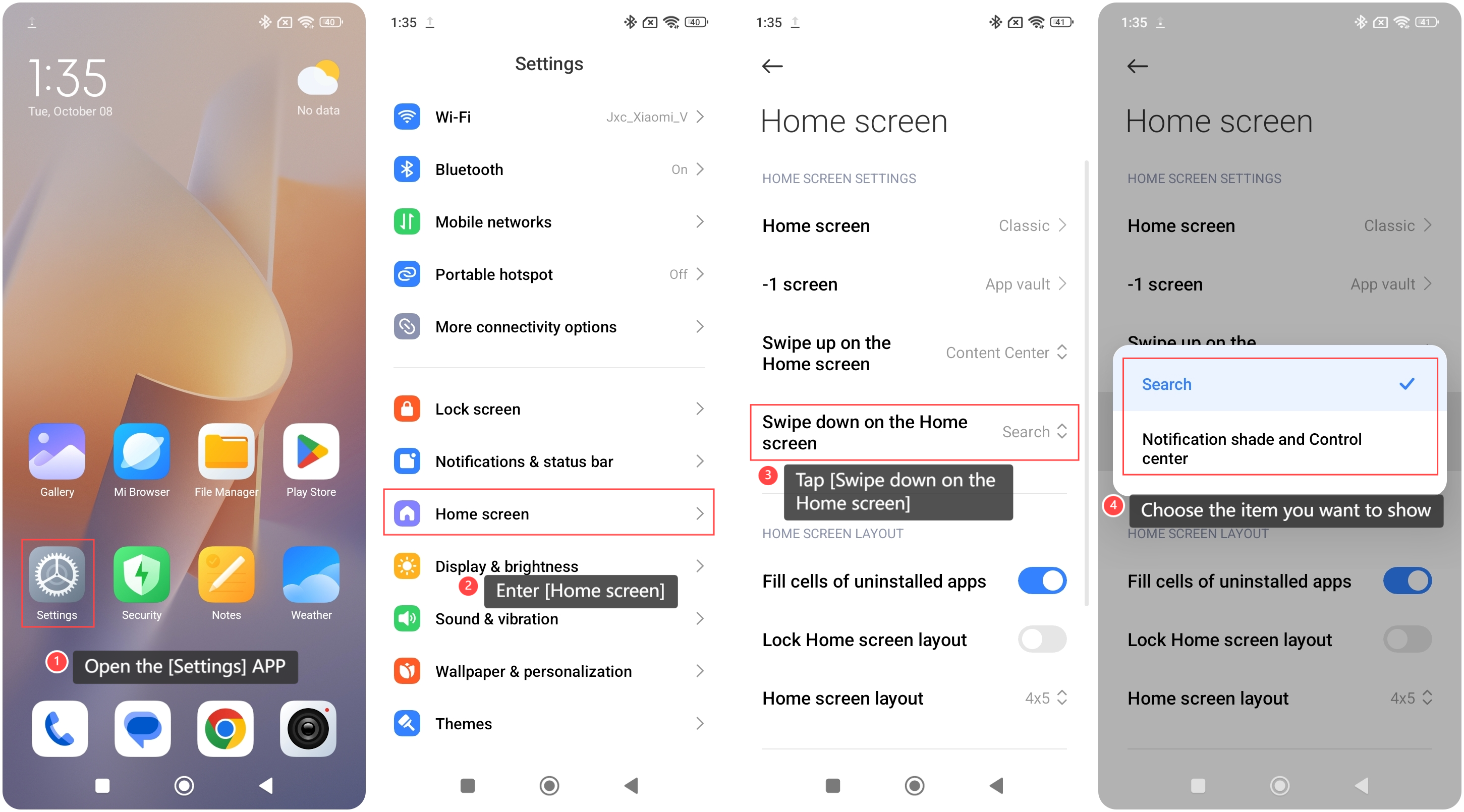
To set the feature on the Redmi 13C after swiping down on the Home screen, please refer to the following steps:
1. Open the [Settings] APP on your phone;
2. Enter [Home screen];
3. Tap [Swipe down on the Home screen];
4. Choose the item you want to show after swiping down on the Home screen.
To set the feature on the Redmi 13C after swiping down on the Home screen, please refer to the following steps:
1. Open the [Settings] APP on your phone;
2. Enter [Home screen];
3. Tap [Swipe down on the Home screen];
4. Choose the item you want to show after swiping down on the Home screen.
Friendly tips:
You can use this feature by swiping down on the blank area of the Home screen without needing to swipe down from the top of the screen.
You can use this feature by swiping down on the blank area of the Home screen without needing to swipe down from the top of the screen.
Does it help?
Yes
No