

How to wake up the Redmi 13C when receiving notifications?
The Redmi 13C supports the screen being wakened up when receiving notifications, which allows you to see notifications at a glance and quickly check notifications without needing to press any buttons. Waking the screen for notifications can help you maintain better awareness of your device's activity, especially in public settings, which will save your time and energy and avoid interrupting the activities that you join in.
To wake up your phone when receiving notifications, please refer to the following steps:
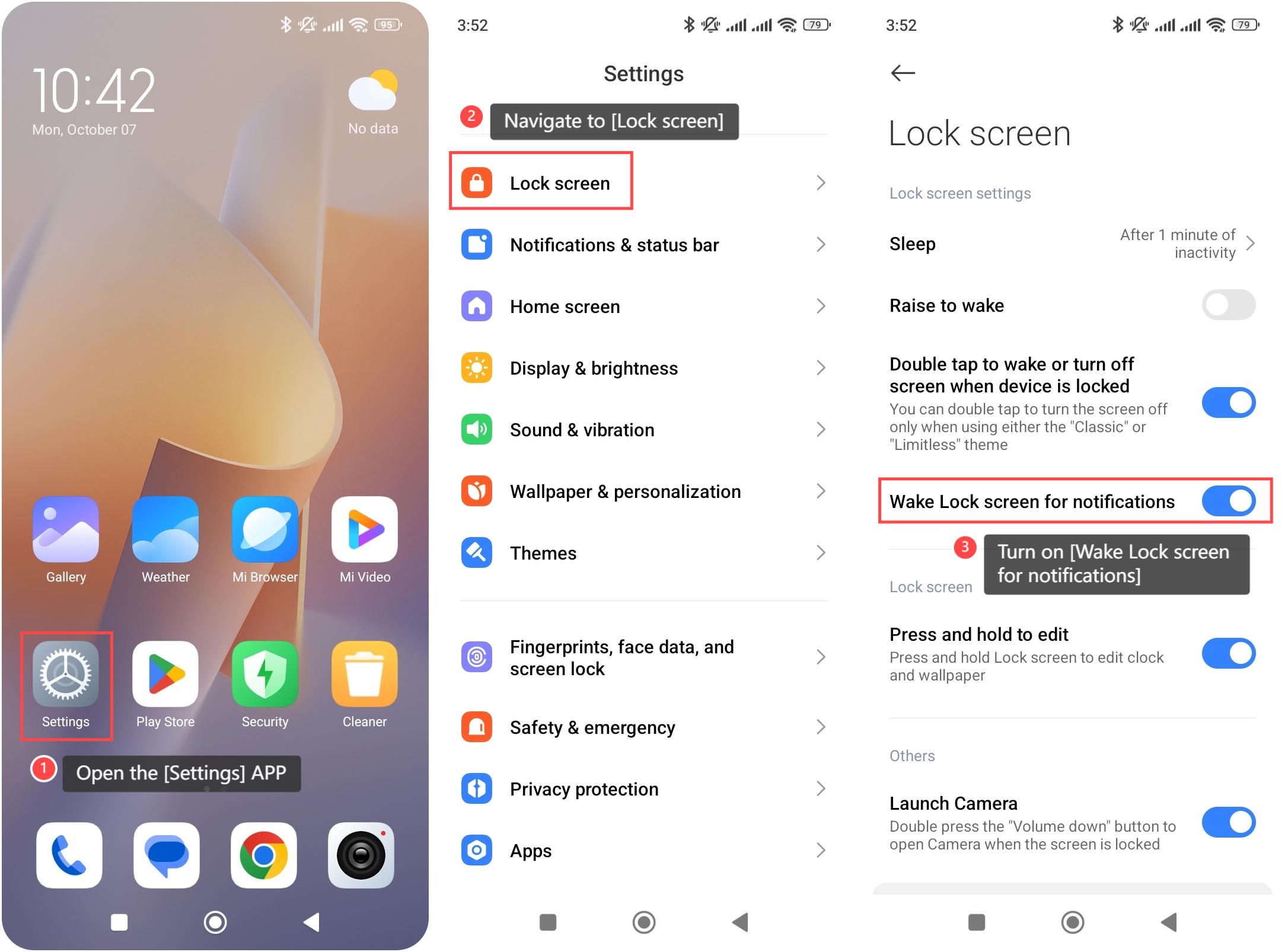
1. Open the [Settings] APP on your device. You can find the gear icon on your home screen or in your APP drawer;
2. Navigate to the [Lock screen] option and tap it;
3. Turn on [Wake Lock screen for notifications] and your phone will wake the lock screen automatically when receiving notifications.
To wake up your phone when receiving notifications, please refer to the following steps:
1. Open the [Settings] APP on your device. You can find the gear icon on your home screen or in your APP drawer;
2. Navigate to the [Lock screen] option and tap it;
3. Turn on [Wake Lock screen for notifications] and your phone will wake the lock screen automatically when receiving notifications.
Does it help?
Yes
No