

How to control the calls and data usage on the Redmi 13C 5G?
The Redmi 13C 5G supports controlling the calls and data usage. Monitoring usage helps prevent unexpected charges, especially on limited plans, allowing you to stay within your budget. You can track data consumption and identify APPs or services that use excessive data, enabling you to adjust your usage habits.
To control the calls and data usage on your phone, please refer to the following steps:
1. Go to [Settings];
2. Tap [Mobile networks];
3. Tap [Carrier plan settings];
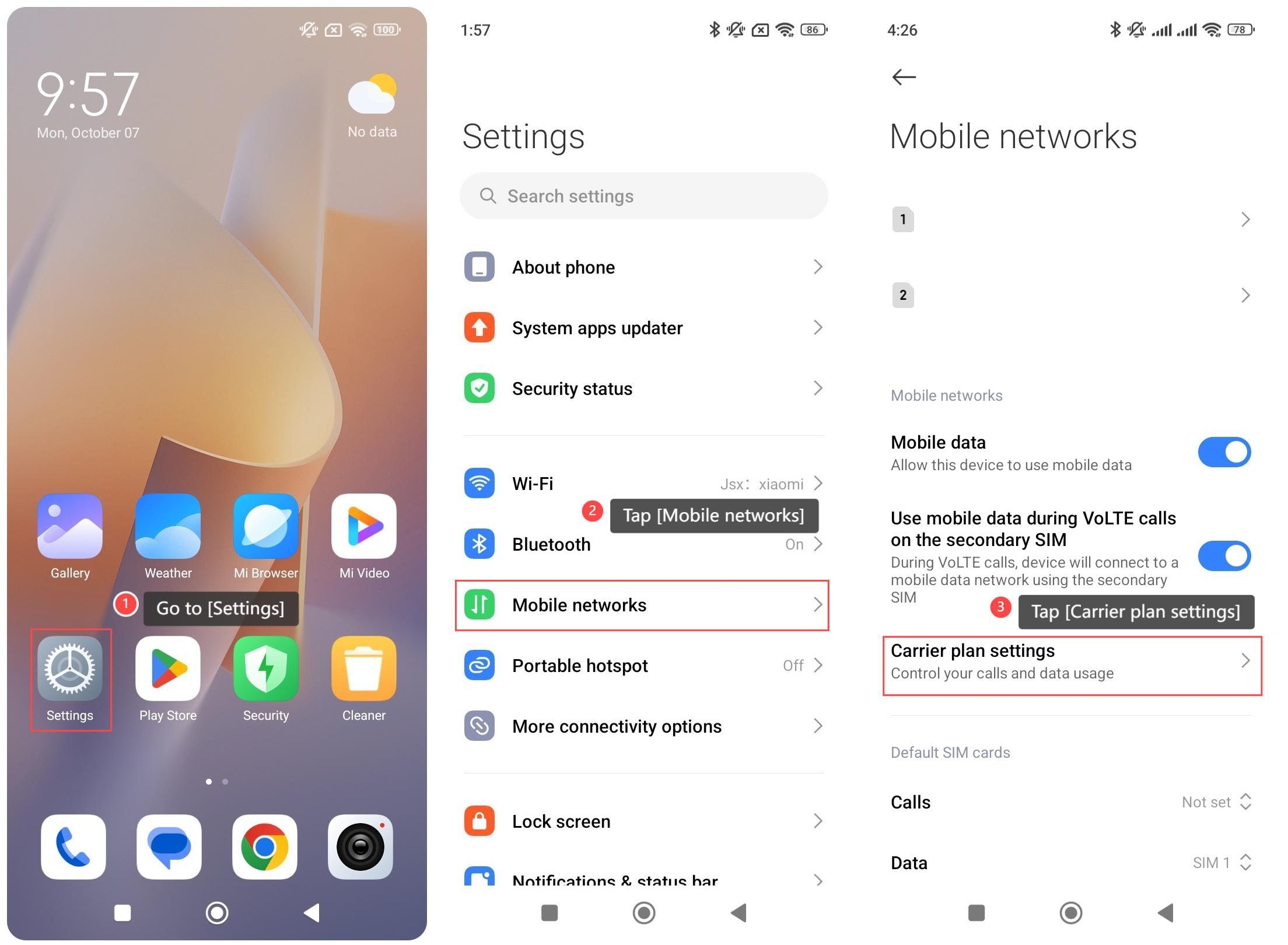
4. Select from the SIM cards;
5. Tap [Set data usage limit];
6. You can configure the monthly data limit and the reminder method below [Monthly data package];
7. You can also configure the data usage warning level and usage reset date below [Additional settings].

To control the calls and data usage on your phone, please refer to the following steps:
1. Go to [Settings];
2. Tap [Mobile networks];
3. Tap [Carrier plan settings];
4. Select from the SIM cards;
5. Tap [Set data usage limit];
6. You can configure the monthly data limit and the reminder method below [Monthly data package];
7. You can also configure the data usage warning level and usage reset date below [Additional settings].
Does it help?
Yes
No