

How to check SIM status on the Redmi 13C?
The Redmi 13C supports checking the SIM status, which can help you ensure your device is properly connected to the network, monitor your data usage and avoid unexpected changes by keeping track of the settings of your SIM.
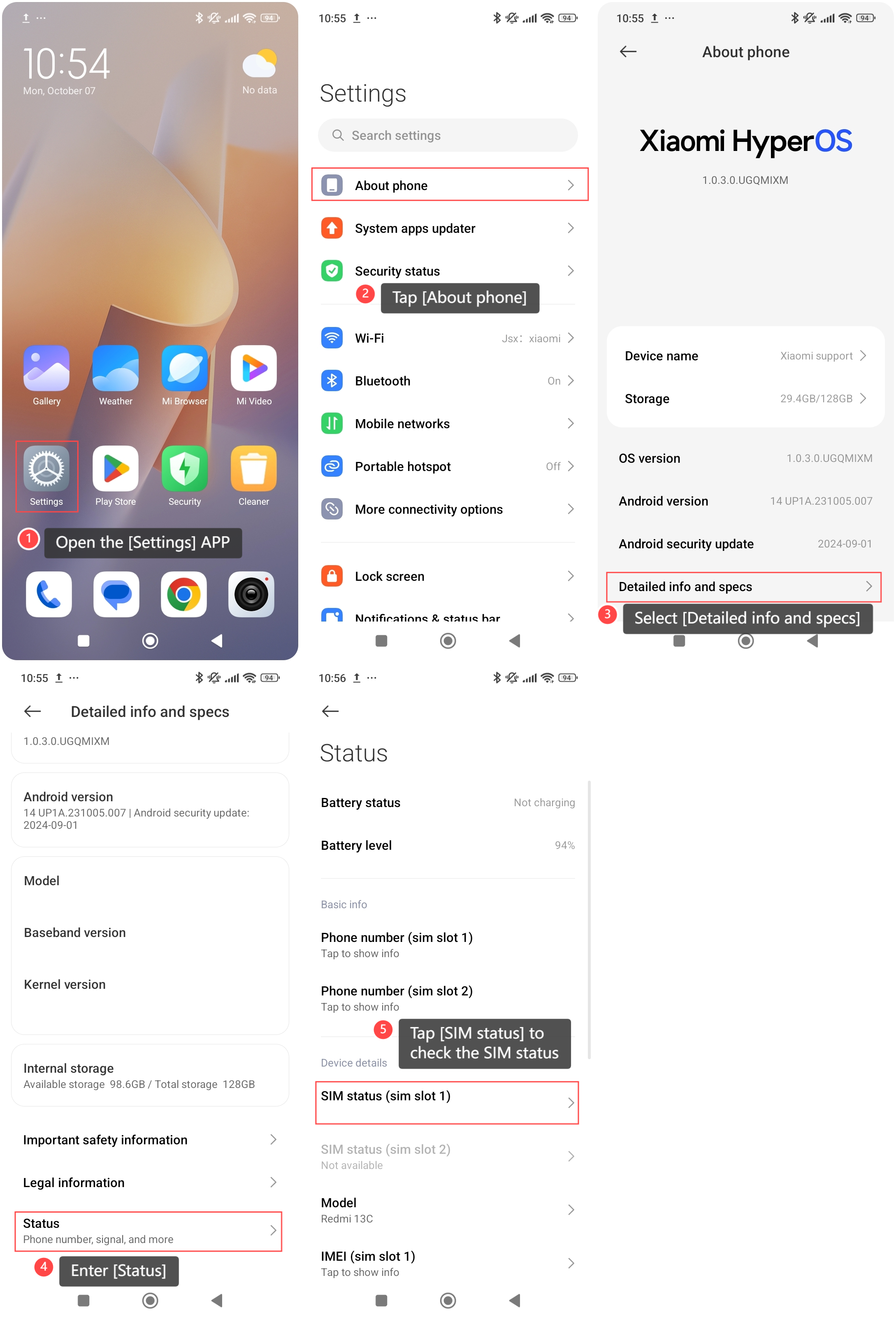
To check the SIM status of your phone, please refer to the following steps:
1. Open the [Settings] APP on your phone;
2. Tap [About phone];
3. Select [Detailed info and specs];
4. Enter [Status];
5. Tap [SIM status] to check the SIM status, such as network, phone number on SIM, mobile network state, etc.
To check the SIM status of your phone, please refer to the following steps:
1. Open the [Settings] APP on your phone;
2. Tap [About phone];
3. Select [Detailed info and specs];
4. Enter [Status];
5. Tap [SIM status] to check the SIM status, such as network, phone number on SIM, mobile network state, etc.
Note:
By regularly checking the SIM status, you can maintain seamless connectivity and prevent potential network-related issues.
By regularly checking the SIM status, you can maintain seamless connectivity and prevent potential network-related issues.
Does it help?
Yes
No