

How to turn on Beautify on the Redmi Pad SE 8.7 while taking a photo or a video?
The Beautify feature on the Redmi Pad SE 8.7 enhances your photos by applying various beautification effects. This can include smoothing skin, brightening the complexion, enhancing facial features, and adding filters to create a more polished look. You can typically adjust the intensity of these effects to achieve the desired result. It’s especially useful for selfies and portraits, giving your photos a professional touch.
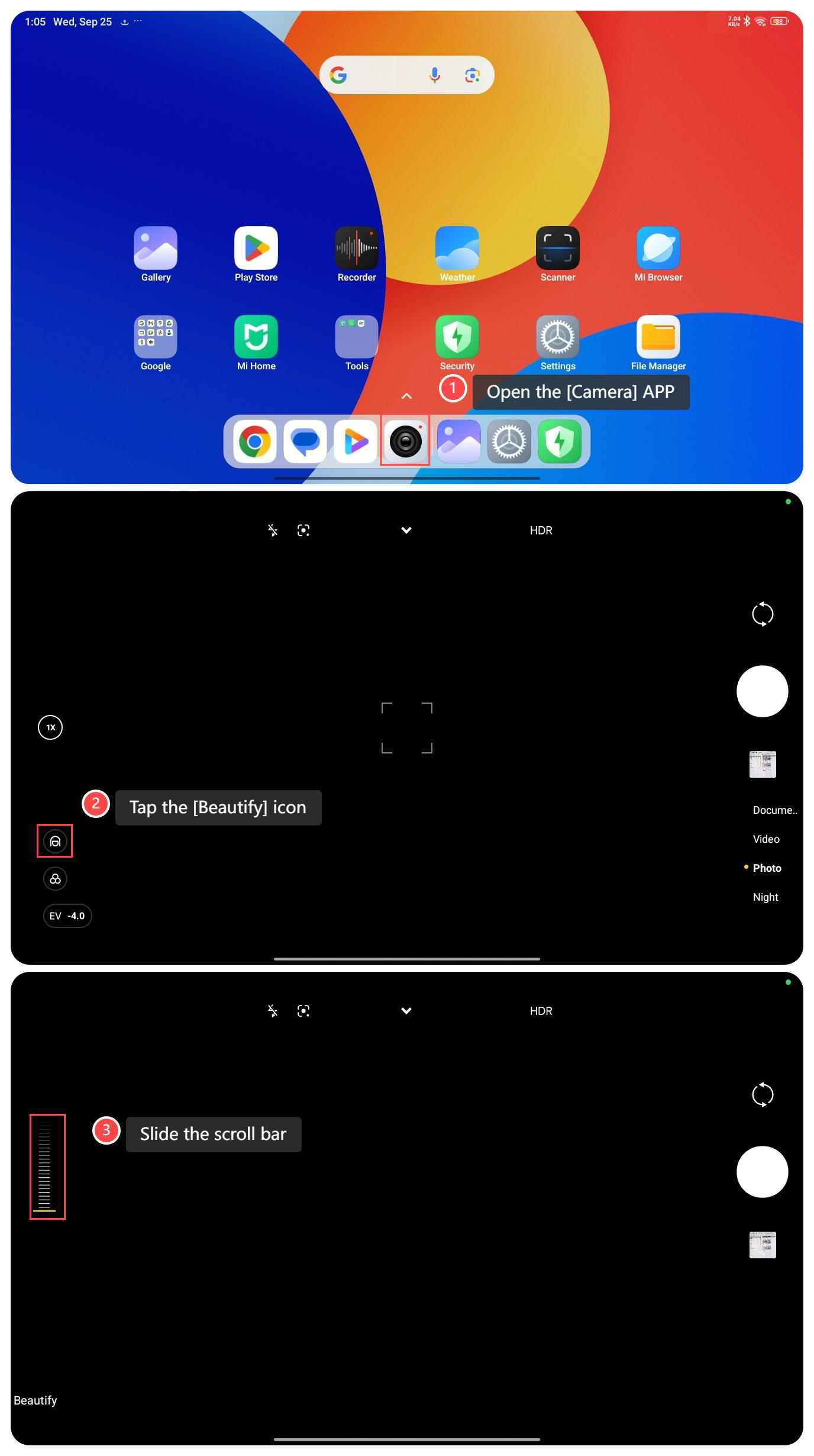
To turn on Beautify on your tablet, please refer to the following steps:
1. Open the [Camera] APP;
2. Tap the [Beautify] icon;
3. Slide the scroll bar in the middle of the left to adjust the intensity of the beautifying effect.
Note:
1. Adjust the intensity of the beautifying effect appropriately according to your personal preferences and shooting environment to avoid over-beautification that makes the photo look unnatural;
2. Make sure to shoot in good lighting conditions to better show the effect of the Beautify feature;
3. Before using the Beautify feature, you can save the original photo first so that you can compare or choose other effects later.
To turn on Beautify on your tablet, please refer to the following steps:
1. Open the [Camera] APP;
2. Tap the [Beautify] icon;
3. Slide the scroll bar in the middle of the left to adjust the intensity of the beautifying effect.
Note:
1. Adjust the intensity of the beautifying effect appropriately according to your personal preferences and shooting environment to avoid over-beautification that makes the photo look unnatural;
2. Make sure to shoot in good lighting conditions to better show the effect of the Beautify feature;
3. Before using the Beautify feature, you can save the original photo first so that you can compare or choose other effects later.
Does it help?
Yes
No