

How to use Control Center on the Redmi Pad SE 8.7 4G?
The Control Center on the Redmi Pad SE 8.7 4G is a feature that provides quick access to essential settings and notifications. It includes quick settings, notifications, shortcuts, and customization. This feature enhances convenience and efficiency in managing the device.
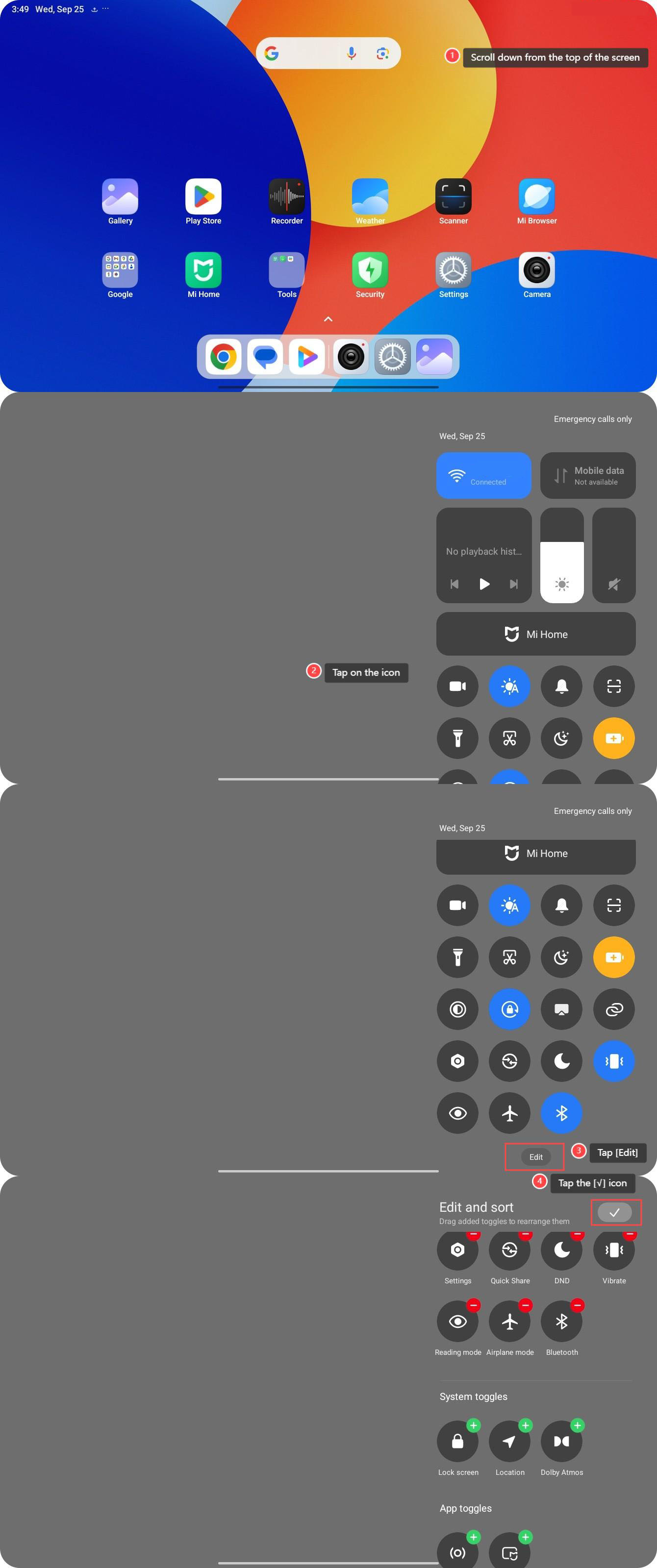
To use Control Center, please refer to the following steps:
1. Scroll down from the top of the screen to open the Control Center;
2. Tap on the icon to quickly enable the features that you want to use;
3. Tap [Edit], then you can add or delete the icon you want to modify;
4. Tap the [√] icon to save your changes.
To use Control Center, please refer to the following steps:
1. Scroll down from the top of the screen to open the Control Center;
2. Tap on the icon to quickly enable the features that you want to use;
3. Tap [Edit], then you can add or delete the icon you want to modify;
4. Tap the [√] icon to save your changes.
Does it help?
Yes
No