

How to set keyboard, mouse, and track pad on the Redmi Pad SE 8.7 4G?
Setting up a keyboard, mouse, and trackpad on the Redmi Pad SE 8.7 4G enhances productivity by enabling more efficient typing, navigation, and multitasking. This setup makes it easier to complete tasks and manage applications.
To set up the keyboard, mouse, and trackpad on the Redmi Pad SE 8.7 4G, please refer to the following steps:
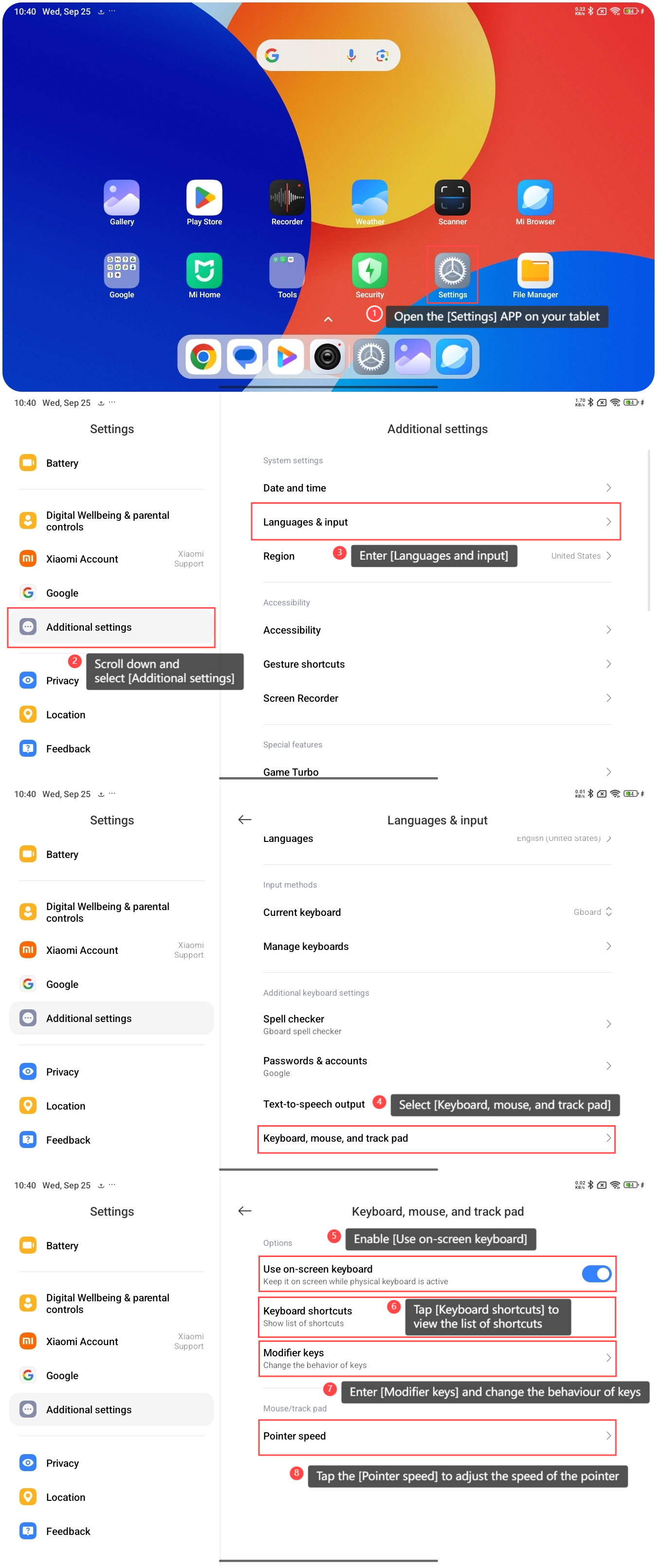
1. Open the [Settings] APP on your tablet;
2. Scroll down and select [Additional settings];
3. Enter [Languages and input];
4. Select [Keyboard, mouse, and track pad];
5. Enable [Use on-screen keyboard] and you can keep it on screen while the physical keyboard is active;
6. Tap [Keyboard shortcuts] and you can view the list of shortcuts;
7. Enter [Modifier keys] and you can change the behavior of keys;
9. Additionally, you can tap the [Pointer speed] to adjust the speed of the pointer.
To set up the keyboard, mouse, and trackpad on the Redmi Pad SE 8.7 4G, please refer to the following steps:
1. Open the [Settings] APP on your tablet;
2. Scroll down and select [Additional settings];
3. Enter [Languages and input];
4. Select [Keyboard, mouse, and track pad];
5. Enable [Use on-screen keyboard] and you can keep it on screen while the physical keyboard is active;
6. Tap [Keyboard shortcuts] and you can view the list of shortcuts;
7. Enter [Modifier keys] and you can change the behavior of keys;
9. Additionally, you can tap the [Pointer speed] to adjust the speed of the pointer.
Does it help?
Yes
No