

How to set the Lock settings of App lock on the REDMI Pad SE 8.7 4G?
Setting the Lock settings of App Lock on the REDMI Pad SE 8.7 4G enhances security by protecting sensitive APPs from unauthorized access. This feature ensures privacy for personal information, messages, and financial data, providing peace of mind while using the tablet.
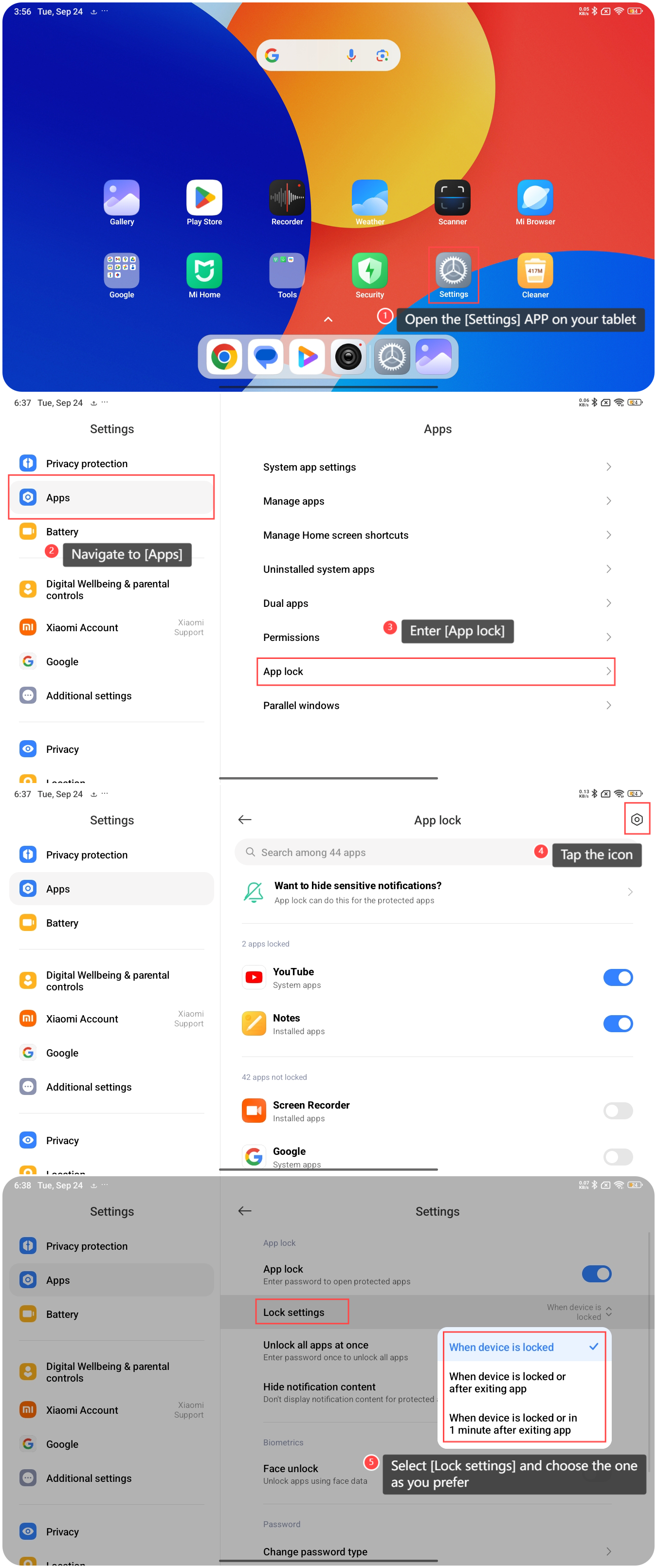
To set the Lock settings for App Lock on the tablet, please refer to the following steps:
1. Open the [Settings] APP on your tablet;
2. Navigate to [Apps];
3. Enter [App lock];
4. Tap the settings icon at the upper right corner;
5. Select [Lock settings] and choose [When device is locked], [When device is locked or after exiting app], or [When device is locked or in 1 minute after exiting app] as you prefer.
To set the Lock settings for App Lock on the tablet, please refer to the following steps:
1. Open the [Settings] APP on your tablet;
2. Navigate to [Apps];
3. Enter [App lock];
4. Tap the settings icon at the upper right corner;
5. Select [Lock settings] and choose [When device is locked], [When device is locked or after exiting app], or [When device is locked or in 1 minute after exiting app] as you prefer.
Does it help?
Yes
No