

How to enable Dual apps on the Redmi Pad SE 8.7?
Enabling Dual apps on the Redmi Pad SE 8.7 allows you to run two separate instances of the same APP. This feature enhances productivity and convenience, especially for social media and messaging applications.
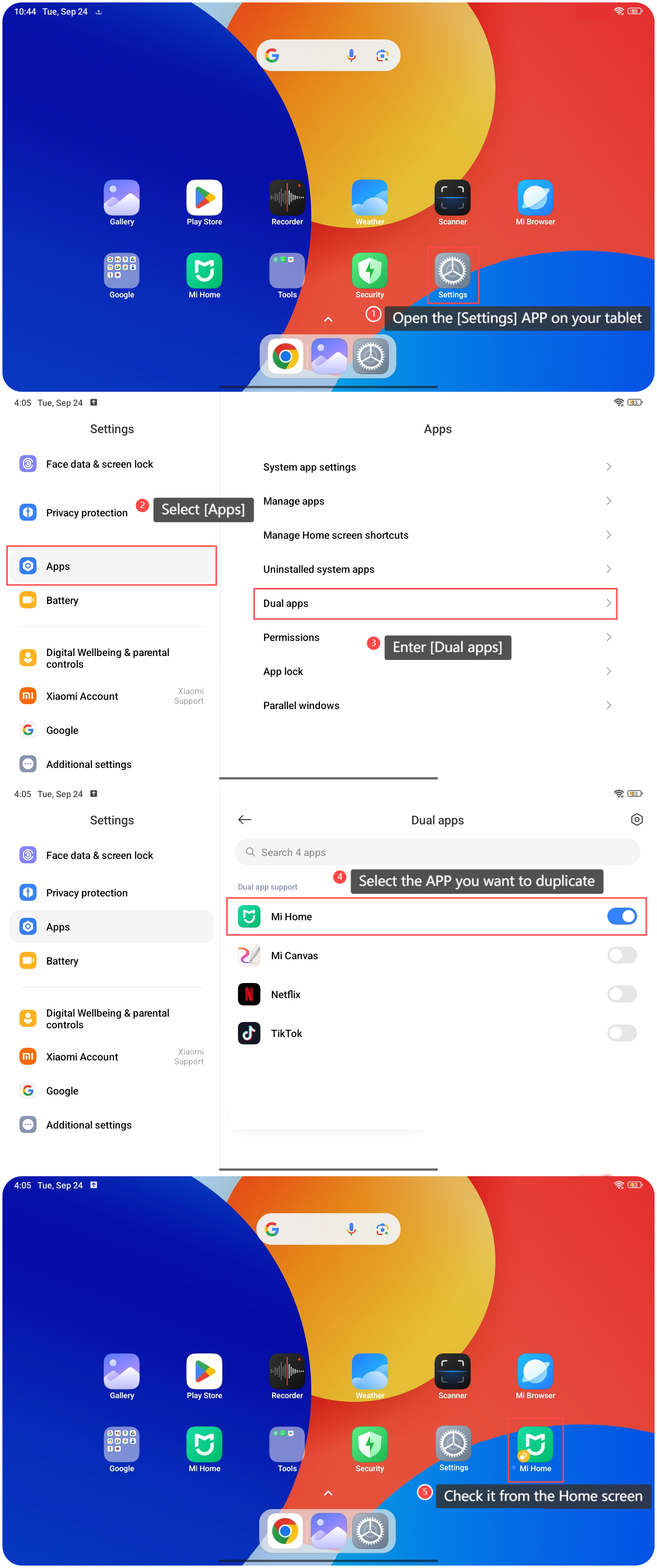
To enable Dual apps on the tablet, please refer to the following steps:
1. Open the [Settings] APP on your tablet;
2. Select [Apps];
3. Enter [Dual apps];
4. Select the APP you want to duplicate;
5. After creating successfully, you can check it from the Home screen.
To enable Dual apps on the tablet, please refer to the following steps:
1. Open the [Settings] APP on your tablet;
2. Select [Apps];
3. Enter [Dual apps];
4. Select the APP you want to duplicate;
5. After creating successfully, you can check it from the Home screen.
Note:
1. Be aware that Dual apps can consume additional storage space, so check your tablet's storage regularly;
2. Before enabling, ensure that the APPs you want to use support the Dual apps feature;
3. It's a good idea to manage updates for both the main APP and the dual APP separately.
1. Be aware that Dual apps can consume additional storage space, so check your tablet's storage regularly;
2. Before enabling, ensure that the APPs you want to use support the Dual apps feature;
3. It's a good idea to manage updates for both the main APP and the dual APP separately.
Does it help?
Yes
No