

How to connect the Redmi Pad SE 8.7 to a printer?
The Redmi Pad SE 8.7 supports connecting to a printer, allowing you to print files directly from your tablet, and no need to transfer files to the computer. This connectivity feature makes printing easier and more convenient, which significantly improves the using experience.
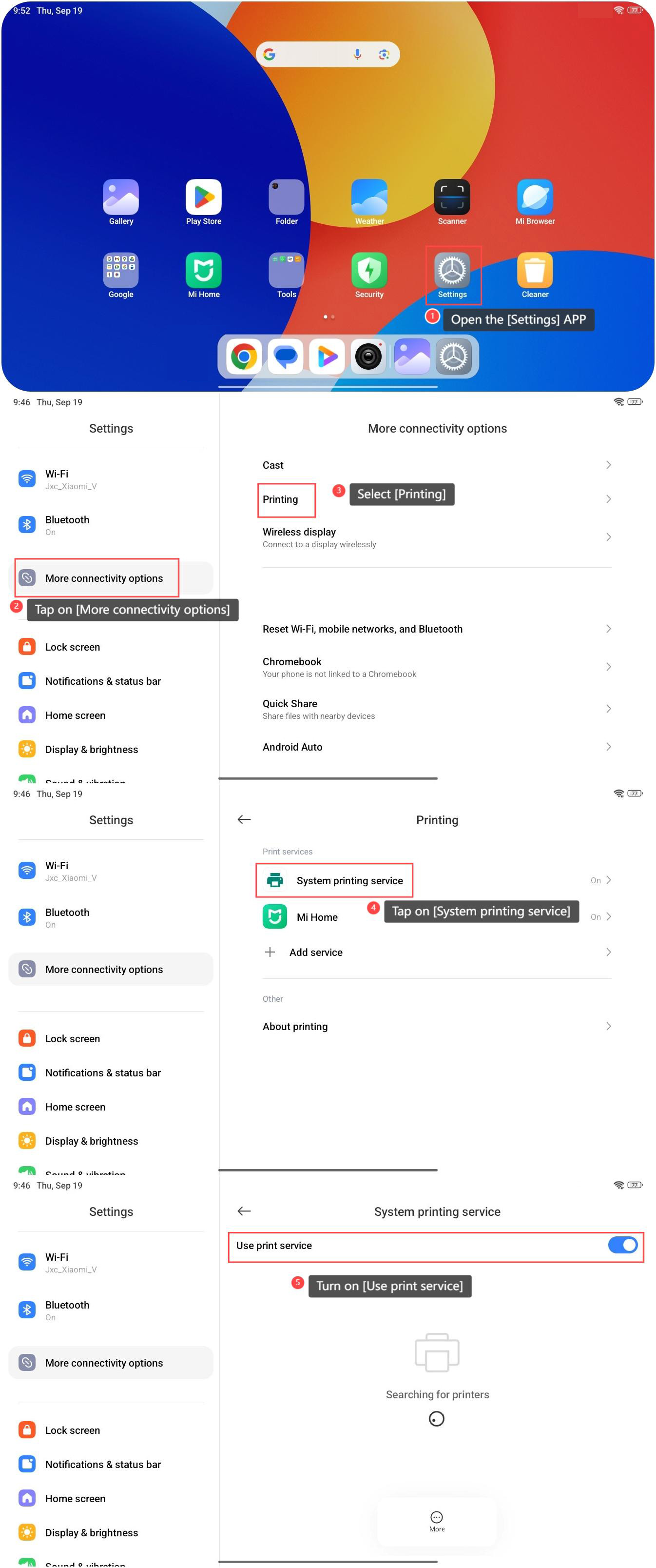
To connect the device to a printer, please refer to the following steps:
1. Open the [Settings] APP, which looks like a gear or cogwheel icon;
2. Tap on [More connectivity options];
3. Select [Printing];
4. Tap on [System printing service];
5. Turn on [Use print service]. Your device will start to search for the printer that can be connected, and you can select your printer from the list.
To connect the device to a printer, please refer to the following steps:
1. Open the [Settings] APP, which looks like a gear or cogwheel icon;
2. Tap on [More connectivity options];
3. Select [Printing];
4. Tap on [System printing service];
5. Turn on [Use print service]. Your device will start to search for the printer that can be connected, and you can select your printer from the list.
Note:
Make sure your printer and tablet are connected to the same Wi-Fi network.
Make sure your printer and tablet are connected to the same Wi-Fi network.
Does it help?
Yes
No