

How to make the Redmi Pad SE 8.7 play sound when taking screenshots?
Turning on this feature on the Redmi Pad SE 8.7 can serve as an alert, making you more conscious of when a screenshot is being taken. This can help prevent accidental screenshots, as the audible cue prompts you to be more intentional about the action.
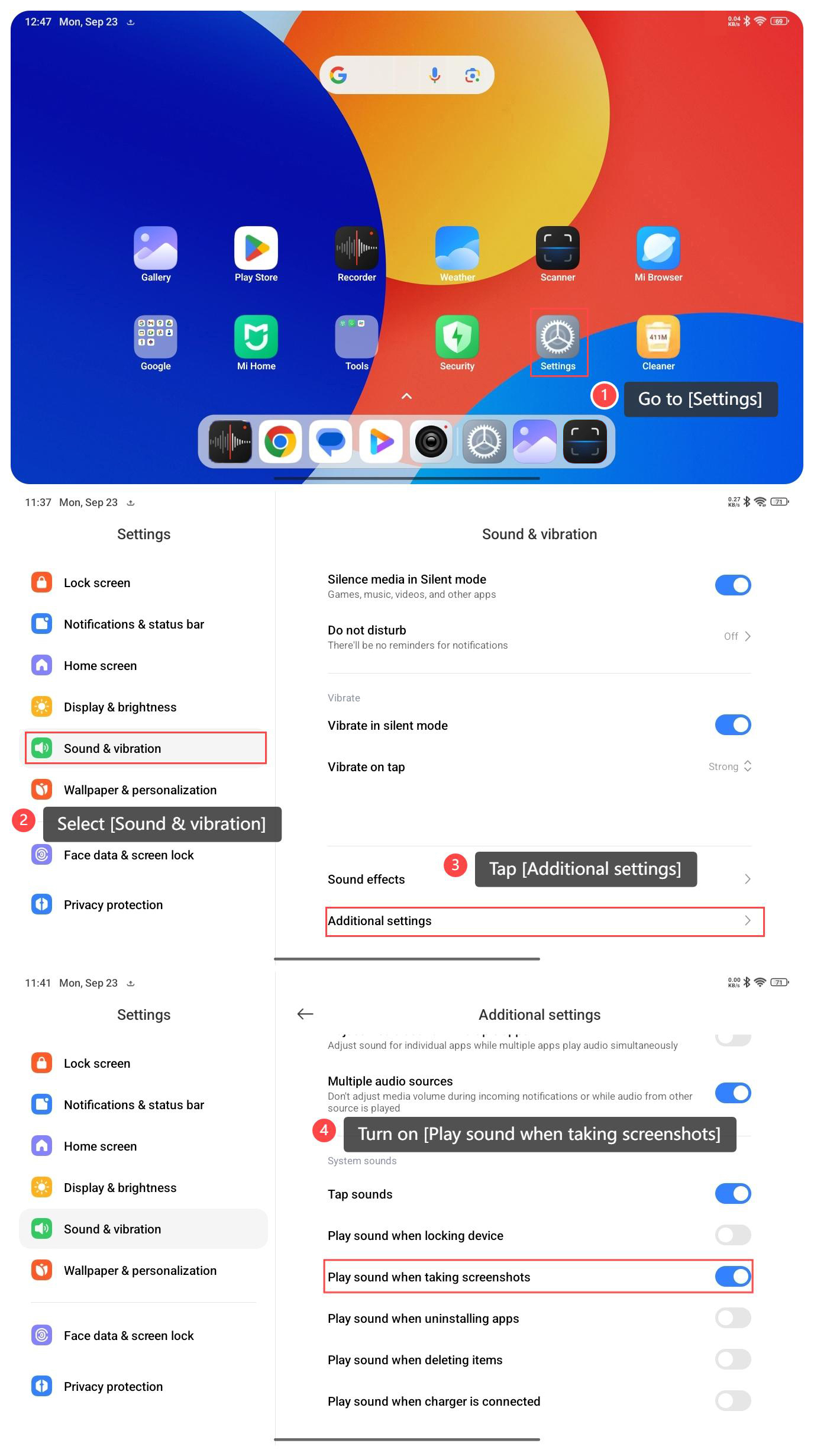
To make your tablet play sound when taking screenshots, please refer to the following steps:
1. Go to [Settings];
2. Select [Sound & vibration];
3. Tap [Additional settings];
4. Turn on [Play sound when taking screenshots].
Note:
1. Confirm that you are taking the screenshot using the standard methods like pressing the volume down and power button or using the three-finger swipe gesture;
2. Ensure the device is not in Do not disturb mode, as this can mute the screenshot sound along with other system sounds.
To make your tablet play sound when taking screenshots, please refer to the following steps:
1. Go to [Settings];
2. Select [Sound & vibration];
3. Tap [Additional settings];
4. Turn on [Play sound when taking screenshots].
Note:
1. Confirm that you are taking the screenshot using the standard methods like pressing the volume down and power button or using the three-finger swipe gesture;
2. Ensure the device is not in Do not disturb mode, as this can mute the screenshot sound along with other system sounds.
Does it help?
Yes
No