

How to schedule power on/off on the Redmi Pad SE 8.7?
The function of Schedule power on/off on the Redmi Pad SE 8.7 refers to the ability to automate the powering on and off of a device at designated times.
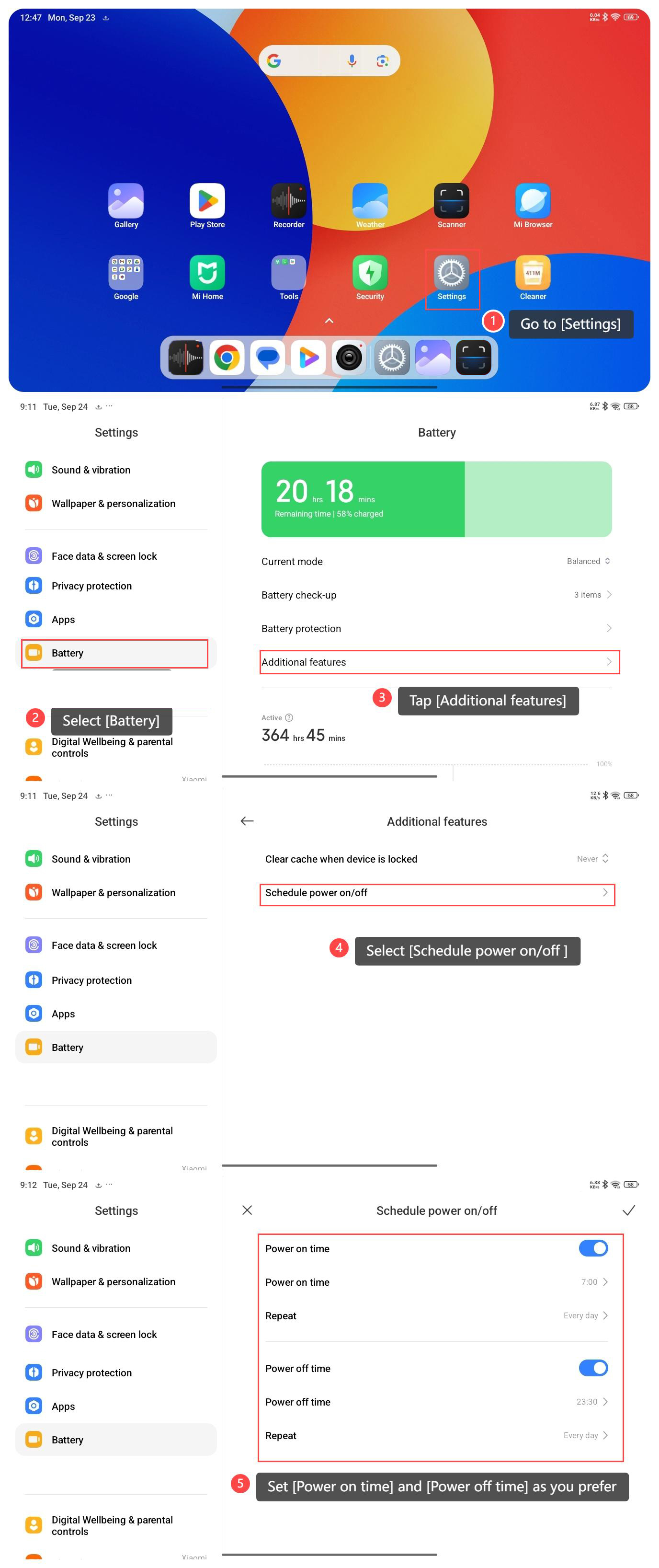
To schedule power on/off on your tablet, please refer to the following steps:
1. Go to [Settings] on your tablet;
2. Select [Battery];
3. Tap [Additional features];
4. Select [Schedule power on/off ];
5. Set [Power on time] and [Power off time] as you prefer.
To schedule power on/off on your tablet, please refer to the following steps:
1. Go to [Settings] on your tablet;
2. Select [Battery];
3. Tap [Additional features];
4. Select [Schedule power on/off ];
5. Set [Power on time] and [Power off time] as you prefer.
Note:
1. Regularly powering on and off your device can contribute to maintaining battery health;
2. Turning off the device during periods of inactivity conserves battery power, especially if you’re not using your tablet for an extended period, such as during sleep hours;
3. Scheduled power cycles can be an added layer of security. It ensures your tablet is regularly restarted, potentially closing any background processes or clearing temporary data that could pose security risks.
1. Regularly powering on and off your device can contribute to maintaining battery health;
2. Turning off the device during periods of inactivity conserves battery power, especially if you’re not using your tablet for an extended period, such as during sleep hours;
3. Scheduled power cycles can be an added layer of security. It ensures your tablet is regularly restarted, potentially closing any background processes or clearing temporary data that could pose security risks.
Does it help?
Yes
No