

How to set color scheme on the Redmi Pad SE 8.7?
The Redmi Pad SE 8.7 supports setting color scheme, which allows you to customize the look and feel of your device to match the style or preferences. Specific colors can influence mood and atmosphere, creating a more enjoyable use experience. A consistent color scheme can create a harmonious and organized interface, making navigation easier.
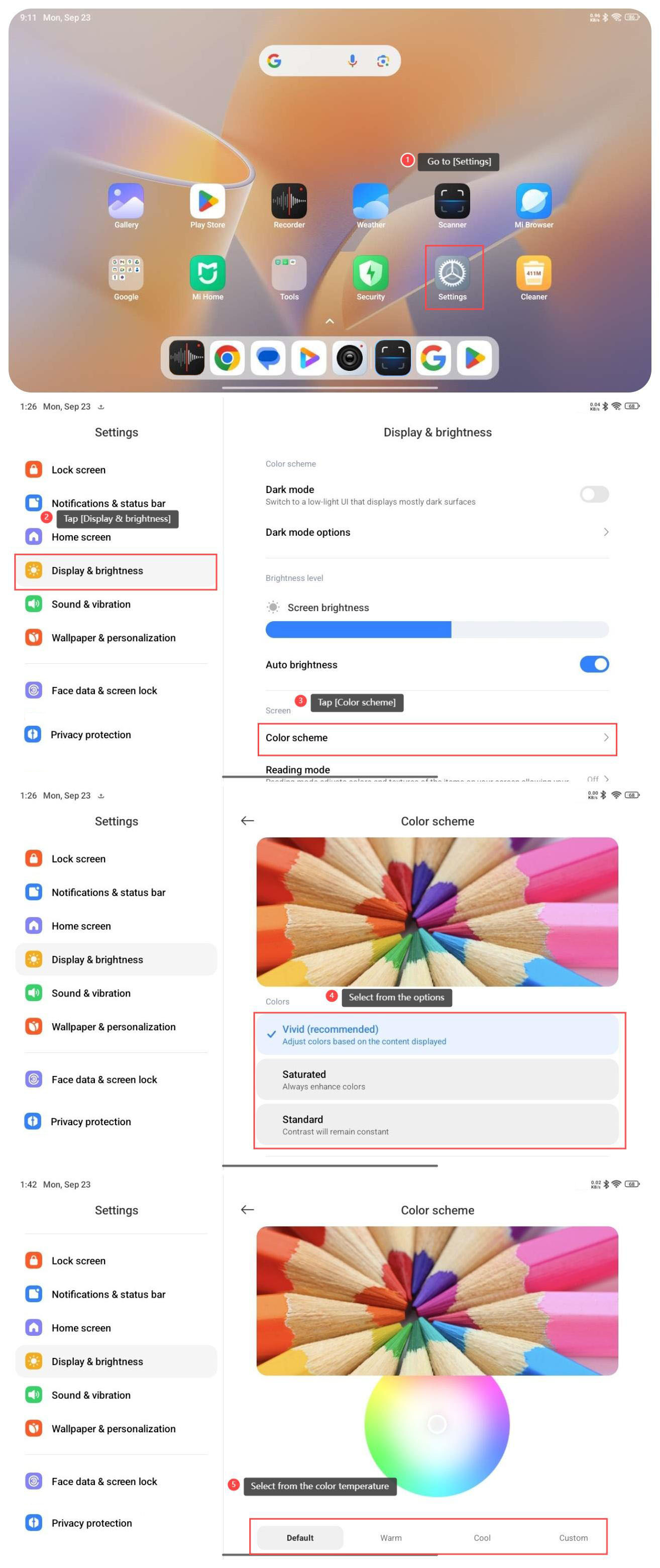
To set color scheme on your tablet, please refer to the following steps:
1. Go to [Settings];
2. Tap [Display & brightness];
3. Tap [Color scheme];
4. Select from the options according to your preferences;
5. You can also adjust the color temperature below the color scheme options.
To set color scheme on your tablet, please refer to the following steps:
1. Go to [Settings];
2. Tap [Display & brightness];
3. Tap [Color scheme];
4. Select from the options according to your preferences;
5. You can also adjust the color temperature below the color scheme options.
Does it help?
Yes
No