

How to maintain the media volume on the Redmi Pad SE 8.7 while audio from other source is played?
The built-in Multiple audio sources feature on the Redmi Pad SE 8.7 allows the device to not adjust media volume during incoming notifications or while audio from other sources is played. This means some APPs, especially those related to media playback (e.g., music players, video players, streaming APPs or incoming calls, message notifications), can continue playing audio in the background while you use other APPs or perform other tasks on your tablet. After enabling this feature, you will enjoy the convenience and have an improved sound effect experience.
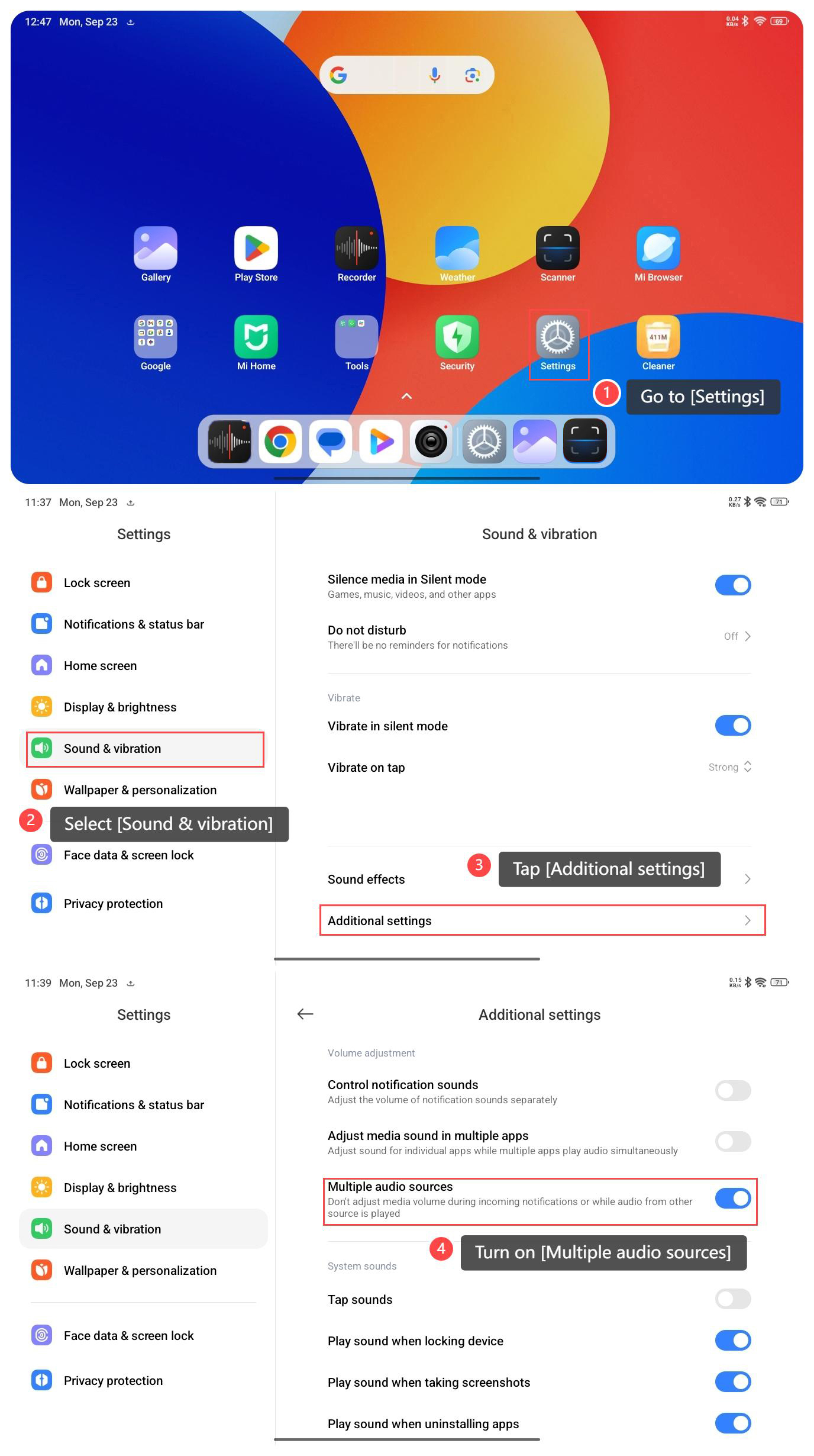
To enable Multiple audio sources on your tablet, please refer to the following steps:
1. Go to [Settings];
2. Select [Sound & vibration];
3. Tap [Additional settings];
4. Turn on [Multiple audio sources].
To enable Multiple audio sources on your tablet, please refer to the following steps:
1. Go to [Settings];
2. Select [Sound & vibration];
3. Tap [Additional settings];
4. Turn on [Multiple audio sources].
Does it help?
Yes
No