

How to manage APP notifications on the Redmi Pad SE 8.7 4G?
Managing APP notifications on the Redmi Pad SE 8.7 4G empowers you to customize your devices according to your preferences, reduce distractions, and optimize the experience for greater efficiency and usability when you receive notifications.
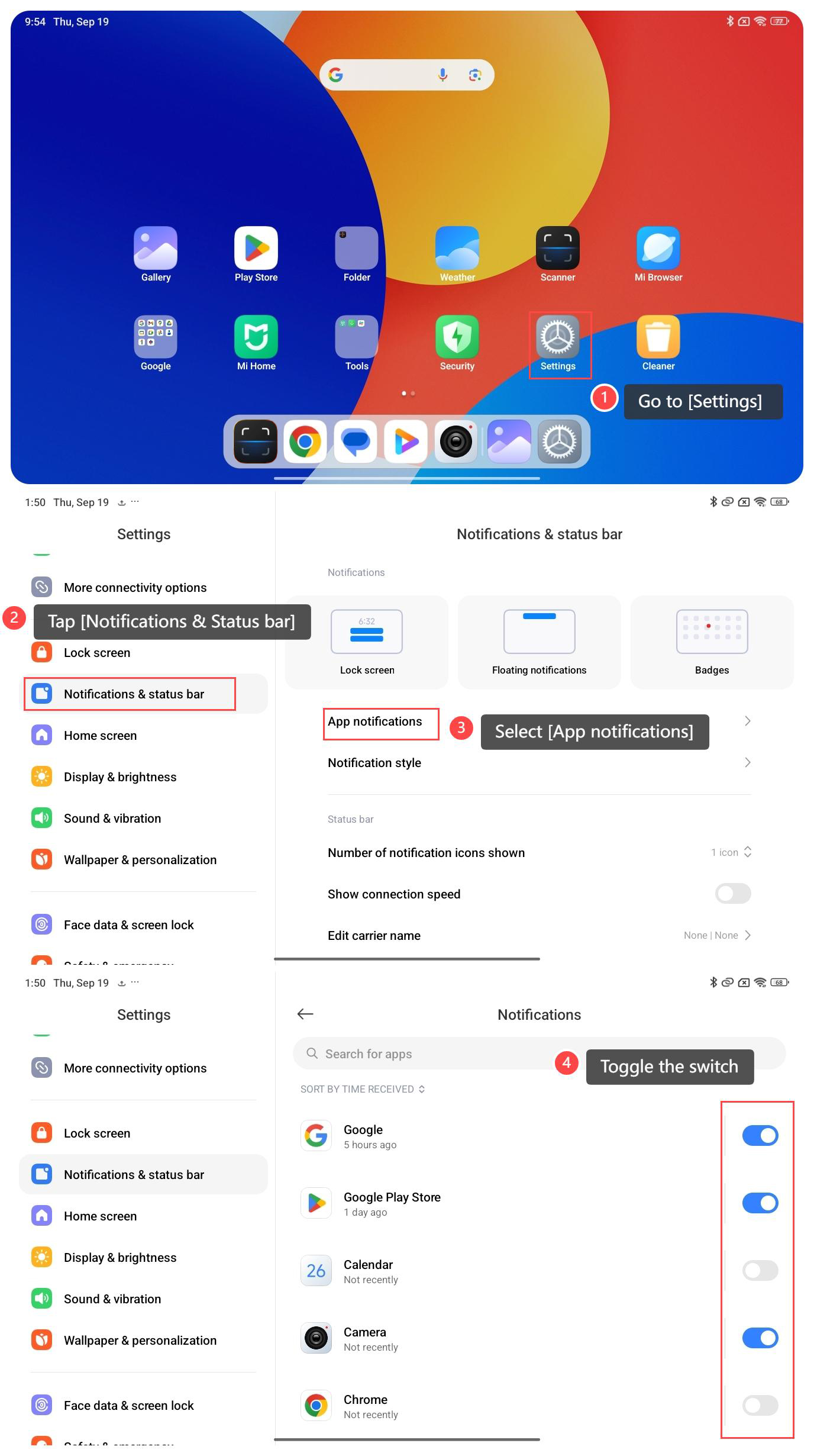
To manage APP notifications on your tablet, please refer to the following steps:
1. Go to [Settings] on the home screen;
2. Scroll down and tap [Notifications & Status bar];
3. Select [App notifications] and you will see a list of APPs that are sorted by time received;
4. Look for the APP for which you want to manage badge notifications and toggle the switch next to the specific APP according to your preference.
Note:
Disabling notifications for the specific application will result in missing important notifications, please choose carefully.
To manage APP notifications on your tablet, please refer to the following steps:
1. Go to [Settings] on the home screen;
2. Scroll down and tap [Notifications & Status bar];
3. Select [App notifications] and you will see a list of APPs that are sorted by time received;
4. Look for the APP for which you want to manage badge notifications and toggle the switch next to the specific APP according to your preference.
Note:
Disabling notifications for the specific application will result in missing important notifications, please choose carefully.
Does it help?
Yes
No