

How to enter the Safe mode on the Redmi Pad SE 8.7?
The Redmi Pad SE 8.7 supports configuring safe mode, which allows you to identify issues by disabling third-party APPs, helping to determine if these APPs are causing problems, runs the device with only essential system APPs to enhance stability, especially if you experience crashes or slow performance. Besides, it helps in checking if the device’s core functions work properly without third-party interference.
To enter the Safe mode on your tablet, please refer to the following steps:
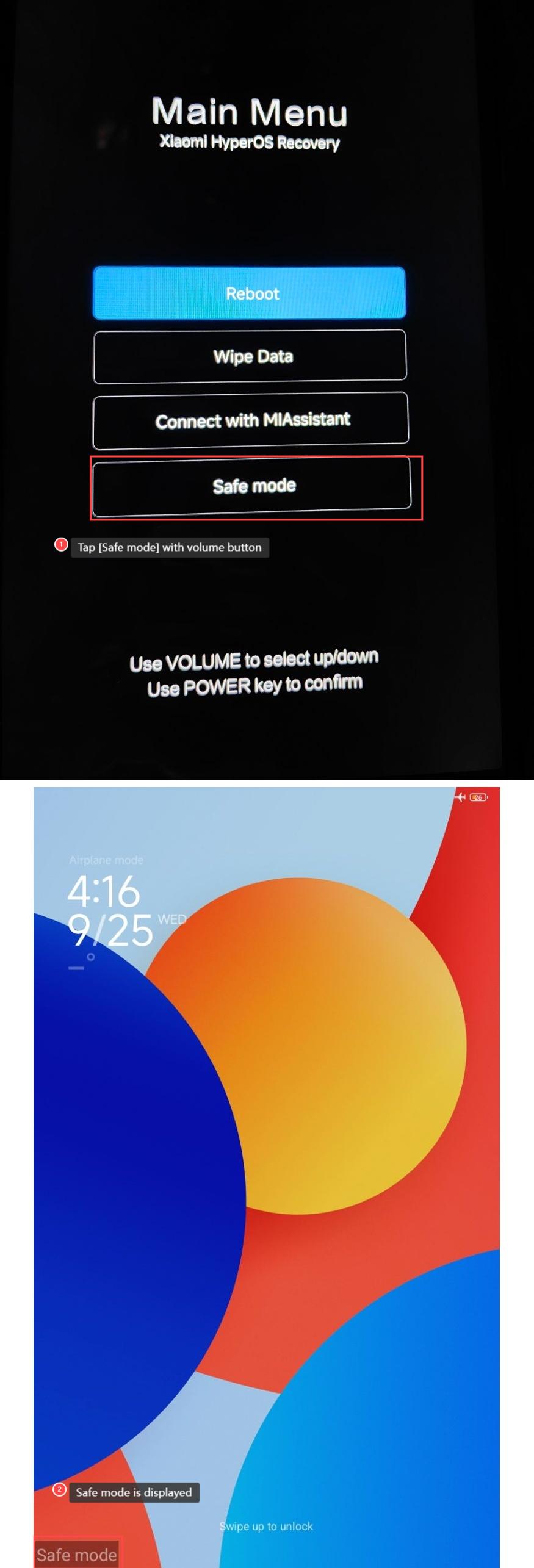
1. Power off the tablet, press and hold the power button and up volume button simultaneously to enter [Main Menu], and use the volume buttons to go up and down and confirm the [Safe mode] with the power button;
2. After entering the safe mode, Safe mode will be displayed at the left bottom of the screen.
To enter the Safe mode on your tablet, please refer to the following steps:
1. Power off the tablet, press and hold the power button and up volume button simultaneously to enter [Main Menu], and use the volume buttons to go up and down and confirm the [Safe mode] with the power button;
2. After entering the safe mode, Safe mode will be displayed at the left bottom of the screen.
Does it help?
Yes
No