

How to check which app supports the parallel windows feature on the Redmi Pad SE 8.7?
The Parallel Windows feature on the Redmi Pad SE 8.7 allows you to run two apps simultaneously in a split-screen view. This feature enhances multitasking by letting you interact with two different applications side by side, making it easier to, for example, chat while browsing the web or take notes during a video call. The flexibility of this feature empowers you to tailor your workflow to your needs, whether for work or leisure. You can optimize your screen space and make multitasking more intuitive than ever.
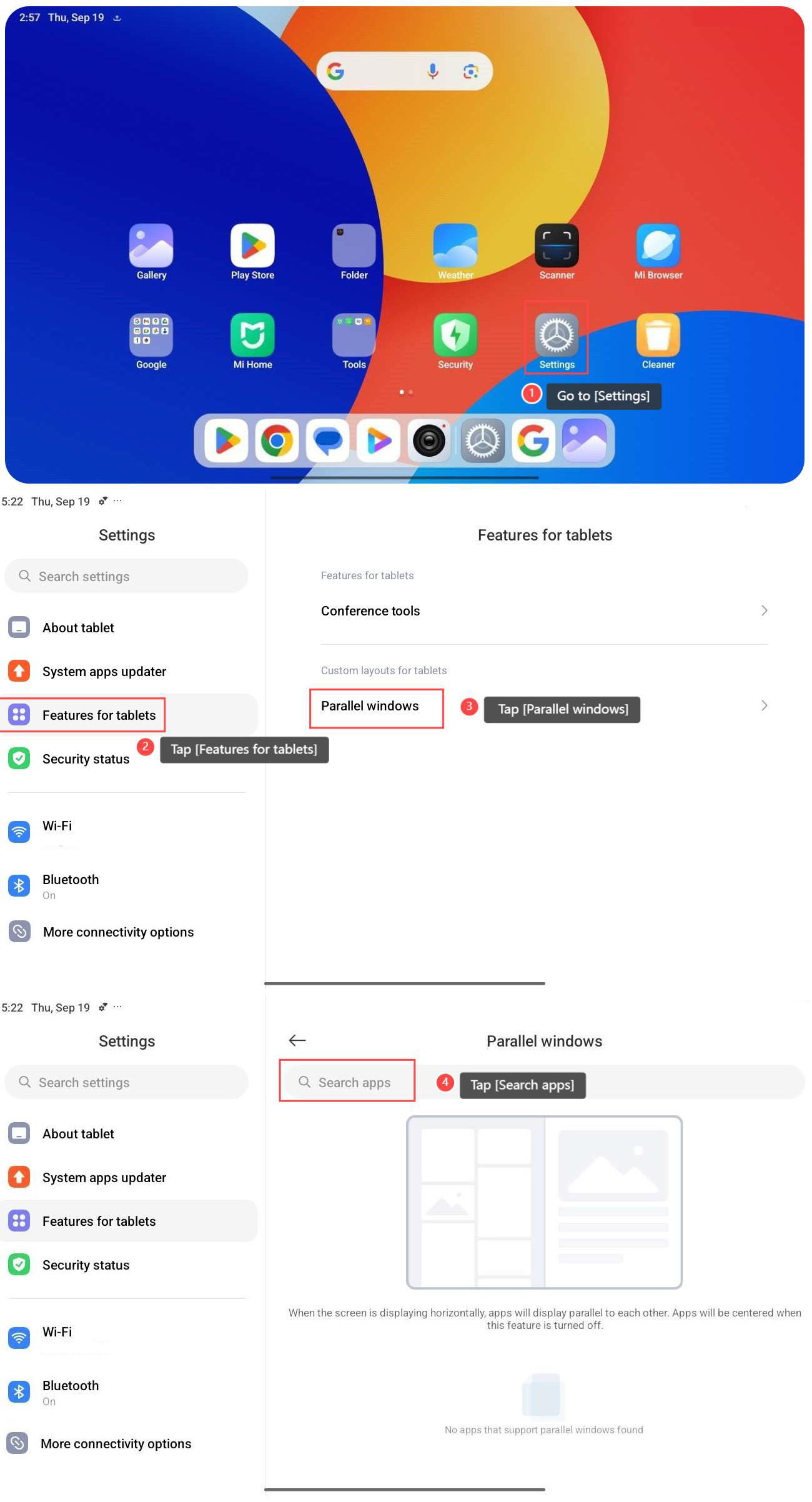
To check which app supports the parallel windows feature, please refer to the following steps:
1. Go to [Settings];
2. Tap [Features for tablets];
3. Tap [Parallel windows];
4. Tap [Search apps], and you can search which apps support Parallel Windows.
To check which app supports the parallel windows feature, please refer to the following steps:
1. Go to [Settings];
2. Tap [Features for tablets];
3. Tap [Parallel windows];
4. Tap [Search apps], and you can search which apps support Parallel Windows.
Does it help?
Yes
No