

How to turn on OTG on the REDMI Pad SE 8.7?
OTG, or On-The-Go, on the REDMI Pad SE 8.7 is a feature that allows the tablet to connect directly to USB devices, such as flash drives, keyboards, mice, and other peripherals, without needing a computer. This functionality enables you to transfer files, expand storage, or use external accessories conveniently. To use OTG, you need an OTG adapter or cable to connect the USB device to the tablet. Once connected, the tablet can recognize the device and allow you to access files or use peripherals directly. This makes it a valuable feature for those who frequently work on the go or need additional storage solutions.
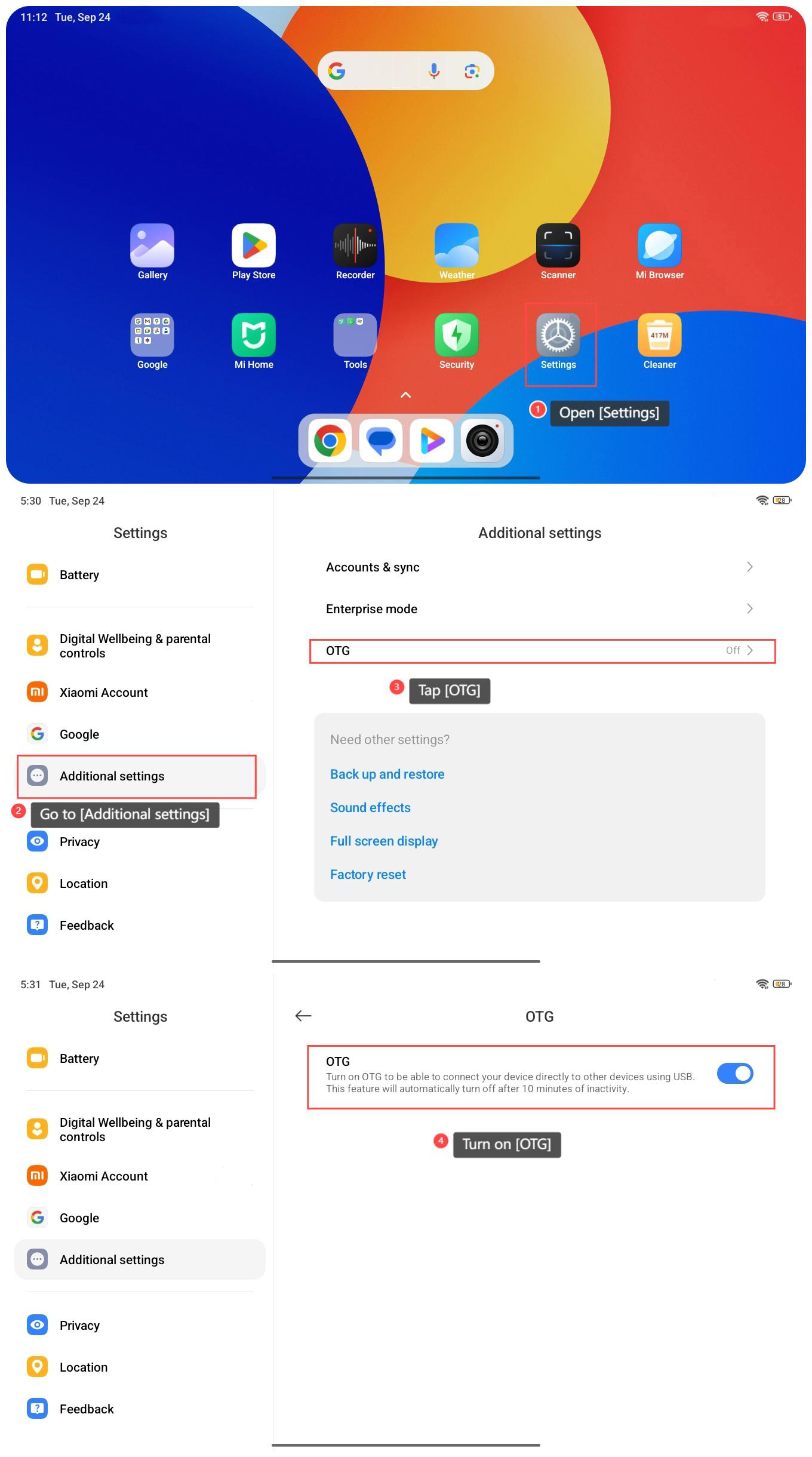
To turn on OTG on the REDMI Pad SE 8.7, please refer to the following steps:
1. Open [Settings] on your tablet;
2. Go to [Additional settings];
3. Tap [OTG];
4. Turn on [OTG].
Note:
OTG will automatically turn off after 10 minutes of inactivity.
To turn on OTG on the REDMI Pad SE 8.7, please refer to the following steps:
1. Open [Settings] on your tablet;
2. Go to [Additional settings];
3. Tap [OTG];
4. Turn on [OTG].
Note:
OTG will automatically turn off after 10 minutes of inactivity.
Does it help?
Yes
No