

How to turn on/off Tap sounds on the Redmi Pad SE 8.7 4G?
The Redmi Pad SE 8.7 4G supports the built-in feature of setting the Tap sounds that allows your device to play sound when tapping it. This feature can remind you and give you haptic feedback that brings you convenience and improves your overall sound effect experience.
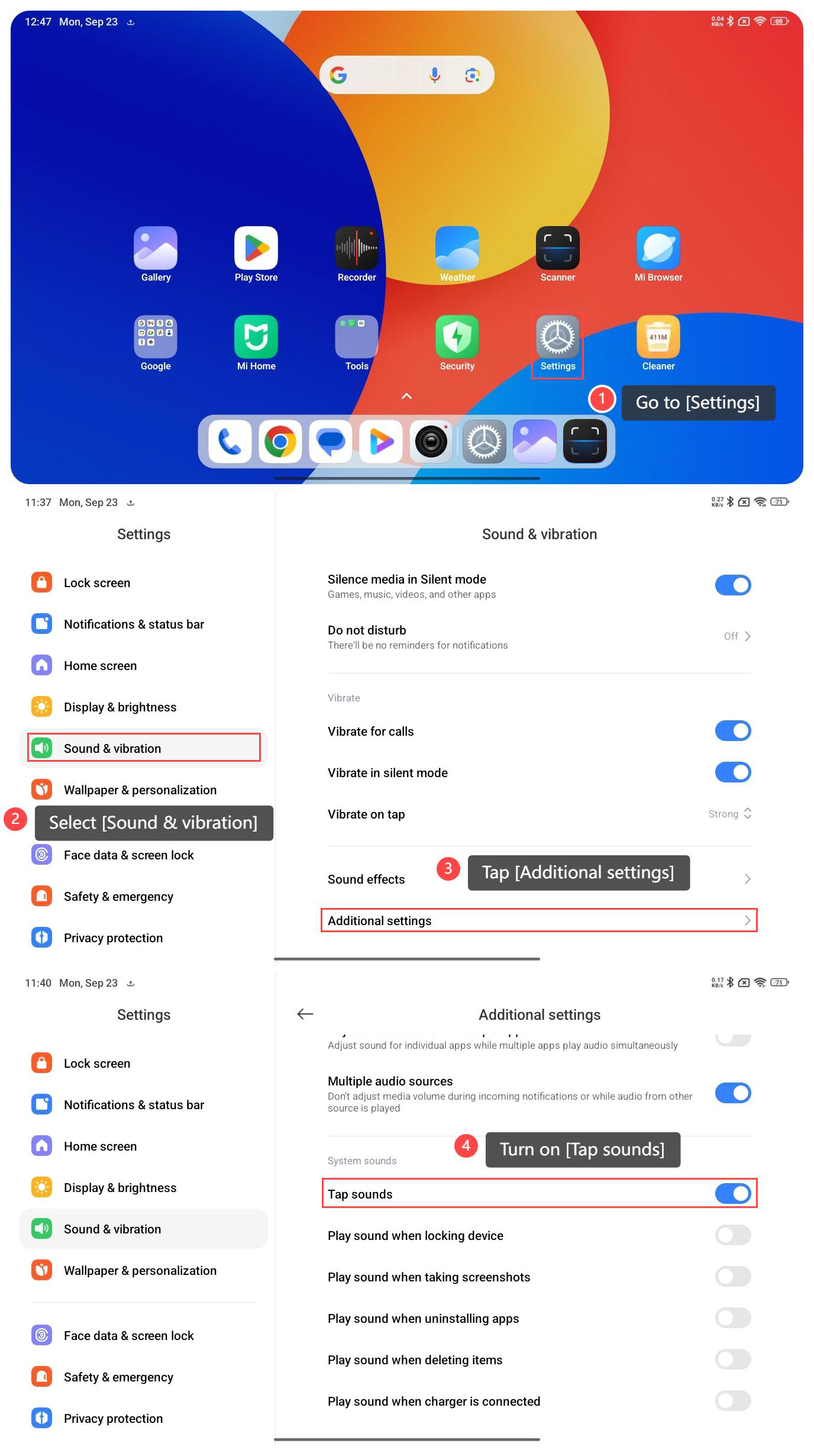
To turn on/off Tap sounds on your tablet, please refer to the following steps:
1. Go to [Settings];
2. Select [Sound & vibration];
3. Tap [Additional settings];
4. Turn on [Tap sounds].
Note:
1. If you're having trouble finding this feature, you can also use the search function within [Settings] to locate it more quickly;
2. If the Tap sounds bother you or others, you can select to turn it off in the same way.
To turn on/off Tap sounds on your tablet, please refer to the following steps:
1. Go to [Settings];
2. Select [Sound & vibration];
3. Tap [Additional settings];
4. Turn on [Tap sounds].
Note:
1. If you're having trouble finding this feature, you can also use the search function within [Settings] to locate it more quickly;
2. If the Tap sounds bother you or others, you can select to turn it off in the same way.
Does it help?
Yes
No