

How to share the hotspot of the Redmi Pad SE 8.7 via USB?
The Redmi Pad SE 8.7 supports sharing the hotspot via USB. USB tethering provides a more stable and reliable internet connection compared to wireless tethering, reducing potential interference. It often delivers faster data transfer rates, making it ideal for activities requiring high bandwidth.
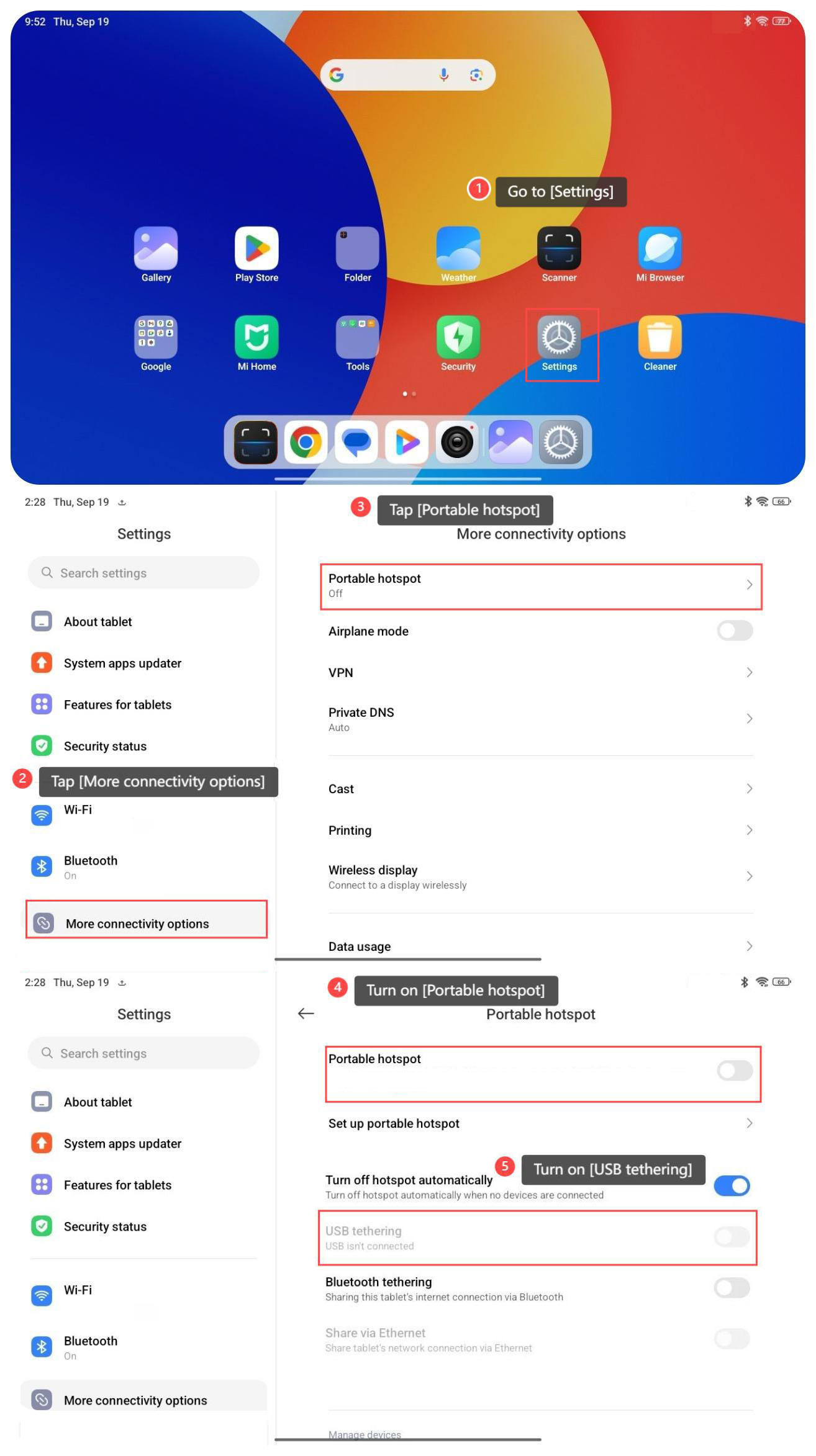
To share the hotspot of your tablet via USB, please refer to the following steps:
1. Go to [Settings];
2. Tap [More connectivity options];
3. Tap [Portable hotspot];
4. Turn on [Portable hotspot];
5. Turn on [USB tethering].
To share the hotspot of your tablet via USB, please refer to the following steps:
1. Go to [Settings];
2. Tap [More connectivity options];
3. Tap [Portable hotspot];
4. Turn on [Portable hotspot];
5. Turn on [USB tethering].
Note:
You need to connect your phone to a USB device to use USB tethering.
You need to connect your phone to a USB device to use USB tethering.
Does it help?
Yes
No