

How to wake up the Redmi Pad SE 8.7 4G by tapping the screen twice?
Double tap to wake improves convenience by allowing screen activation without pressing buttons, reduces button wear, saves battery, and provides quick access to notifications and time while the Redmi Pad SE 8.7 4G is locked.
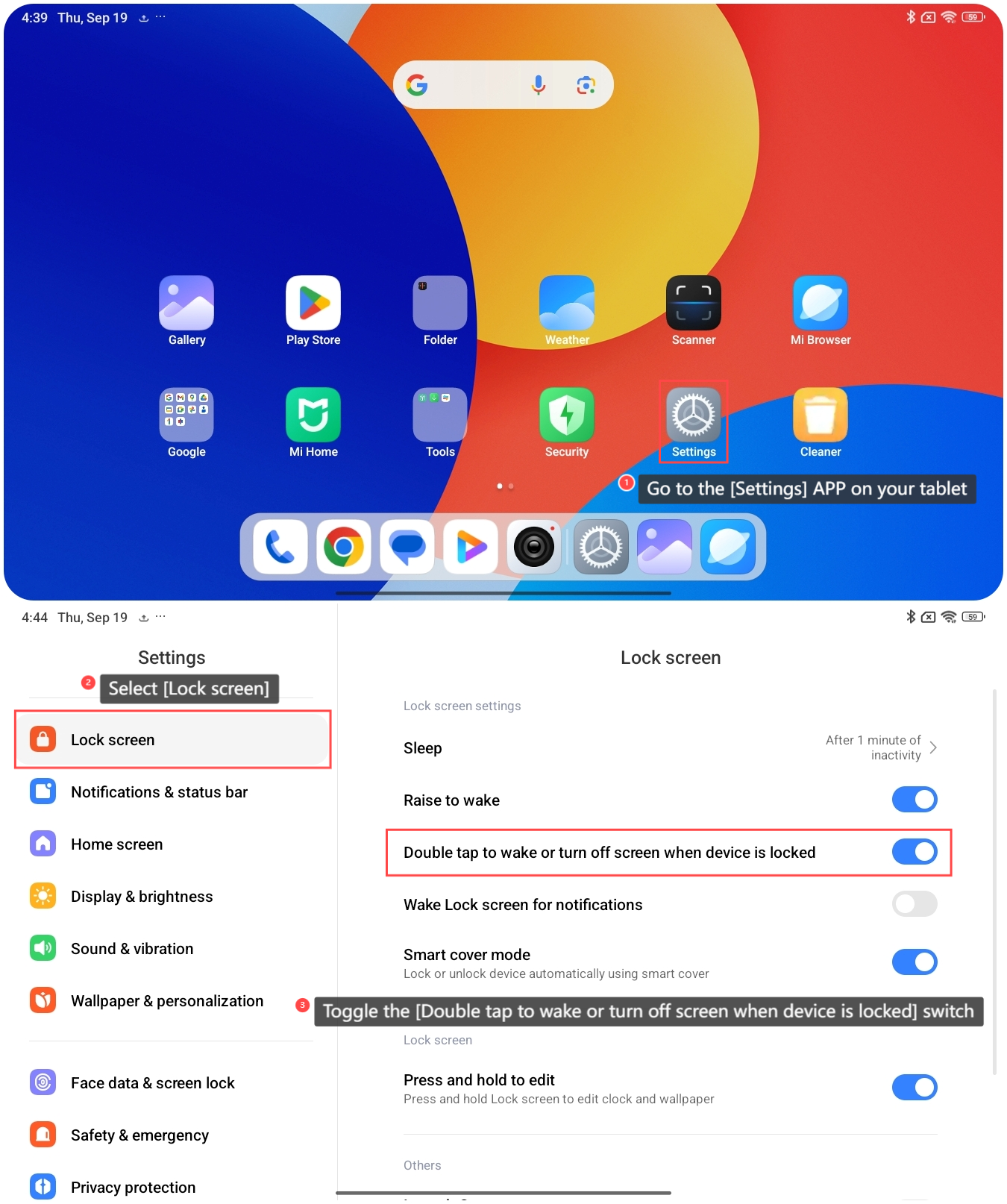
To enable waking up your tablet by tapping the screen twice, please refer to the following steps:
1. Go to the [Settings] APP on your tablet;
2. Select [Lock screen];
3. Toggle the [Double tap to wake or turn off screen when device is locked] switch to activate this feature.
After the settings are completed, you can turn off the screen and then double tap the screen to check if the tablet wakes up.
To enable waking up your tablet by tapping the screen twice, please refer to the following steps:
1. Go to the [Settings] APP on your tablet;
2. Select [Lock screen];
3. Toggle the [Double tap to wake or turn off screen when device is locked] switch to activate this feature.
After the settings are completed, you can turn off the screen and then double tap the screen to check if the tablet wakes up.
Note:
You can double tap to turn the screen off only when pre-installed themes are applied.
You can double tap to turn the screen off only when pre-installed themes are applied.
Does it help?
Yes
No