

How to set the sleep time on the Redmi Pad SE 8.7?
The sleep time setting function saves power, protects the screen, and enhances privacy by automatically turning off the screen. You can customize the idle time as needed to optimize device performance and battery life.
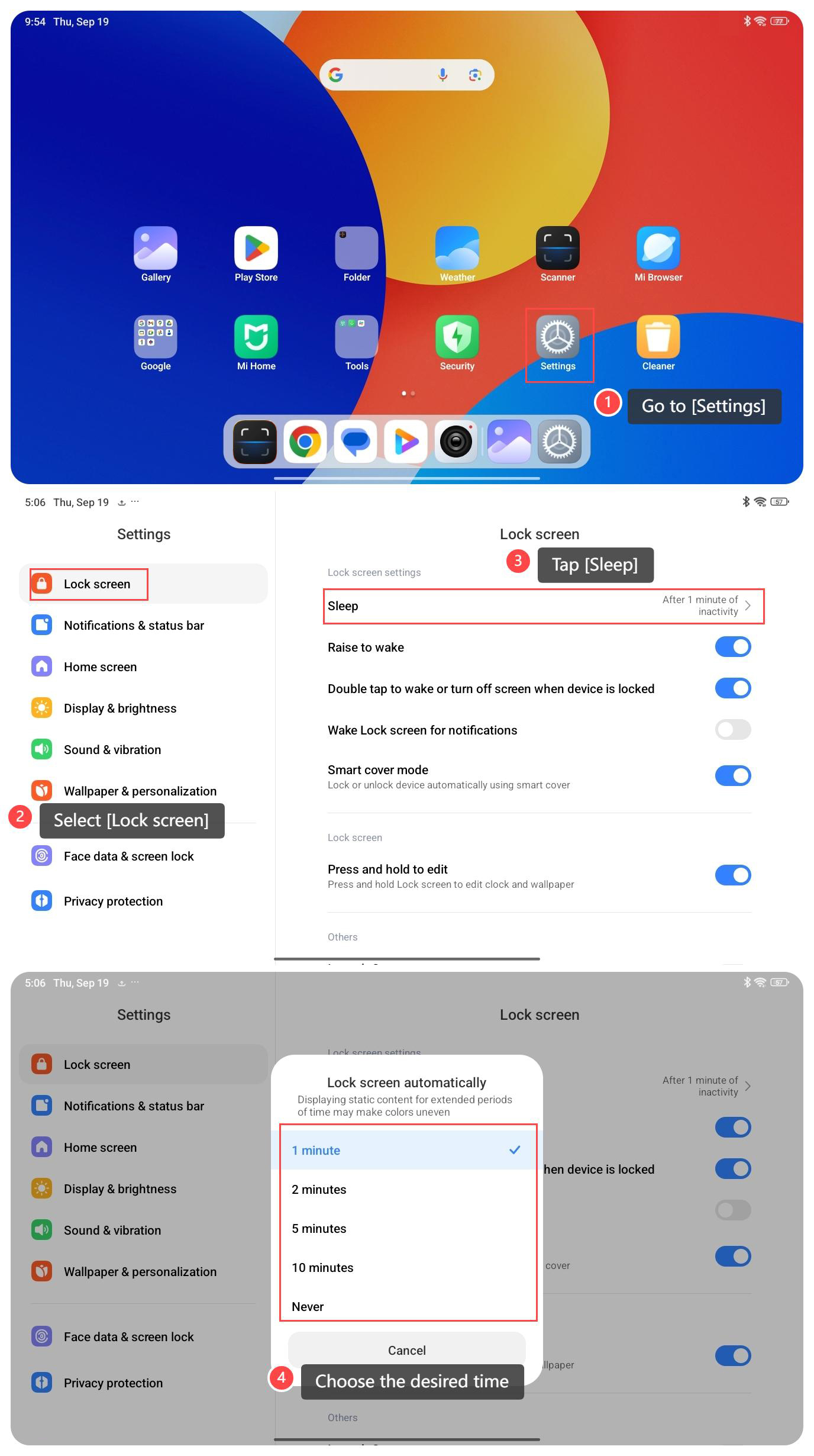
To set the sleep time on the Redmi Pad SE 8.7, please refer to the following steps:
1. Go to [Settings];
2. Scroll down and select [Lock screen];
3. Tap [Sleep];
4. Choose the desired time: [1 minute], [2 minutes], [5 minutes], [10 minutes] or [Never] for your tablet to enter sleep mode when inactive.
Note:
1. When reading or watching videos, prolonged screen illumination is more convenient and suitable for extending sleep time;
2. Shorter sleep time helps save power and is suitable for use when the battery is low or not in use for a long time;
3. If certain tasks that require continuous operation are being performed (such as navigation or calling), automatic screen shutdown will cause inconvenience. It is recommended to manually adjust the screen shutdown time or enable related functions.
To set the sleep time on the Redmi Pad SE 8.7, please refer to the following steps:
1. Go to [Settings];
2. Scroll down and select [Lock screen];
3. Tap [Sleep];
4. Choose the desired time: [1 minute], [2 minutes], [5 minutes], [10 minutes] or [Never] for your tablet to enter sleep mode when inactive.
Note:
1. When reading or watching videos, prolonged screen illumination is more convenient and suitable for extending sleep time;
2. Shorter sleep time helps save power and is suitable for use when the battery is low or not in use for a long time;
3. If certain tasks that require continuous operation are being performed (such as navigation or calling), automatic screen shutdown will cause inconvenience. It is recommended to manually adjust the screen shutdown time or enable related functions.
Does it help?
Yes
No