

How to set a language on the Redmi Pad SE 8.7?
The Redmi Pad SE 8.7 supports setting a language, which can translate menus, settings, and notifications into the selected language, making the device more accessible. You will be allowed to communicate more effectively in the preferred language, including text input and voice recognition and provided with culturally relevant content and formatting, such as date and time formats, currency, and more.
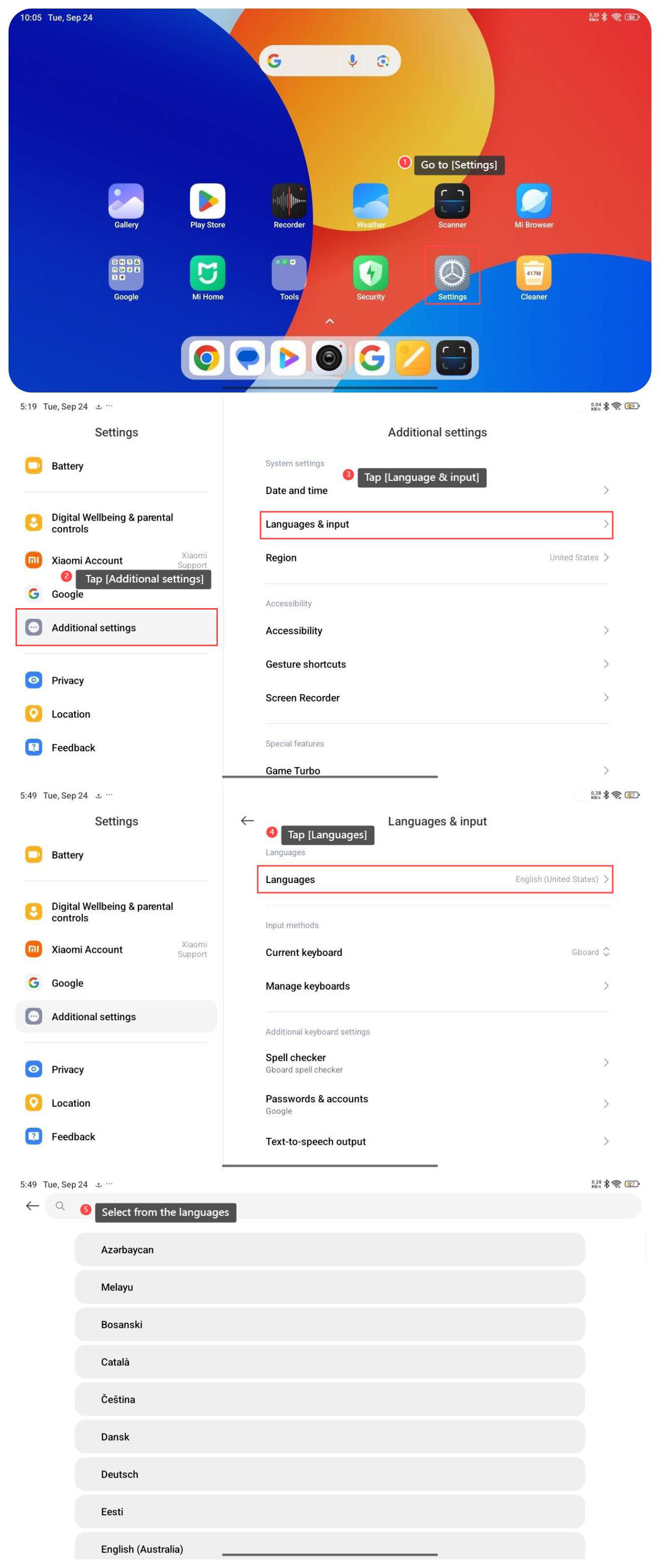
To set a language on your tablet, please refer to the following steps:
1. Go to [Settings];
2. Tap [Additional settings];
3. Tap [Language & input];
4. Tap [Languages];
5. Select from the language options that you need.
To set a language on your tablet, please refer to the following steps:
1. Go to [Settings];
2. Tap [Additional settings];
3. Tap [Language & input];
4. Tap [Languages];
5. Select from the language options that you need.
Does it help?
Yes
No