

How to set the time on the Redmi Pad SE 8.7?
The Redmi Pad SE 8.7 supports setting the time, ensuring the device displays the correct time, which is essential for scheduling and time management. You are also enabled to set the correct time zone, which is crucial for travel and communication across different regions. The function of setting the time helps you in managing sleep schedules when combined with features like Bedtime mode.
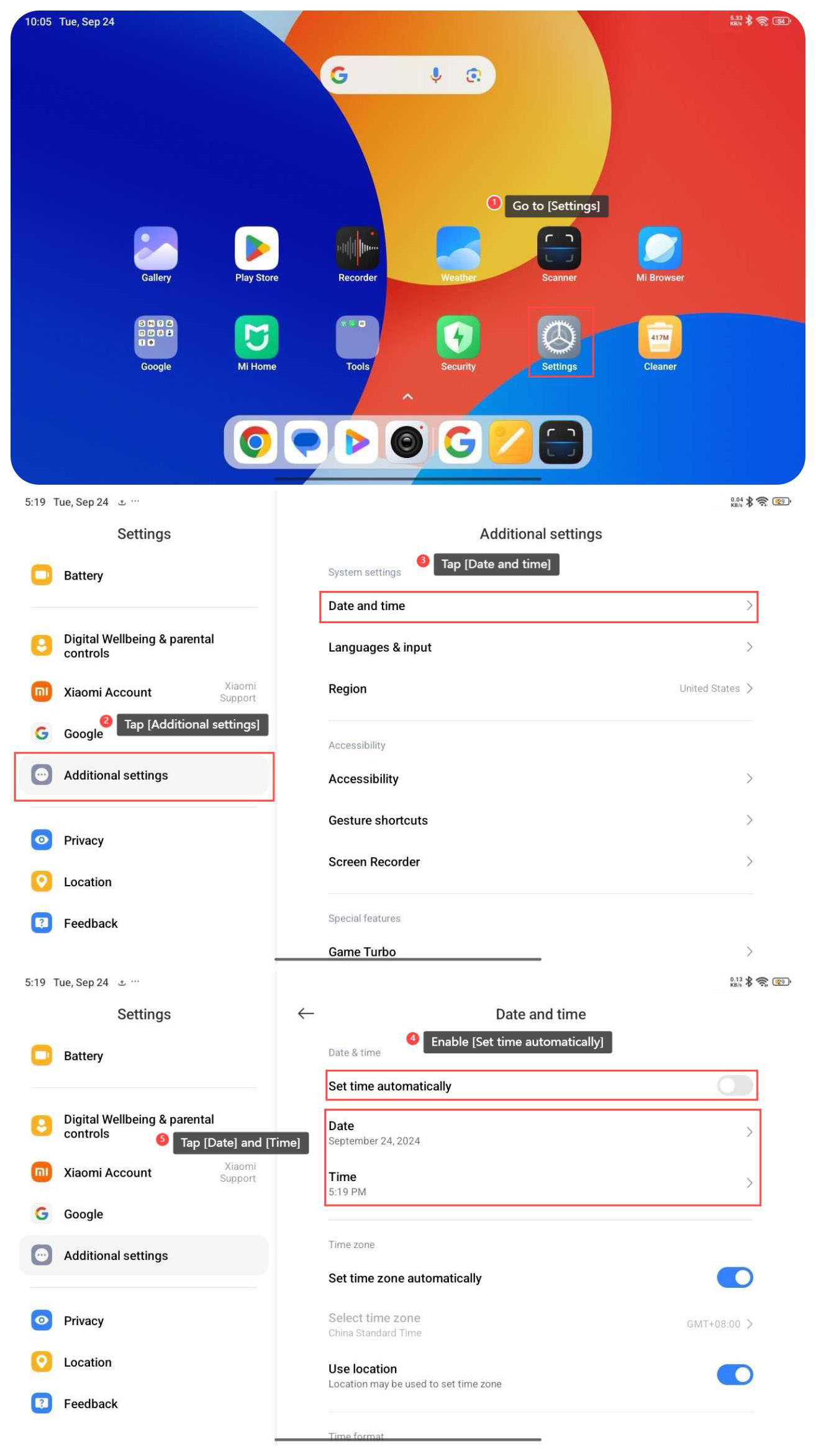
To set the time on your tablet, please refer to the following steps:
1. Go to [Settings];
2. Tap [Additional settings];
3. Tap [Date and time];
4. If you enable [Set time automatically], and the time will be adjusted automatically;
5. You can also tap [Date] and [Time] to scroll up and down to manually set the time.
To set the time on your tablet, please refer to the following steps:
1. Go to [Settings];
2. Tap [Additional settings];
3. Tap [Date and time];
4. If you enable [Set time automatically], and the time will be adjusted automatically;
5. You can also tap [Date] and [Time] to scroll up and down to manually set the time.
Does it help?
Yes
No