

How to enable APP lock function on the Redmi Pad SE 8.7?
The Redmi Pad SE 8.7 supports enabling APP lock, which can restrict access to specific APPs, protecting your sensitive information. You can set unique passwords, PINs, or biometric locks for different APPs. Besides, APP lock allows parents to restrict access to certain APPs for children, promoting safer usage.
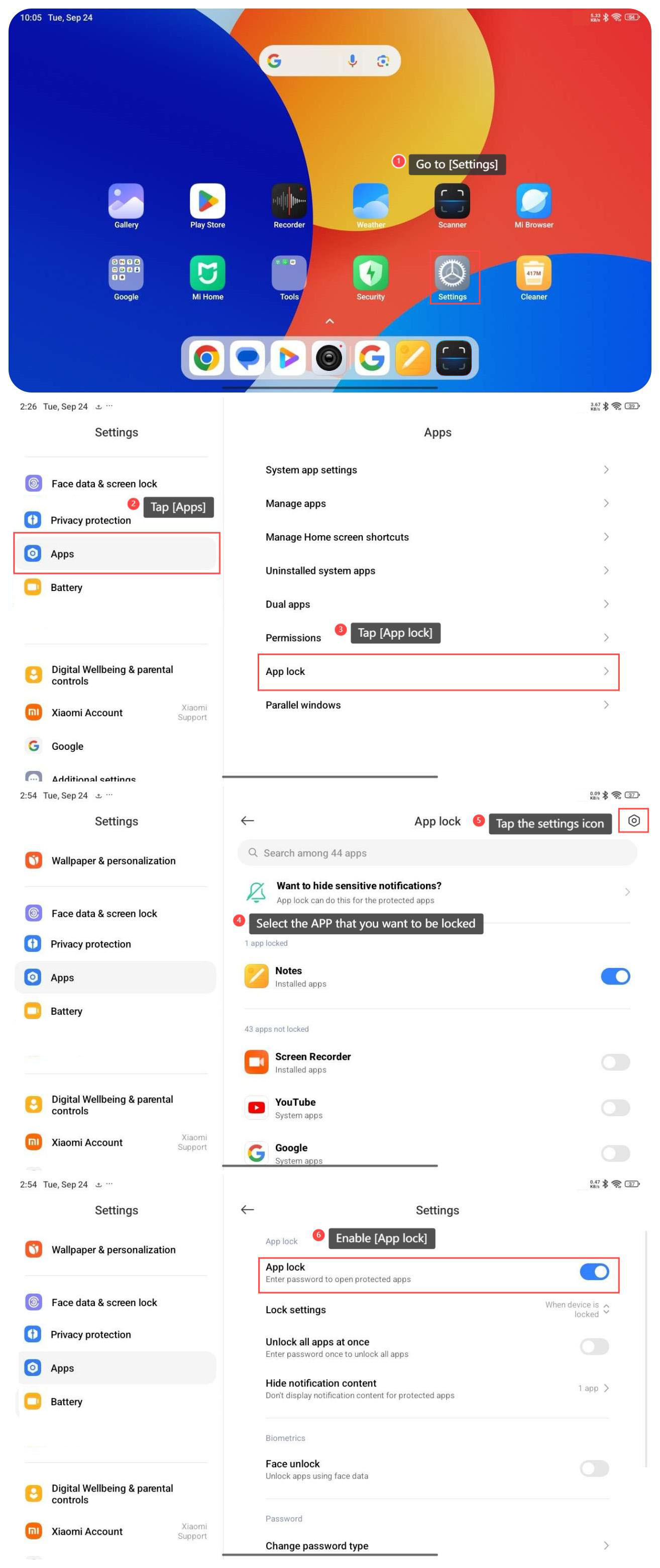
To enable APP lock function on your tablet, please refer to the following steps:
1. Go to [Settings];
2. Swipe down to find and tap [Apps];
3. Tap [App lock];
4. Select the APP that you want to be locked;
5. Tap the settings icon at the right top of the screen;
6. Enable [App lock] and you need to enter password to open protected APPs.
To enable APP lock function on your tablet, please refer to the following steps:
1. Go to [Settings];
2. Swipe down to find and tap [Apps];
3. Tap [App lock];
4. Select the APP that you want to be locked;
5. Tap the settings icon at the right top of the screen;
6. Enable [App lock] and you need to enter password to open protected APPs.
Does it help?
Yes
No