

How to manage Home screen shortcuts on the Redmi Pad SE 8.7 4G?
The Redmi Pad SE 8.7 4G supports managing home screen shortcuts, which will provide immediate access to your favorite APPs, contacts, or settings, enhancing usability, keep your APPs and important functions organized, reducing clutter and improving navigation and reduces the number of taps needed to access frequently used items, saving time.
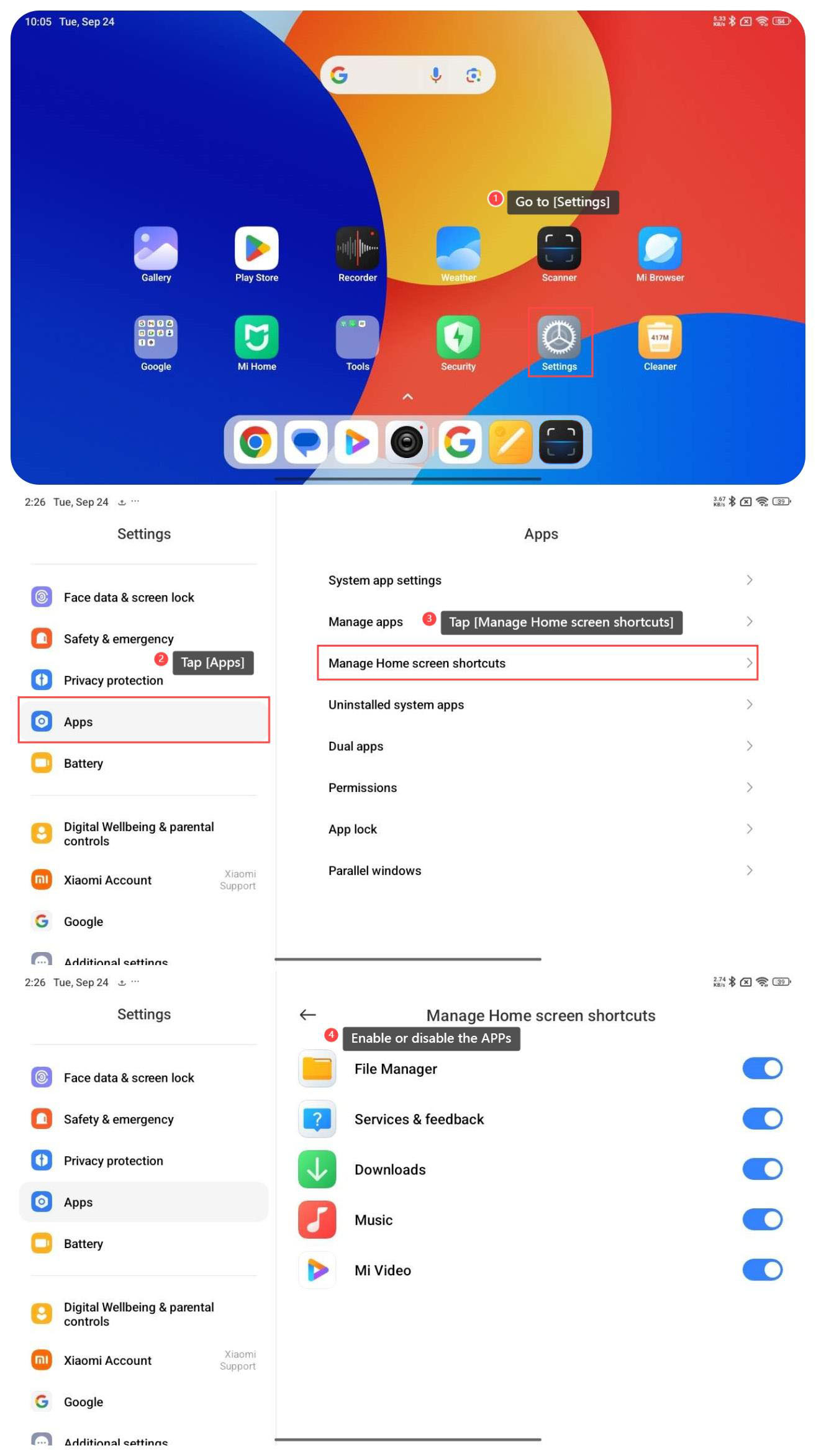
To manage Home screen shortcuts on your tablet, please refer to the following steps:
1. Go to [Settings];
2. Swipe down to find and tap [Apps];
3. Tap [Manage Home screen shortcuts];
4. You can enable or disable the APPs below [Manage Home screen shortcuts] to manage the shortcuts according to your needs.
To manage Home screen shortcuts on your tablet, please refer to the following steps:
1. Go to [Settings];
2. Swipe down to find and tap [Apps];
3. Tap [Manage Home screen shortcuts];
4. You can enable or disable the APPs below [Manage Home screen shortcuts] to manage the shortcuts according to your needs.
Does it help?
Yes
No