

How to modify the Wi-Fi network on the Redmi Pad SE 8.7?
The Redmi Pad SE 8.7 supports modifying the Wi-Fi network, which can enhance security and reduce the risk of unauthorized access, promote a more stable and faster connection, and allow you to manage connected devices more effectively. Modifying settings can improve the overall speed, stability, and coverage of your Wi-Fi network. Setting up restrictions can help manage internet access for specific devices.
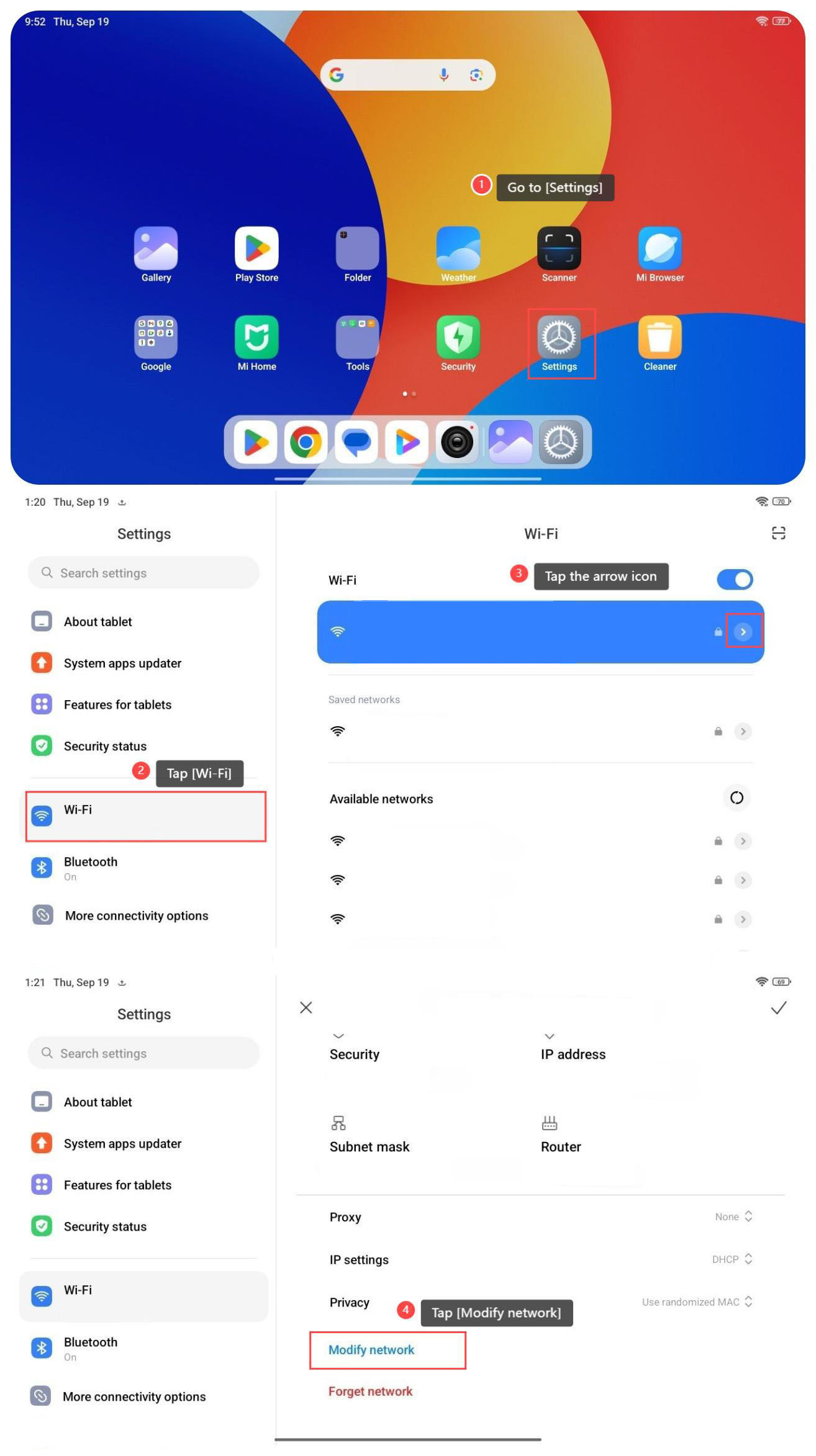
To modify the Wi-Fi network on your tablet, please refer to the following steps:
1. Go to [Settings];
2. Tap [Wi-Fi];
3. Tap the arrow icon on the Wi-Fi network that you connect;
4. Swipe down to find and tap [Modify network].
To modify the Wi-Fi network on your tablet, please refer to the following steps:
1. Go to [Settings];
2. Tap [Wi-Fi];
3. Tap the arrow icon on the Wi-Fi network that you connect;
4. Swipe down to find and tap [Modify network].
Does it help?
Yes
No