

How to update the Android version on the Redmi Pad SE 8.7 4G?
Updating the Android version improves the performance, security, and stability of the Redmi Pad SE 8.7 4G. It offers new features, enhances APP functionality, and resolves bugs, ensuring a better using experience.
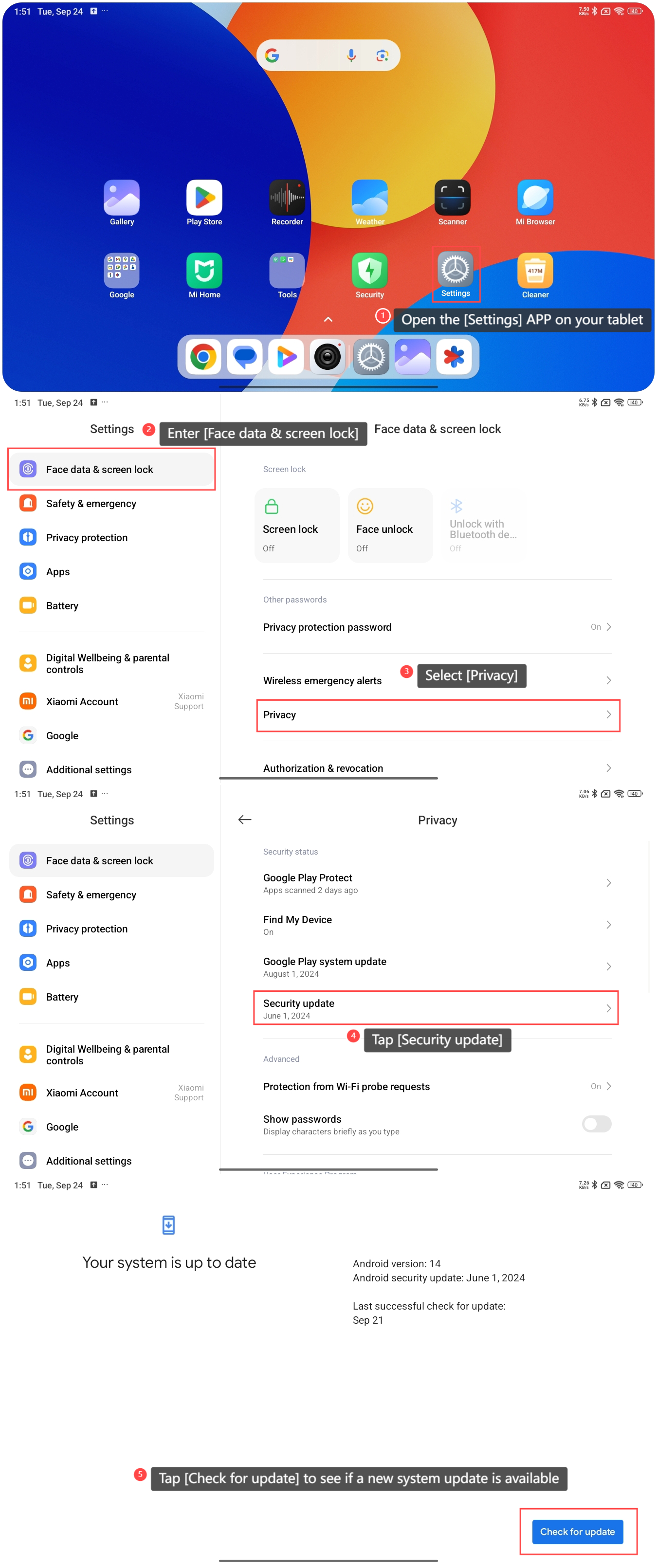
To update the Android version on the tablet, please refer to the following steps:
1. Open the [Settings] APP on your tablet;
2. Enter [Face data & screen lock];
3. Tap [Security update];
5. Tap [Check for update] to see if a new system update is available. If an update is available, download and install the latest Android version. On this page, you can also view the current Android version, Android security update, and the last successful check for updates.
Note:
Ensure there is enough storage space available on your tablet for the download and installation.
To update the Android version on the tablet, please refer to the following steps:
1. Open the [Settings] APP on your tablet;
2. Enter [Face data & screen lock];
3. Tap [Security update];
5. Tap [Check for update] to see if a new system update is available. If an update is available, download and install the latest Android version. On this page, you can also view the current Android version, Android security update, and the last successful check for updates.
Note:
Ensure there is enough storage space available on your tablet for the download and installation.
Does it help?
Yes
No