

How to use the video toolbox on the Redmi Pad SE 8.7?
The Redmi Pad SE 8.7 supports the video toolbox function. It can offer special effects and features for video playback. Through this feature, you can record, take screenshots, and cast. You can also enable Dolby Atmos and adjust the video quality settings.
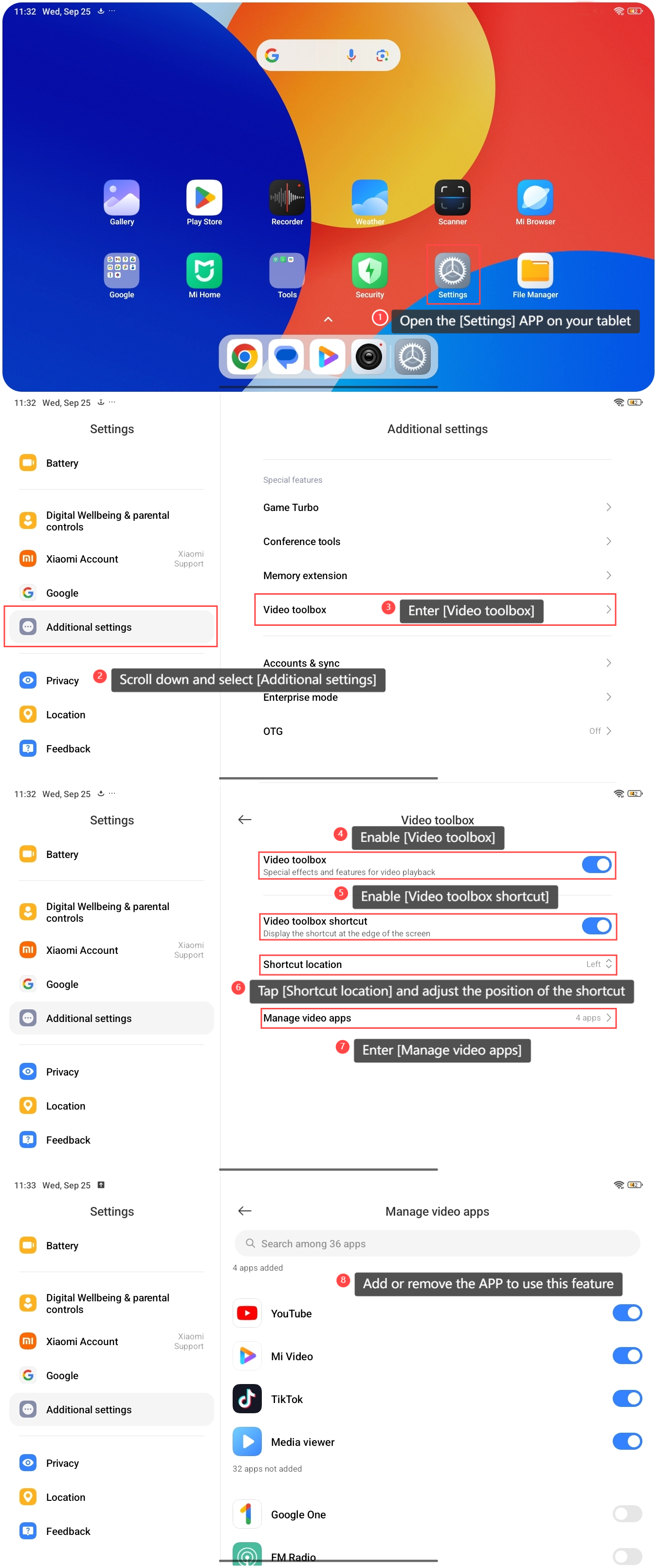
To use the video toolbox on the Redmi Pad SE 8.7, please refer to the following steps:
1. Open the [Settings] APP on your tablet;
2. Scroll down and select [Additional settings];
3. Enter [Video toolbox];
4. Enable [Video toolbox];
5. Enable [Video toolbox shortcut] and you can view the shortcut at the edge of the screen;
6. Tap [Shortcut location] and adjust the position of the shortcut;
7. Enter [Manage video apps];
8. Add or remove the APP to use this feature.
To use the video toolbox on the Redmi Pad SE 8.7, please refer to the following steps:
1. Open the [Settings] APP on your tablet;
2. Scroll down and select [Additional settings];
3. Enter [Video toolbox];
4. Enable [Video toolbox];
5. Enable [Video toolbox shortcut] and you can view the shortcut at the edge of the screen;
6. Tap [Shortcut location] and adjust the position of the shortcut;
7. Enter [Manage video apps];
8. Add or remove the APP to use this feature.
Does it help?
Yes
No