

How to adjust media sound in multiple apps on the Redmi Pad SE 8.7?
Adjust media sound in multiple apps is the built-in feature of the Redmi Pad SE 8.7 that allows you to adjust sound for individual APPs while multiple APPs play audio simultaneously. This feature brings you convenience and improve your overall sound effect experience.
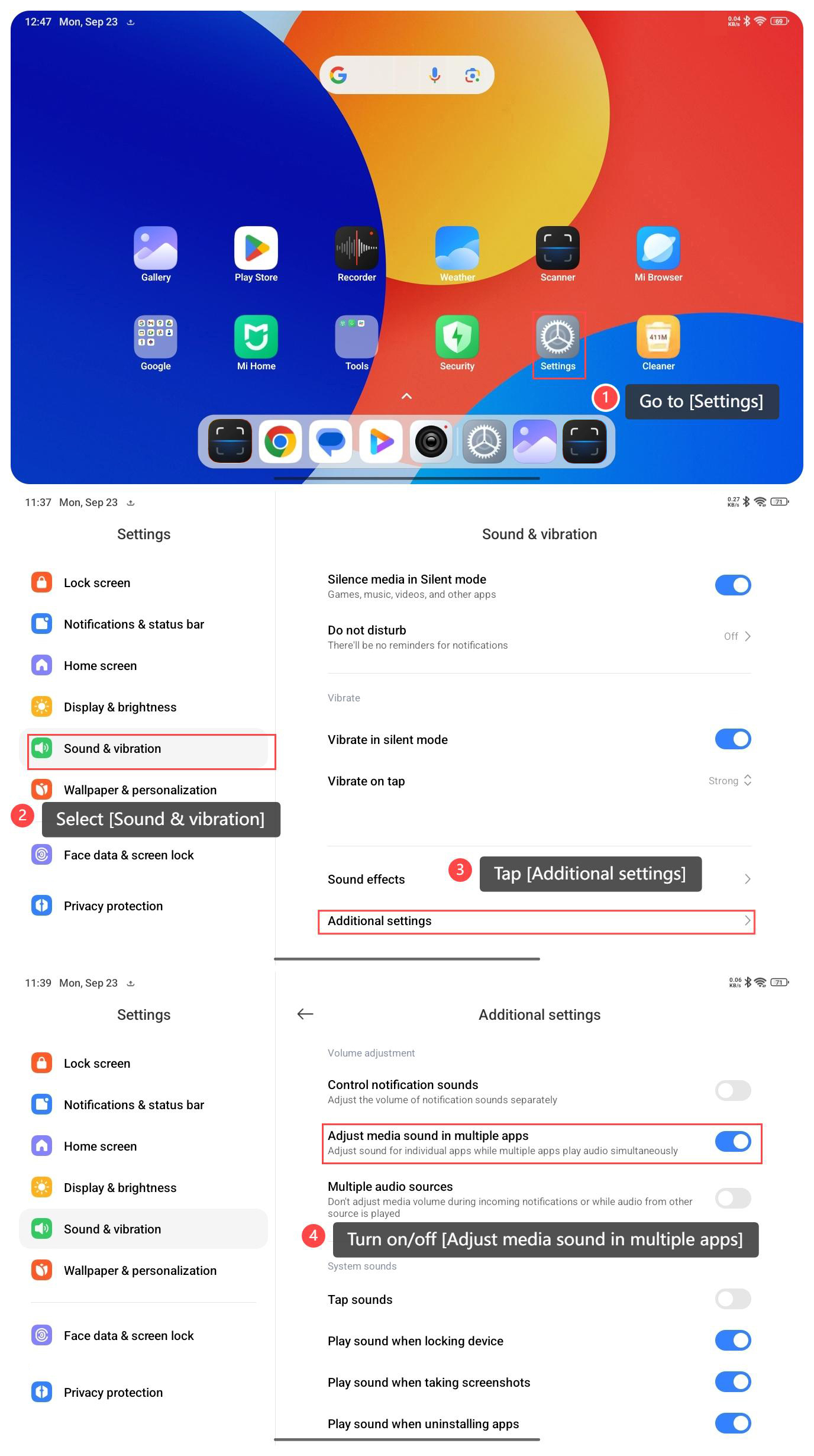
To adjust media sound in multiple apps on your tablet, please refer to the following steps:
1. Go to [Settings];
2. Select [Sound & vibration];
3. Tap [Additional settings];
4. Turn on/off [Adjust media sound in multiple apps].
Note:
Here are three general methods to adjust the device volume:
1. Use the physical volume control buttons on the side of the device;
2. Go to control center and slide the volume control bar;
3. Some APPs such as music or video players have their specific volume control options.
To adjust media sound in multiple apps on your tablet, please refer to the following steps:
1. Go to [Settings];
2. Select [Sound & vibration];
3. Tap [Additional settings];
4. Turn on/off [Adjust media sound in multiple apps].
Note:
Here are three general methods to adjust the device volume:
1. Use the physical volume control buttons on the side of the device;
2. Go to control center and slide the volume control bar;
3. Some APPs such as music or video players have their specific volume control options.
Does it help?
Yes
No