

How to select a ringtone for the notification on the Redmi Pad SE 8.7?
The ringtone for notifications on the Redmi Pad SE 8.7 can be customized. By default, it comes with a set of pre-installed notification tones that vary in style, such as melodic, alert sounds, or simple tones. You can select your preferred notification sound through the settings menu, where you can choose from the available tones or even add custom sounds from your files.
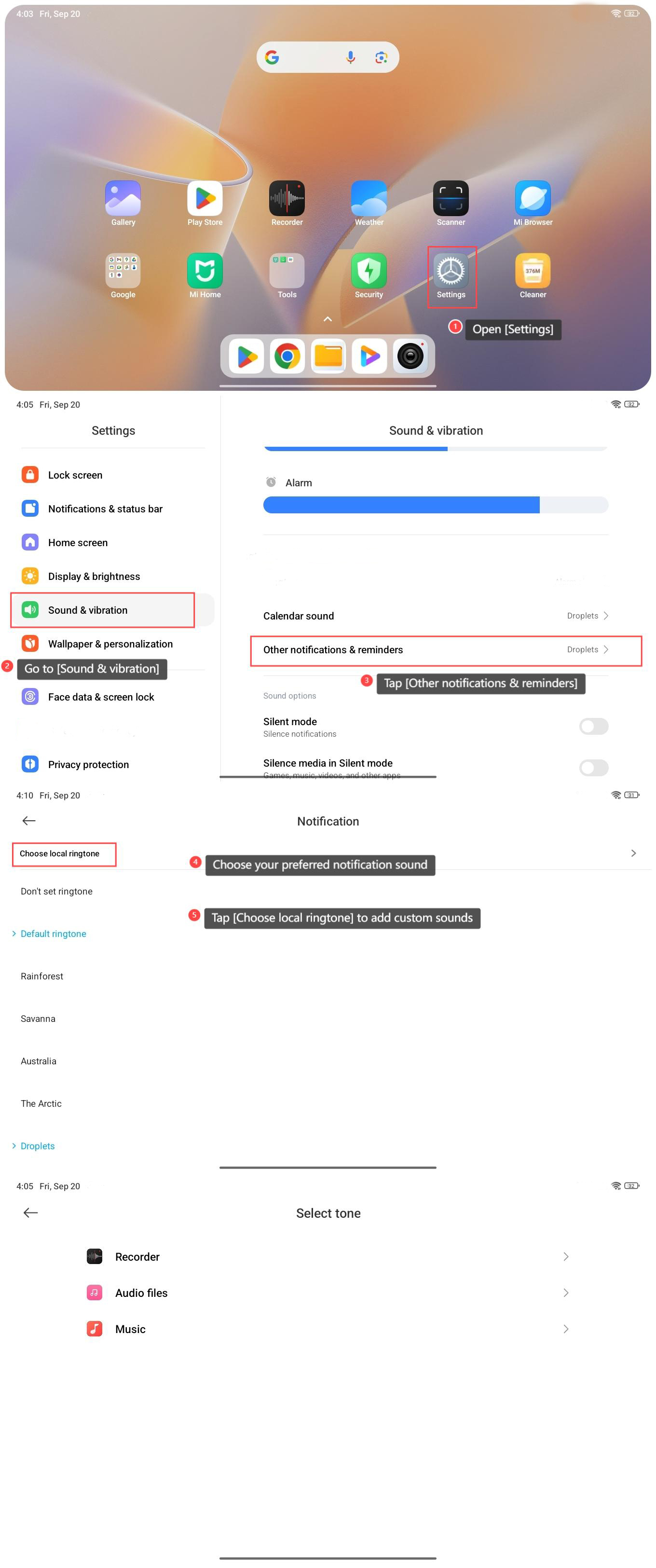
To select a ringtone for the notification on the Redmi Pad SE 8.7, please refer to the following steps:
1. Open [Settings] on your tablet;
2. Go to [Sound & vibration];
3. Tap [Other notifications & reminders];
4. Choose your preferred notification sound;
5. You can also tap [Choose local ringtone] to add custom sounds from [Recorder], [Audio files], and [Music].
To select a ringtone for the notification on the Redmi Pad SE 8.7, please refer to the following steps:
1. Open [Settings] on your tablet;
2. Go to [Sound & vibration];
3. Tap [Other notifications & reminders];
4. Choose your preferred notification sound;
5. You can also tap [Choose local ringtone] to add custom sounds from [Recorder], [Audio files], and [Music].
Does it help?
Yes
No